MASTER
Le Script Hub
Sélectionne un projet pour voir son tutoriel complet.
Pourquoi ce script ?
Ne ratez plus jamais le jour pour sortir la poubelle jaune ! Ce script vérifie que nous sommes la bonne semaine et le bon jour (Mercredi) pour afficher automatiquement une alerte clignotante.
1. Installer les dépendances
- HACS (Frontend) : Assurez-vous d'avoir les cartes mushroom-template-card et card_mod installées.
2. Configuration Home Assistant
Ajoutez ce capteur dans votre fichier configuration.yaml pour déterminer automatiquement le jour de sortie :
template:
  - binary_sensor:
      - name: "Alerte Poubelle Jaune"
        unique_id: alerte_poubelle_jaune
        state: >
          {{ now().weekday() == 2 and now().hour >= 9 and (now().isocalendar()[1] % 2 != 0) }}
        icon: mdi:trash-can-outline
3. Création de l'Entrée (Alternative)
Si vous préférez l'interface (UI) sans toucher au configuration.yaml, vous devez créer une aide dans :
Paramètres > Appareils et services > Entrées
Créez un Capteur Binaire (Modèle / Template) et nommez-le exactement : binary_sensor.alerte_poubelle_jaune
4. Le Code Dashboard (YAML)
Ajoutez une carte "Manuel" dans votre Dashboard et collez ce code. La carte sera cachée la plupart du temps, et s'affichera sous la forme d'une alerte uniquement au bon moment !
type: conditional
conditions:
  - entity: binary_sensor.alerte_poubelle_jaune
    state: "on"
card:
  type: custom:mushroom-template-card
  entity: sensor.poubelle_jaune
  primary: Poubelle Jaune
  secondary: SORTIR CE SOIR
  picture: /api/image/serve/44eb98bd5dedf45d1787d568ec4fa3d8/256x256
  tap_action:
    action: none
  card_mod:
    style: |
      ha-card {
        border-radius: 25px !important;
        /* On passe sur la même transparence que les autres cartes (0.1 ou 0.05) */
        background: rgba(255, 255, 0, 0.1) !important;
        backdrop-filter: blur(10px);
        animation: alert-jaune 2s infinite ease-in-out;
        border: 2px solid yellow !important;
        overflow: hidden;
        position: relative;
      }

      /* Icône fantôme Recyclage */
      ha-card::after {
        content: "♻️";
        position: absolute;
        right: 12px;
        bottom: -5px;
        font-size: 3.5rem;
        opacity: 0.15;
        pointer-events: none;
        transform: rotate(15deg);
      }

      @keyframes alert-jaune {
        0% { border-color: rgba(255, 255, 0, 0.5); transform: scale(1); }
        50% { border-color: rgba(255, 255, 0, 1); box-shadow: 0 0 20px 5px rgba(255, 255, 0, 0.3); transform: scale(1.02); }
        100% { border-color: rgba(255, 255, 0, 0.5); transform: scale(1); }
      }

      .mushroom-shape-avatar {
        border-radius: 0px !important;
        background: none !important;
      }

      .primary {
        color: yellow !important;
        font-weight: bold;
      }

      .secondary {
        color: yellow !important;
        font-weight: 900;
        animation: blink 1s infinite;
      }

      @keyframes blink { 50% { opacity: 0; } }
5. Aperçu du Rendu (Simulation)
Un rendu clignotant jaune qui s'affiche automatiquement quand il est l'heure de sortir les poubelles (semaines impaires, mercredi après 9h).
Pourquoi ce script ?
Suivez avec élégance l'état de la batterie de vos appareils. Ce script trie automatiquement du plus faible au plus chargé, intègre des indicateurs visuels et compteurs statistiques avec une micro-animation de charge électrique, le tout dans une carte Premium Brutaliste.
1. Installer les dépendances
- HACS (Frontend) : Assurez-vous d'avoir la carte button-card installée.
- Important : Remplacez les entités
sensor.xxx_battery_levelpar vos entités dans le tableaudevices. Pour l'animation de charge, spécifiez unchargingEntitys'il est distinct de la batterie.
2. Le Code Dashboard (YAML)
Ajoutez une carte manuelle "Bouton" (ou Custom: Button-Card) et collez ce code :
type: custom:button-card
entity: sensor.sm_s921b_battery_level
show_name: false
show_icon: false
show_state: false
tap_action:
  action: none
styles:
  card:
    - padding: 16px
    - background: rgba(255, 255, 255, 0.08) !important
    - backdrop-filter: blur(20px) saturate(180%)
    - "-webkit-backdrop-filter": blur(20px) saturate(180%)
    - border-radius: 15px
    - border: 1px solid rgba(255, 255, 255, 0.15)
    - box-shadow: >-
        0 8px 32px rgba(0, 0, 0, 0.3), inset 0 1px 0 rgba(255, 255, 255, 0.2),
        inset 0 -1px 0 rgba(0, 0, 0, 0.1)
    - overflow: hidden
    - position: relative
  grid:
    - grid-template-areas: "\"main\""
  custom_fields:
    main:
      - width: 100%
custom_fields:
  main: |
    [[[
      const devices = [
        { entity: 'sensor.sm_s921b_battery_level',                  name: 'Samsung Papa'        },
        { entity: 'sensor.sm_julie_battery_level',                   name: 'Samsung Maman'           },
        { entity: 'sensor.esteban_battery_level',                    name: 'Esteban'            },
        { entity: 'sensor.honor_battery_level',                      name: 'Tablette Honor'     },
        { entity: 'sensor.galaxy_watch6_classic_d4he_battery_level', name: 'Montre Papa'        },
        { entity: 'sensor.galaxy_watch8_fbxh_battery_level',         name: 'Montre Maman'       },
        { entity: 'sensor.bob_batterie',                             name: 'Aspirateur BOB',    chargingEntity: 'vacuum.bob' },
        { entity: 'sensor.dyad_air_2024_batterie',                   name: 'Aspirateur DYAD',   chargingEntity: 'sensor.dyad_air_2024_status' },
        { entity: 'sensor.maison_interrupteur_batterie',             name: 'Télécommande HUE'   },
        { entity: 'sensor.samsung_m2020_series_black_toner_s_n_crum_17091625519', name: 'Toner Imprimante' },
        { entity: 'sensor.detecterur_batterie',                      name: 'Boîte aux lettres'  },
        { entity: 'sensor.detecteur_1_batterie',                     name: 'Détecteur Cuisine'  },
        { entity: 'sensor.detecteur_2_batterie',                     name: 'Détecteur Escalier' },
        { entity: 'sensor.arriere_cour_battery_percentage',          name: 'Caméra Jardin'       },
        { entity: 'sensor.temp_batterie',                            name: 'Thermomètre Bureau'     },
      ];

      const isDeviceCharging = (state, device) => {
        if (!state) return false;
        const pct = parseFloat(state.state) || 0;
        if (device.chargingEntity) {
          const chgState = states[device.chargingEntity];
          if (chgState) {
            const val = String(chgState.state).toLowerCase();
            return (val === 'charging' || val === 'recharging' || val === 'docked') && pct < 100;
          }
          return false;
        }
        const icon = String(state.attributes?.icon ?? '').toLowerCase();
        return icon.includes('charging') && !icon.includes('wireless');
      };

      const getStatusColor = (pct, isCharging) => {
        if (isCharging) return '#3b82f6';
        if (pct <= 20)  return '#ef4444';
        if (pct <= 50)  return '#f59e0b';
        return '#22c55e';
      };

      const data = devices.map(d => {
        const state = states[d.entity];
        const pct = parseFloat(state?.state) || 0;
        const isCharging = isDeviceCharging(state, d);
        return { ...d, pct, isCharging, color: getStatusColor(pct, isCharging) };
      });

      const sorted = [...data].sort((a, b) => a.pct - b.pct);
      const low = data.filter(d => d.pct <= 20 && !d.isCharging).length;
      const charging = data.filter(d => d.isCharging).length;
      const avgPct = Math.round(data.reduce((s, d) => s + d.pct, 0) / data.length);

      const rows = sorted.map(d => {
        const chargingIcon = d.isCharging
          ? `<span style="font-size:10px;margin-left:4px;color:#3b82f6;animation:chargePulse 1.5s infinite;display:inline-block;">⚡</span>`
          : '';
        return `
          <div style="display:flex;align-items:center;gap:10px;margin-bottom:8px;">
            <div style="font-size:12px;color:rgba(255,255,255,0.6);width:115px;flex-shrink:0;text-align:right;white-space:nowrap;overflow:hidden;text-overflow:ellipsis;">
              ${d.name}${chargingIcon}
            </div>
            <div style="flex:1;height:8px;background:rgba(255,255,255,0.08);border-radius:99px;overflow:hidden;border:1px solid rgba(255,255,255,0.05);">
              <div style="width:${d.pct}%;height:100%;background:${d.color};border-radius:99px;box-shadow:0 0 6px ${d.color}44;transition:width 0.6s ease;"></div>
            </div>
            <div style="font-size:11px;font-weight:600;color:${d.color};width:35px;flex-shrink:0;text-align:right;">
              ${Math.round(d.pct)}<span style="font-size:9px;opacity:0.6;">%</span>
            </div>
          </div>`;
      }).join('');

      return `
        <div style="font-family:var(--primary-font-family,sans-serif);width:100%;">
          <style>
            @keyframes battFloat { 0%,100% { transform:rotate(-5deg) scale(1); opacity:0.07; } 50% { transform:rotate(-2deg) scale(1.08); opacity:0.12; } }
            @keyframes chargePulse { 0%,100% { opacity:1; transform:scale(1); } 50% { opacity:0.5; transform:scale(1.2); } }
          </style>
          <div style="position:absolute;right:-5px;bottom:-20px;font-size:6rem;opacity:0.07;pointer-events:none;animation:battFloat 6s ease-in-out infinite;">🔋</div>
          <div style="font-size:11px;color:rgba(255,255,255,0.5);margin-bottom:14px;letter-spacing:0.05em;text-transform:uppercase;text-align:center;">🔋 État des équipements</div>
          ${rows}
          <div style="display:grid;grid-template-columns:repeat(3,1fr);gap:8px;margin-top:16px;">
            <div style="background:rgba(255,255,255,0.06);border:1px solid rgba(255,255,255,0.1);border-radius:10px;padding:10px 5px;text-align:center;">
              <div style="font-size:10px;color:rgba(255,255,255,0.4);margin-bottom:3px;">Moyenne</div>
              <div style="font-size:16px;font-weight:600;color:#fff;">${avgPct}<span style="font-size:10px;opacity:0.5;"> %</span></div>
            </div>
            <div style="background:rgba(255,255,255,0.06);border:1px solid rgba(255,255,255,0.1);border-radius:10px;padding:10px 5px;text-align:center;">
              <div style="font-size:10px;color:rgba(255,255,255,0.4);margin-bottom:3px;">En charge</div>
              <div style="font-size:16px;font-weight:600;color:#3b82f6;">${charging}<span style="font-size:10px;opacity:0.5;color:#fff;"> /15</span></div>
            </div>
            <div style="background:rgba(255,255,255,0.06);border:1px solid ${low > 0 ? 'rgba(239,68,68,0.3)' : 'rgba(255,255,255,0.1)'};border-radius:10px;padding:10px 5px;text-align:center;">
              <div style="font-size:10px;color:rgba(255,255,255,0.4);margin-bottom:3px;">Critique</div>
              <div style="font-size:16px;font-weight:600;color:${low > 0 ? '#ef4444' : '#fff'};">${low}<span style="font-size:10px;opacity:0.5;color:#fff;"> /15</span></div>
            </div>
          </div>
        </div>
3. Aperçu du Rendu (Simulation)
Un rendu dynamique et coloré pour vos batteries (vert > 50%, orange > 20%, rouge critique, bleu en charge).
Pourquoi ce script ?
Regroupez intelligemment toutes vos lumières par pièce ou par zone dans une seule et même carte premium dépolie au style Glassmorphism. Idéal pour un contrôle global et rapide sans encombrer votre Dashboard.
1. Installer les dépendances
- HACS (Frontend) : Assurez-vous d'avoir installé card_mod pour appliquer l'effet de verre dépoli en fond de carte.
- Important : Remplacez chaque
light.xxxpar les entités de vos propres lumières, et nommez seulement le permier interrupteur de chaque ligne pour simuler la séparation de la pièce (ex: Salon, Cuisine).
2. Le Code Dashboard (YAML)
Ajoutez une carte manuelle et collez ce code complet :
type: entities
title: Toutes les Lumières
state_color: true
show_header_toggle: false
entities:
  - type: buttons
    entities:
      - entity: light.salon
        icon: mdi:lightbulb-group
        name: Salon
        tap_action:
          action: toggle
        hold_action:
          action: more-info
      - entity: light.plafond
        icon: mdi:ceiling-light
        name: " "
        tap_action:
          action: toggle
        hold_action:
          action: more-info
      - entity: light.canapes
        icon: mdi:sofa
        name: " "
        tap_action:
          action: toggle
        hold_action:
          action: more-info
      - entity: light.lampadaire
        icon: mdi:floor-lamp
        name: " "
        tap_action:
          action: toggle
        hold_action:
          action: more-info
      - entity: light.lampe_de_chevet_2
        icon: mdi:lamp
        name: " "
        tap_action:
          action: toggle
        hold_action:
          action: more-info
      - entity: light.grosse_boule
        icon: mdi:circle-double
        name: " "
        tap_action:
          action: toggle
        hold_action:
          action: more-info
      - entity: light.petite_boule
        icon: mdi:circle-outline
        name: " "
        tap_action:
          action: toggle
        hold_action:
          action: more-info
  - type: divider
  - type: buttons
    entities:
      - entity: light.lsc_smart_led_strip_rgbic_cctic_5m
        icon: mdi:led-strip-variant
        name: Cuisine
        tap_action:
          action: toggle
        hold_action:
          action: more-info
      - entity: light.cuisine_2
        icon: mdi:lightbulb-outline
        name: " "
        tap_action:
          action: toggle
        hold_action:
          action: more-info
  - type: divider
  - type: buttons
    entities:
      - entity: light.pc_3
        icon: mdi:led-strip-variant
        name: Esteban
        tap_action:
          action: toggle
        hold_action:
          action: more-info
  - type: divider
  - type: buttons
    entities:
      - entity: light.bureau
        icon: mdi:desk-lamp
        name: Bureau
        tap_action:
          action: toggle
        hold_action:
          action: more-info
      - entity: light.pc
        icon: mdi:monitor
        name: " "
        tap_action:
          action: toggle
        hold_action:
          action: more-info
      - entity: light.pc_2
        icon: mdi:monitor-shimmer
        name: " "
        tap_action:
          action: toggle
        hold_action:
          action: more-info
  - type: divider
  - type: buttons
    entities:
      - entity: light.chambre_parentale
        icon: mdi:lightbulb-group
        name: Parents
        tap_action:
          action: toggle
        hold_action:
          action: more-info
      - entity: light.plafond_2
        icon: mdi:ceiling-light
        name: " "
        tap_action:
          action: toggle
        hold_action:
          action: more-info
grid_options:
  columns: 12
  rows: auto
card_mod:
  style: |
    ha-card {
      background: rgba(255, 255, 255, 0.08) !important;
      backdrop-filter: blur(20px) saturate(180%);
      -webkit-backdrop-filter: blur(20px) saturate(180%);
      border: 1px solid rgba(255, 255, 255, 0.15) !important;
      box-shadow:
        0 8px 32px rgba(0, 0, 0, 0.3),
        inset 0 1px 0 rgba(255, 255, 255, 0.2),
        inset 0 -1px 0 rgba(0, 0, 0, 0.1) !important;
      border-radius: 15px !important;
      overflow: hidden;
      position: relative;
    }
    ha-card::before {
      content: "💡";
      position: absolute;
      right: 8px;
      top: 10px;
      font-size: 4rem;
      opacity: 0.07;
      pointer-events: none;
      transform-origin: top right;
      animation: glowPulse 8s ease-in-out infinite;
      z-index: 1;
    }
    ha-card::after {
      content: "🏠";
      position: absolute;
      right: 8px;
      bottom: 2px;
      font-size: 4rem;
      opacity: 0.07;
      pointer-events: none;
      transform-origin: bottom right;
      animation: glowPulse 8s ease-in-out infinite;
      animation-delay: 4s;
      z-index: 1;
    }
    @keyframes glowPulse {
      0%, 100% { transform: rotate(-5deg) scale(1); opacity: 0.07; }
      50% { transform: rotate(-2deg) scale(1.08); opacity: 0.13; }
    }
    .card-header {
      color: #f9fafb !important;
      font-weight: 600 !important;
      letter-spacing: 0.04em;
    }
    ha-icon-button, mwc-icon-button {
      color: rgba(255, 255, 255, 0.75) !important;
    }
3. Aperçu du Rendu (Simulation)
Un regroupement propre de vos interrupteurs organisés par zones avec un joli rendu "Verre dépoli".
Pourquoi ce script ?
Regroupez intelligemment toutes vos lumières par pièce ou par zone dans une seule et même carte premium dépolie au style Glassmorphism. Idéal pour un contrôle global et rapide sans encombrer votre Dashboard.
1. Installer les dépendances
- HACS (Frontend) : Assurez-vous d'avoir installé card_mod pour appliquer l'effet de verre dépoli en fond de carte.
- Important : Remplacez chaque
light.xxxpar les entités de vos propres lumières, et nommez seulement le permier interrupteur de chaque ligne pour simuler la séparation de la pièce (ex: Salon, Cuisine).
2. Le Code Dashboard (YAML)
Ajoutez une carte manuelle et collez ce code complet :
type: entities
title: Toutes les Lumières
state_color: true
show_header_toggle: false
entities:
  - type: buttons
    entities:
      - entity: light.salon
        icon: mdi:lightbulb-group
        name: Salon
        tap_action:
          action: toggle
        hold_action:
          action: more-info
      - entity: light.plafond
        icon: mdi:ceiling-light
        name: " "
        tap_action:
          action: toggle
        hold_action:
          action: more-info
      - entity: light.canapes
        icon: mdi:sofa
        name: " "
        tap_action:
          action: toggle
        hold_action:
          action: more-info
      - entity: light.lampadaire
        icon: mdi:floor-lamp
        name: " "
        tap_action:
          action: toggle
        hold_action:
          action: more-info
      - entity: light.lampe_de_chevet_2
        icon: mdi:lamp
        name: " "
        tap_action:
          action: toggle
        hold_action:
          action: more-info
      - entity: light.grosse_boule
        icon: mdi:circle-double
        name: " "
        tap_action:
          action: toggle
        hold_action:
          action: more-info
      - entity: light.petite_boule
        icon: mdi:circle-outline
        name: " "
        tap_action:
          action: toggle
        hold_action:
          action: more-info
  - type: divider
  - type: buttons
    entities:
      - entity: light.lsc_smart_led_strip_rgbic_cctic_5m
        icon: mdi:led-strip-variant
        name: Cuisine
        tap_action:
          action: toggle
        hold_action:
          action: more-info
      - entity: light.cuisine_2
        icon: mdi:lightbulb-outline
        name: " "
        tap_action:
          action: toggle
        hold_action:
          action: more-info
  - type: divider
  - type: buttons
    entities:
      - entity: light.pc_3
        icon: mdi:led-strip-variant
        name: Esteban
        tap_action:
          action: toggle
        hold_action:
          action: more-info
  - type: divider
  - type: buttons
    entities:
      - entity: light.bureau
        icon: mdi:desk-lamp
        name: Bureau
        tap_action:
          action: toggle
        hold_action:
          action: more-info
      - entity: light.pc
        icon: mdi:monitor
        name: " "
        tap_action:
          action: toggle
        hold_action:
          action: more-info
      - entity: light.pc_2
        icon: mdi:monitor-shimmer
        name: " "
        tap_action:
          action: toggle
        hold_action:
          action: more-info
  - type: divider
  - type: buttons
    entities:
      - entity: light.chambre_parentale
        icon: mdi:lightbulb-group
        name: Parents
        tap_action:
          action: toggle
        hold_action:
          action: more-info
      - entity: light.plafond_2
        icon: mdi:ceiling-light
        name: " "
        tap_action:
          action: toggle
        hold_action:
          action: more-info
grid_options:
  columns: 12
  rows: auto
card_mod:
  style: |
    ha-card {
      background: rgba(255, 255, 255, 0.08) !important;
      backdrop-filter: blur(20px) saturate(180%);
      -webkit-backdrop-filter: blur(20px) saturate(180%);
      border: 1px solid rgba(255, 255, 255, 0.15) !important;
      box-shadow:
        0 8px 32px rgba(0, 0, 0, 0.3),
        inset 0 1px 0 rgba(255, 255, 255, 0.2),
        inset 0 -1px 0 rgba(0, 0, 0, 0.1) !important;
      border-radius: 15px !important;
      overflow: hidden;
      position: relative;
    }
    ha-card::before {
      content: "💡";
      position: absolute;
      right: 8px;
      top: 10px;
      font-size: 4rem;
      opacity: 0.07;
      pointer-events: none;
      transform-origin: top right;
      animation: glowPulse 8s ease-in-out infinite;
      z-index: 1;
    }
    ha-card::after {
      content: "🏠";
      position: absolute;
      right: 8px;
      bottom: 2px;
      font-size: 4rem;
      opacity: 0.07;
      pointer-events: none;
      transform-origin: bottom right;
      animation: glowPulse 8s ease-in-out infinite;
      animation-delay: 4s;
      z-index: 1;
    }
    @keyframes glowPulse {
      0%, 100% { transform: rotate(-5deg) scale(1); opacity: 0.07; }
      50% { transform: rotate(-2deg) scale(1.08); opacity: 0.13; }
    }
    .card-header {
      color: #f9fafb !important;
      font-weight: 600 !important;
      letter-spacing: 0.04em;
    }
    ha-icon-button, mwc-icon-button {
      color: rgba(255, 255, 255, 0.75) !important;
    }
3. Aperçu du Rendu (Simulation)
Un regroupement propre de vos interrupteurs organisés par zones avec un joli rendu "Verre dépoli".
Pourquoi ce script ?
Suivez avec précision votre consommation électrique mensuelle. Ce script premium calcule automatiquement le coût total basé sur vos différents tarifs Lixee Tempo et ventile la consommation par appareil avec des barres de progression graphiques.
1. Installer les dépendances
- HACS (Frontend) : Assurez-vous d'avoir la carte button-card installée.
- Important : Remplacez les tarifs
TARIFS = { p1: ... }par les vôtres, et ajustez les entitéssensor.lixee_zlinky...et vosappareilsavec les puissances réelles.
2. Le Code Dashboard (YAML)
Ajoutez une carte manuelle "Bouton" (ou Custom: Button-Card) et collez ce code :
type: custom:button-card
entity: sensor.lixee_zlinky_tic_zlinky_p1_mensuel
show_name: false
show_icon: false
show_state: false
tap_action:
  action: none
styles:
  card:
    - padding: 16px
    - background: rgba(255, 255, 255, 0.08) !important
    - backdrop-filter: blur(20px) saturate(180%)
    - "-webkit-backdrop-filter": blur(20px) saturate(180%)
    - border-radius: 15px
    - border: 1px solid rgba(255, 255, 255, 0.15)
    - box-shadow: >
        0 8px 32px rgba(0, 0, 0, 0.3), inset 0 1px 0 rgba(255, 255, 255, 0.2),
        inset 0 -1px 0 rgba(0, 0, 0, 0.1)
    - overflow: hidden
    - position: relative
  grid:
    - grid-template-areas: "\"main\""
  custom_fields:
    main:
      - width: 100%
custom_fields:
  main: |
    [[[
      const TARIFS = { p1: 0.1296, p2: 0.1603, p3: 0.1486, p4: 0.1894, p5: 0.1568, p6: 0.7562 };

      function getFloat(entity) {
        return parseFloat(states[entity]?.state) || 0;
      }
      function getAttrFloat(entity, attr) {
        return parseFloat(states[entity]?.attributes?.[attr]) || 0;
      }

      const p1 = getFloat('sensor.lixee_zlinky_tic_zlinky_p1_mensuel');
      const p2 = getFloat('sensor.lixee_zlinky_tic_zlinky_p2_mensuel');
      const p3 = getFloat('sensor.lixee_zlinky_tic_zlinky_p3_mensuel');
      const p4 = getFloat('sensor.lixee_zlinky_tic_zlinky_p4_mensuel');
      const p5 = getFloat('sensor.lixee_zlinky_tic_zlinky_p5_mensuel');
      const p6 = getFloat('sensor.lixee_zlinky_tic_zlinky_p6_mensuel');
      const totalKwh = p1 + p2 + p3 + p4 + p5 + p6;
      const totalCost = (p1*TARIFS.p1)+(p2*TARIFS.p2)+(p3*TARIFS.p3)+(p4*TARIFS.p4)+(p5*TARIFS.p5)+(p6*TARIFS.p6);
      const avgRate = totalKwh > 0 ? totalCost / totalKwh : 0.16;

      const hierP1 = getAttrFloat('sensor.lixee_zlinky_tic_zlinky_p1_daily','last_period');
      const hierP2 = getAttrFloat('sensor.lixee_zlinky_tic_zlinky_p2_daily','last_period');
      const hierP3 = getAttrFloat('sensor.lixee_zlinky_tic_zlinky_p3_daily','last_period');
      const hierP4 = getAttrFloat('sensor.lixee_zlinky_tic_zlinky_p4_daily','last_period');
      const hierP5 = getAttrFloat('sensor.lixee_zlinky_tic_zlinky_p5_daily','last_period');
      const hierP6 = getAttrFloat('sensor.lixee_zlinky_tic_zlinky_p6_daily','last_period');
      const hierKwh = hierP1+hierP2+hierP3+hierP4+hierP5+hierP6;
      const hierCost = (hierP1*TARIFS.p1)+(hierP2*TARIFS.p2)+(hierP3*TARIFS.p3)+(hierP4*TARIFS.p4)+(hierP5*TARIFS.p5)+(hierP6*TARIFS.p6);

      const aujP1 = getFloat('sensor.lixee_zlinky_tic_zlinky_p1_daily');
      const aujP2 = getFloat('sensor.lixee_zlinky_tic_zlinky_p2_daily');
      const aujP3 = getFloat('sensor.lixee_zlinky_tic_zlinky_p3_daily');
      const aujP4 = getFloat('sensor.lixee_zlinky_tic_zlinky_p4_daily');
      const aujP5 = getFloat('sensor.lixee_zlinky_tic_zlinky_p5_daily');
      const aujP6 = getFloat('sensor.lixee_zlinky_tic_zlinky_p6_daily');
      const aujKwh = aujP1+aujP2+aujP3+aujP4+aujP5+aujP6;
      const aujCost = (aujP1*TARIFS.p1)+(aujP2*TARIFS.p2)+(aujP3*TARIFS.p3)+(aujP4*TARIFS.p4)+(aujP5*TARIFS.p5)+(aujP6*TARIFS.p6);

      function kwh(entity) { return getFloat(entity); }

      const appareils = [
        { name: 'TV Salon',        entity: 'sensor.prise_1_salon_mensuel',                watts: getFloat('sensor.prise_1_puissance'),           color: '#378ADD' },
        { name: 'PC Esteban',      entity: 'sensor.prise_3_pc_esteban_mensuel',           watts: getFloat('sensor.prise_3_puissance'),           color: '#7F77DD' },
        { name: 'Renault ZOE',     entity: 'sensor.zoe_mensuel',                          watts: 0,                                              color: '#1D9E75' },
        { name: 'Lave-vaisselle',  entity: 'sensor.prise_2_lave_vaisselle_mensuel',       watts: getFloat('sensor.prise_2_puissance'),           color: '#5DCAA5' },
        { name: 'PC Salon',        entity: 'sensor.pc_salon_conso_pc_salon_mensuel_2',    watts: getFloat('sensor.aspirateur_dreame_puissance'), color: '#AFA9EC' },
        { name: 'Bureau',          entity: 'sensor.bureau_mensuel',                       watts: getFloat('sensor.prise_4_puissance'),           color: '#EF9F27' },
      ].map(d => ({ ...d, kwhVal: kwh(d.entity), cost: kwh(d.entity) * avgRate }));

      const sortedApp = [...appareils].sort((a,b) => b.kwhVal - a.kwhVal);
      const maxKwh = Math.max(...appareils.map(d => d.kwhVal), 1);

      const rows = sortedApp.map(d => {
        const pct = Math.round(d.kwhVal / maxKwh * 100);
        const wattsLabel = d.watts > 0
          ? `<span style="font-size:10px;color:rgba(255,255,255,0.4);margin-left:6px;">${d.watts}W</span>`
          : '';
        return `
        <div style="margin-bottom:10px;">
          <div style="display:flex;justify-content:space-between;align-items:center;margin-bottom:4px;">
            <span style="font-size:12px;color:rgba(255,255,255,0.75);">${d.name}${wattsLabel}</span>
            <span style="font-size:12px;color:rgba(255,255,255,0.5);">${d.kwhVal.toFixed(1)} kWh · ${d.cost.toFixed(2)} €</span>
          </div>
          <div style="height:4px;background:rgba(255,255,255,0.08);border-radius:4px;overflow:hidden;">
            <div style="width:${pct}%;height:100%;background:${d.color};border-radius:4px;transition:width 0.6s ease;"></div>
          </div>
        </div>`;
      }).join('');

      // Gestion de la couleur du bandeau en fonction de la couleur Tempo
      const tempoState = states['sensor.tarif_tempo_couleur_aujourd_hui']?.state?.toLowerCase() || 'bleu';
      let tempoColors = { bg: 'rgba(96,165,250,0.12)', border: 'rgba(96,165,250,0.3)', dot: '#60a5fa', shadow: '#60a5fa99' }; // Bleu par défaut
      if (tempoState.includes('blanc')) {
        tempoColors = { bg: 'rgba(255,255,255,0.12)', border: 'rgba(255,255,255,0.3)', dot: '#ffffff', shadow: '#ffffff99' };
      } else if (tempoState.includes('rouge')) {
        tempoColors = { bg: 'rgba(239,68,68,0.12)', border: 'rgba(239,68,68,0.3)', dot: '#ef4444', shadow: '#ef444499' };
      }

      return `
        <div style="position:relative;overflow:hidden;padding:4px;">

          <div style="
            position:absolute;top:0;left:0;right:0;bottom:0;
            background:radial-gradient(ellipse at top left, rgba(96,165,250,0.08) 0%, transparent 60%),
                        radial-gradient(ellipse at bottom right, rgba(167,139,250,0.06) 0%, transparent 60%);
            pointer-events:none;z-index:0;
          "></div>

          <div style="
            position:absolute;top:0;right:0;width:200px;height:200px;
            background:radial-gradient(circle, rgba(96,165,250,0.06) 0%, transparent 70%);
            pointer-events:none;z-index:1;
          "></div>

          <div style="
            position:absolute;bottom:0;left:0;right:0;height:60px;
            background:linear-gradient(to top, rgba(0,0,0,0.15) 0%, transparent 100%);
            pointer-events:none;z-index:2;
          "></div>

          <div style="
            position:absolute;top:0;left:0;right:0;height:1px;
            background:linear-gradient(to right, transparent 0%, rgba(255,255,255,0.15) 50%, transparent 100%);
            pointer-events:none;z-index:3;
          "></div>

          <div style="
            position:absolute;right:-5px;bottom:-10px;
            font-size:6rem;opacity:0.07;
            pointer-events:none;
            transform-origin:bottom right;
            animation:boltFloat 8s ease-in-out infinite;
          ">⚡</div>

          <style>
            @keyframes boltFloat {
              0%,100% { transform:rotate(-5deg) scale(1); opacity:0.07; }
              50% { transform:rotate(-2deg) scale(1.08); opacity:0.12; }
            }
            @keyframes pulse {
              0%,100% { opacity:1; }
              50% { opacity:0.3; }
            }
          </style>

          <div style="font-size:11px;color:rgba(255,255,255,0.5);margin-bottom:14px;letter-spacing:0.05em;text-transform:uppercase;">Consommation mensuelle</div>

          <div style="
            background:${tempoColors.bg};
            border:1px solid ${tempoColors.border};
            border-radius:10px;padding:10px 12px;margin-bottom:8px;
            display:flex;align-items:center;justify-content:space-between;
            box-shadow:inset 0 1px 0 rgba(255,255,255,0.15);
          ">
            <div style="display:flex;align-items:center;gap:8px;">
              <div style="width:6px;height:6px;border-radius:50%;background:${tempoColors.dot};flex-shrink:0;box-shadow:0 0 6px ${tempoColors.shadow};animation:pulse 2s infinite;"></div>
              <span style="font-size:12px;color:rgba(255,255,255,0.5);">EDF aujourd'hui</span>
            </div>
            <span style="font-size:13px;font-weight:500;color:#f9fafb;">
              ${aujKwh.toFixed(1)} kWh
              <span style="color:rgba(255,255,255,0.4);font-weight:400;"> · ${aujCost.toFixed(2)} €</span>
            </span>
          </div>

          <div style="
            background:rgba(255,255,255,0.08);
            border:1px solid rgba(255,255,255,0.12);
            border-radius:10px;padding:10px 12px;margin-bottom:14px;
            display:flex;align-items:center;justify-content:space-between;
            box-shadow:inset 0 1px 0 rgba(255,255,255,0.15);
          ">
            <div style="display:flex;align-items:center;gap:8px;">
              <div style="width:6px;height:6px;border-radius:50%;background:#60a5fa;flex-shrink:0;box-shadow:0 0 6px #60a5fa99;"></div>
              <span style="font-size:12px;color:rgba(255,255,255,0.5);">EDF hier</span>
            </div>
            <span style="font-size:13px;font-weight:500;color:#f9fafb;">
              ${hierKwh.toFixed(1)} kWh
              <span style="color:rgba(255,255,255,0.4);font-weight:400;"> · ${hierCost.toFixed(2)} €</span>
            </span>
          </div>

          <div style="font-size:11px;color:rgba(255,255,255,0.5);margin-bottom:10px;letter-spacing:0.05em;text-transform:uppercase;">Par appareil</div>

          ${rows}

          <div style="display:grid;grid-template-columns:repeat(3,1fr);gap:8px;margin-top:14px;">
            <div style="
              background:rgba(255,255,255,0.08);
              border:1px solid rgba(255,255,255,0.12);
              border-radius:10px;padding:10px 12px;text-align:center;
              box-shadow:inset 0 1px 0 rgba(255,255,255,0.15);
            ">
              <div style="font-size:11px;color:rgba(255,255,255,0.5);margin-bottom:3px;">Total mois</div>
              <div style="font-size:18px;font-weight:500;color:#f9fafb;">${totalKwh.toFixed(1)}<span style="font-size:11px;font-weight:400;color:rgba(255,255,255,0.4);"> kWh</span></div>
            </div>
            <div style="
              background:rgba(255,255,255,0.08);
              border:1px solid rgba(255,255,255,0.12);
              border-radius:10px;padding:10px 12px;text-align:center;
              box-shadow:inset 0 1px 0 rgba(255,255,255,0.15);
            ">
              <div style="font-size:11px;color:rgba(255,255,255,0.5);margin-bottom:3px;">Coût mois</div>
              <div style="font-size:18px;font-weight:500;color:#f9fafb;">${totalCost.toFixed(2)}<span style="font-size:11px;font-weight:400;color:rgba(255,255,255,0.4);"> €</span></div>
            </div>
            <div style="
              background:rgba(255,255,255,0.08);
              border:1px solid rgba(255,255,255,0.12);
              border-radius:10px;padding:10px 12px;text-align:center;
              box-shadow:inset 0 1px 0 rgba(255,255,255,0.15);
            ">
              <div style="font-size:11px;color:rgba(255,255,255,0.5);margin-bottom:3px;">Prix moy.</div>
              <div style="font-size:18px;font-weight:500;color:#f9fafb;">${(avgRate*100).toFixed(1)}<span style="font-size:11px;font-weight:400;color:rgba(255,255,255,0.4);"> cts/kWh</span></div>
            </div>
          </div>

        </div>
3. Aperçu du Rendu (Simulation)
Un rendu dynamique reprenant les couleurs tempo pour la journée en cours, listant la consommation des appareils avec barres de pourcentage, et affichant les coûts et la puissance réelle.
Pourquoi ce script ?
Ne ratez plus aucun anniversaire ! Cette carte conditionnelle apparaît magiquement le jour J avec un beau design festif animé. Le cœur de votre domotique qui vous rappelle les événements familiaux importants.
1. Installer les dépendances
- HACS (Frontend) : Assurez-vous d'avoir les cartes button-card et card_mod installées.
- Important : Vous devez disposer d'une entité
calendar.anniversairesou équivalente (agenda Google, local HA, etc.) configurée.
2. Le Code Dashboard (YAML)
Ajoutez une carte manuelle "Conditionnelle" ou Custom: Button-Card et collez ceci :
type: conditional
conditions:
  - entity: calendar.anniversaires
    state: "on"
card:
  type: custom:button-card
  entity: calendar.anniversaires
  tap_action:
    action: navigate
    navigation_path: /calendar
  show_name: true
  show_icon: false
  styles:
    card:
      - background: |-
          linear-gradient(
            135deg,
            rgba(255, 215, 0, 0.08) 0%,
            rgba(255, 255, 255, 0.06) 30%,
            rgba(255, 105, 180, 0.06) 60%,
            rgba(138, 43, 226, 0.08) 100%
          )
      - backdrop-filter: blur(24px) saturate(200%)
      - "-webkit-backdrop-filter": blur(24px) saturate(200%)
      - border-radius: 16px
      - height: 80px
      - padding: 10px 20px
      - border: 1px solid rgba(255, 255, 255, 0.15)
      - box-shadow: >
          0 8px 32px rgba(0, 0, 0, 0.35), inset 0 1px 0 rgba(255, 255, 255,
          0.25), inset 0 -1px 0 rgba(0, 0, 0, 0.1)
      - display: flex
      - flex-direction: column
      - justify-content: center
      - align-items: center
      - text-align: center
      - position: relative
      - overflow: visible
      - transition: all 0.4s cubic-bezier(0.25, 0.46, 0.45, 0.94)
  name: |
    [[[
      const months = ["Janvier", "Février", "Mars", "Avril", "Mai", "Juin",
                      "Juillet", "Août", "Septembre", "Octobre", "Novembre", "Décembre"];
      const now = new Date();
      const dateStr = now.getDate() + " " + months[now.getMonth()] + " " + now.getFullYear();
      const message = states['calendar.anniversaires'].attributes.message;
      return `
        <div style="
          display: flex;
          align-items: center;
          justify-content: center;
          gap: 8px;
          margin-bottom: 6px;">
          <span style="
            font-size: 1.3rem;
            filter: drop-shadow(0 0 6px rgba(255,215,0,0.6));
            animation: cakeWiggle 2s ease-in-out infinite;">
            🎂
          </span>
          <span style="
            background: linear-gradient(90deg, #FFD700, #FFA500, #FFD700);
            background-size: 200% auto;
            -webkit-background-clip: text;
            background-clip: text;
            -webkit-text-fill-color: transparent;
            font-weight: 900;
            font-size: 0.95rem;
            letter-spacing: 0.5px;
            animation: shimmerGold 3s linear infinite;
            text-shadow: none;">
            ${dateStr}
          </span>
          <span style="
            font-size: 1.3rem;
            filter: drop-shadow(0 0 6px rgba(255,215,0,0.6));
            animation: cakeWiggle 2s ease-in-out infinite reverse;">
            🎂
          </span>
        </div>
        <div style="
          display: flex;
          align-items: center;
          justify-content: center;
          gap: 6px;
          color: rgba(203,213,225,0.95);
          font-size: 1rem;
          font-weight: bold;
          line-height: 1.2;
          text-shadow: 0 2px 6px rgba(0,0,0,0.4);">
          <span style="font-size: 1.1rem;">🎉</span>
          ${message} !
          <span style="font-size: 1.1rem;">💐</span>
        </div>`;
    ]]]
  card_mod:
    style: |
      ha-card {
        overflow: visible !important;
        animation: cardGlow 4s ease-in-out infinite;
      }

      @keyframes shimmerGold {
        to { background-position: 200% center; }
      }

      @keyframes cakeWiggle {
        0%, 100% { transform: rotate(-5deg); }
        50% { transform: rotate(5deg); }
      }

      @keyframes cardGlow {
        0%, 100% {
          box-shadow:
            0 8px 32px rgba(0, 0, 0, 0.35),
            0 0 20px rgba(255, 215, 0, 0.06),
            inset 0 1px 0 rgba(255, 255, 255, 0.25);
        }
        50% {
          box-shadow:
            0 8px 32px rgba(0, 0, 0, 0.35),
            0 0 30px rgba(255, 215, 0, 0.12),
            inset 0 1px 0 rgba(255, 255, 255, 0.3);
        }
      }

      /* Ligne lumineuse en haut */
      ha-card::before {
        content: "";
        position: absolute;
        top: 0;
        left: 5%;
        width: 90%;
        height: 1px;
        background: linear-gradient(
          90deg,
          transparent 0%,
          rgba(255, 215, 0, 0.6) 30%,
          rgba(255, 255, 255, 0.5) 50%,
          rgba(255, 215, 0, 0.6) 70%,
          transparent 100%
        );
        pointer-events: none;
        z-index: 2;
        animation: lineShimmer 3s ease-in-out infinite;
      }

      @keyframes lineShimmer {
        0%, 100% { opacity: 0.6; width: 90%; left: 5%; }
        50% { opacity: 1; width: 70%; left: 15%; }
      }

      /* Gâteau décoratif à droite */
      ha-card::after {
        content: "";
        position: absolute;
        right: 8px;
        bottom: 5px;
        width: 55px;
        height: 55px;
        background: linear-gradient(
          135deg,
          rgba(255, 215, 0, 0.15),
          rgba(255, 105, 180, 0.10)
        );
        -webkit-mask-image: url("https://api.iconify.design/mdi/cake-variant.svg");
        -webkit-mask-repeat: no-repeat;
        -webkit-mask-size: contain;
        pointer-events: none;
        animation: cakeDanceRight 4s ease-in-out infinite;
        z-index: 1;
      }

      @keyframes cakeDanceRight {
        0%, 100% { transform: rotate(-5deg) scale(1); }
        50% { transform: rotate(10deg) scale(1.05); }
      }

      ha-card:hover {
        box-shadow:
          0 12px 40px rgba(0, 0, 0, 0.4),
          0 0 40px rgba(255, 215, 0, 0.12),
          inset 0 1px 0 rgba(255, 255, 255, 0.3) !important;
        transform: translateY(-2px);
      }
3. Aperçu du Rendu (Simulation)
Un rendu super fun avec un effet de bordure glowing or et un gâteau animé ! Ne s'affiche que le jour même.
Pourquoi ce script ?
Gardez un œil sur la puissance instantanée de votre habitation avec cette petite carte compacte. Conçue avec un logo Linky officiel en filigrane et des accents jaune clair électriques animés, c'est le partenaire idéal de votre ZLinky_TIC.
1. Installer les dépendances
- HACS (Frontend) : Assurez-vous d'avoir button-card et card_mod activés.
- Important : Vérifiez bien que votre entité ZLinky correspond à
sensor.lixee_zlinky_tic_puissance_apparentedans le code.
2. Le Code Dashboard (YAML)
Ajoutez cette carte manuelle et collez-y ce code complet :
type: grid
columns: 1
square: false
cards:
  - type: custom:button-card
    entity: sensor.lixee_zlinky_tic_puissance_apparente
    show_icon: false
    show_state: false
    show_name: false
    show_units: false
    tap_action:
      action: more-info
    styles:
      card:
        - min-height: 55px
        - border-radius: 15px
        - padding: 6px 20px
        - position: relative
        - overflow: hidden
        - background: rgba(255, 255, 255, 0.08)
        - backdrop-filter: blur(20px) saturate(180%)
        - "-webkit-backdrop-filter": blur(20px) saturate(180%)
        - border: 1px solid rgba(255, 255, 255, 0.15)
        - box-shadow: >
            0 8px 32px rgba(0, 0, 0, 0.3), inset 0 1px 0 rgba(255, 255, 255,
            0.2), inset 0 -1px 0 rgba(0, 0, 0, 0.1)
        - transition: all 0.3s ease
      grid:
        - grid-template-areas: "\"i content\""
        - grid-template-columns: min-content 1fr
        - grid-template-rows: 1fr
        - align-items: center
      custom_fields:
        i:
          - grid-area: i
          - display: flex
          - align-items: center
          - justify-content: center
          - margin-right: 15px
        content:
          - grid-area: content
          - display: flex
          - flex-direction: column
          - align-items: flex-start
          - justify-content: center
          - gap: 0px
    custom_fields:
      i: |
        [[[
          return `
            <div style="
              width: 45px;
              height: 45px;
              border-radius: 14px;
              background: linear-gradient(135deg, rgba(247, 151, 30, 0.15), rgba(255, 210, 0, 0.15));
              border: 1px solid rgba(255, 255, 255, 0.12);
              display: flex;
              align-items: center;
              justify-content: center;
              animation: iconGlowLinky 3s ease-in-out infinite;">
              <ha-icon icon="mdi:lightning-bolt"
                style="--mdi-icon-size: 26px; color: #ffd200; filter: drop-shadow(0 0 8px rgba(255, 210, 0, 0.6));"></ha-icon>
            </div>`;
        ]]]
      content: |
        [[[
          const val = states['sensor.lixee_zlinky_tic_puissance_apparente'].state;
          return `
            <div style="display: flex; flex-direction: column; align-items: flex-start; gap: 0px;">
              <span style="
                font-size: 0.75em;
                font-weight: 700;
                color: rgba(255,255,255,0.95);
                letter-spacing: 1.5px;
                text-transform: uppercase;
                text-shadow: 0 2px 8px rgba(0,0,0,0.4);">
                Puissance apparente
              </span>
              <div style="display: flex; align-items: baseline; gap: 4px;">
                <span style="
                  font-size: 2em;
                  font-weight: 900;
                  background: linear-gradient(135deg, #f7971e 0%, #ffd200 50%, #f7971e 100%);
                  background-size: 200% auto;
                  -webkit-background-clip: text;
                  background-clip: text;
                  -webkit-text-fill-color: transparent;
                  animation: shimmerLinky 8s linear infinite;">
                  ${val}
                </span>
                <span style="
                  font-size: 0.85em;
                  font-weight: 700;
                  color: rgba(255, 210, 0, 0.85);
                  text-shadow: 0 0 8px rgba(255, 210, 0, 0.4);
                  letter-spacing: 1px;">
                  VA
                </span>
              </div>
            </div>`;
        ]]]
    card_mod:
      style: |
        ha-card {
          overflow: hidden !important;
        }

        ha-card::before {
          content: "";
          position: absolute;
          top: 0;
          left: 8%;
          width: 84%;
          height: 1px;
          background: linear-gradient(
            90deg,
            transparent 0%,
            rgba(255, 210, 0, 0.6) 50%,
            transparent 100%
          );
          pointer-events: none;
          z-index: 3;
        }

        ha-card::after {
          content: "";
          position: absolute;
          right: -10px;
          bottom: -20px;
          width: 130px;
          height: 130px;
          background: url("https://upload.wikimedia.org/wikipedia/fr/thumb/5/5a/Logo_Linky.svg/1200px-Logo_Linky.svg.png");
          background-size: contain;
          background-repeat: no-repeat;
          opacity: 0.08;
          filter: grayscale(1) brightness(1.5);
          transform: rotate(-10deg);
          pointer-events: none;
          animation: bgPulseLinky 5s ease-in-out infinite;
        }

        @keyframes bgPulseLinky {
          0%, 100% { transform: rotate(-10deg) scale(1); opacity: 0.06; }
          50% { transform: rotate(-12deg) scale(1.1); opacity: 0.14; }
        }

        @keyframes shimmerLinky {
          to { background-position: 200% center; }
        }

        @keyframes iconGlowLinky {
          0%, 100% {
            box-shadow: 0 4px 15px rgba(0, 0, 0, 0.2), 0 0 10px rgba(247, 151, 30, 0.2);
          }
          50% {
            box-shadow: 0 4px 15px rgba(0, 0, 0, 0.2), 0 0 20px rgba(255, 210, 0, 0.4);
          }
        }

        ha-card:hover {
          transform: translateY(-2px);
          filter: brightness(1.1);
          box-shadow:
            0 12px 40px rgba(0, 0, 0, 0.4),
            inset 0 1px 0 rgba(255, 255, 255, 0.25) !important;
        }
3. Aperçu du Rendu (Simulation)
Un rendu super clean, coloré d'énergie jaune électrique "Linky" avec le vrai logo en filigrane qui palpite et tourne légèrement en arrière-plan.
Pourquoi ce script ?
Cette carte premium permet de suivre en temps réel la consommation de vos lumières, affichant la puissance en watts, une barre de progression colorée dynamique, ainsi qu'un résumé estimé visuel avec une micro-animation du plus bel effet.
1. Télécharger button-card
- HACS (Frontend) : Installez la carte button-card.
- HACS (Intégration) : Installez le composant Powercalc (très utile si vos ampoules ne remontent pas nativement leur consommation).
- Important : Modifiez les entités
sensor.xxx_powerdans la listeconst devicesavec les entités de vos propres lumières.
2. Le Code Dashboard (YAML)
Ajoutez une carte manuelle "Bouton" (ou Custom: Button-Card) et collez ce code :
type: custom:button-card
entity: sensor.cuisine_power
show_name: false
show_icon: false
show_state: false
tap_action:
  action: none
styles:
  card:
    - padding: 16px
    - background: rgba(255, 255, 255, 0.08) !important
    - backdrop-filter: blur(20px) saturate(180%)
    - "-webkit-backdrop-filter": blur(20px) saturate(180%)
    - border-radius: 15px
    - border: 1px solid rgba(255, 255, 255, 0.15)
    - box-shadow: >
        0 8px 32px rgba(0, 0, 0, 0.3), inset 0 1px 0 rgba(255, 255, 255, 0.2),
        inset 0 -1px 0 rgba(0, 0, 0, 0.1)
    - overflow: hidden
    - position: relative
  grid:
    - grid-template-areas: "\"main\""
  custom_fields:
    main:
      - width: 100%
custom_fields:
  main: |
    [[[
      const devices = [
        { entity: 'sensor.cuisine_power',              name: 'Cuisine',           color: '#EF9F27' },
        { entity: 'sensor.canapes_power',              name: 'Canapés',           color: '#1D9E75' },
        { entity: 'sensor.plafond_power',              name: 'Plafond',           color: '#AFA9EC' },
        { entity: 'sensor.grosse_boule_power',         name: 'Grosse boule',      color: '#D4537E' },
        { entity: 'sensor.lampadaire_power',           name: 'Lampadaire',        color: '#85B7EB' },
        { entity: 'sensor.lampe_de_chevet_power',      name: 'Lampe chevet',      color: '#639922' },
        { entity: 'sensor.petite_boule_power',         name: 'Petite boule',      color: '#E24B4A' },
        { entity: 'sensor.chambre_parentale_power',    name: 'Chambre parentale', color: '#e879f9' },
        { entity: 'sensor.escalier_power',             name: 'Escalier',          color: '#fb923c' },
      ];

      const watts = devices.map(d => {
        const s = parseFloat(states[d.entity]?.state);
        return { ...d, w: isNaN(s) ? 0 : s };
      });

      const sorted = [...watts].sort((a, b) => b.w - a.w);
      const max = Math.max(...watts.map(d => d.w), 1);
      const total = watts.reduce((s, d) => s + d.w, 0);
      const active = watts.filter(d => d.w > 1).length;
      const cost = (total / 1000 * 0.2276 * 100).toFixed(1);

      const rows = sorted.map(d => {
        const pct = Math.round(d.w / max * 100);
        return `
          <div style="display:flex;align-items:center;gap:10px;margin-bottom:7px;">
            <div style="font-size:12px;color:rgba(255,255,255,0.6);width:110px;flex-shrink:0;text-align:right;white-space:nowrap;overflow:hidden;text-overflow:ellipsis;">${d.name}</div>
            <div style="flex:1;height:9px;background:rgba(255,255,255,0.08);border-radius:99px;overflow:hidden;border:1px solid rgba(255,255,255,0.08);">
              <div style="width:${pct}%;height:100%;background:${d.color};border-radius:99px;box-shadow:0 0 6px ${d.color}66;"></div>
            </div>
            <div style="font-size:12px;font-weight:500;color:rgba(255,255,255,0.9);width:44px;flex-shrink:0;">${Math.round(d.w)} W</div>
          </div>`;
      }).join('');

      return `
        <div style="font-family:var(--primary-font-family,sans-serif);width:100%;position:relative;">

          <!-- Reflet supérieur verre -->
          <div style="
            position:absolute;
            top:-16px;left:8%;width:84%;height:1px;
            background:linear-gradient(90deg,transparent 0%,rgba(255,255,255,0.4) 50%,transparent 100%);
            pointer-events:none;z-index:3;
          "></div>

          <!-- Icône fantôme lumière -->
          <div style="
            position:absolute;right:-5px;bottom:-20px;
            font-size:6rem;opacity:0.07;
            pointer-events:none;
            transform:rotate(-5deg);
            animation:lightFloat 8s ease-in-out infinite;
          ">💡</div>

          <style>
            @keyframes lightFloat {
              0%,100% { transform:rotate(-5deg) scale(1); opacity:0.07; }
              50% { transform:rotate(-2deg) scale(1.08); opacity:0.12; }
            }
          </style>

          <div style="font-size:13px;color:rgba(255,255,255,0.5);margin-bottom:12px;letter-spacing:0.05em;text-transform:uppercase;font-size:11px;">Consommation Lumières</div>

          ${rows}

          <div style="display:grid;grid-template-columns:repeat(3,1fr);gap:8px;margin-top:14px;">
            <div style="
              background:rgba(255,255,255,0.08);
              border:1px solid rgba(255,255,255,0.12);
              border-radius:10px;padding:10px 12px;text-align:center;
              box-shadow:inset 0 1px 0 rgba(255,255,255,0.15);
            ">
              <div style="font-size:11px;color:rgba(255,255,255,0.5);margin-bottom:3px;">Total estimé</div>
              <div style="font-size:20px;font-weight:500;color:#f9fafb;">${Math.round(total)}<span style="font-size:11px;font-weight:400;color:rgba(255,255,255,0.5);"> W</span></div>
            </div>
            <div style="
              background:rgba(255,255,255,0.08);
              border:1px solid rgba(255,255,255,0.12);
              border-radius:10px;padding:10px 12px;text-align:center;
              box-shadow:inset 0 1px 0 rgba(255,255,255,0.15);
            ">
              <div style="font-size:11px;color:rgba(255,255,255,0.5);margin-bottom:3px;">Actifs</div>
              <div style="font-size:20px;font-weight:500;color:#f9fafb;">${active}<span style="font-size:11px;font-weight:400;color:rgba(255,255,255,0.5);"> /9</span></div>
            </div>
            <div style="
              background:rgba(255,255,255,0.08);
              border:1px solid rgba(255,255,255,0.12);
              border-radius:10px;padding:10px 12px;text-align:center;
              box-shadow:inset 0 1px 0 rgba(255,255,255,0.15);
            ">
              <div style="font-size:11px;color:rgba(255,255,255,0.5);margin-bottom:3px;">Coût estimé</div>
              <div style="font-size:20px;font-weight:500;color:#f9fafb;">${cost}<span style="font-size:11px;font-weight:400;color:rgba(255,255,255,0.5);"> cts/h</span></div>
            </div>
          </div>
        </div>`;
    ]]]
3. Aperçu du Rendu (Simulation)
Un rendu visuel avec barres progressives selon la puissance, couleurs distinctes, calcul de total / actifs / coût, et un léger reflet vitré avec icône fantôme animée.
Pourquoi ce script ?
Suivez avec précision votre consommation électrique mensuelle. Ce script calcule automatiquement le coût total basé sur vos différents tarifs (Lixee ZLinky) et ventile la consommation par appareil (Prises, PC, Lave-vaisselle, ZOE).
1. Prérequis
- HACS : template-entity-row & card_mod.
- Entrées (Helpers) : Créer des compteurs de services publics pour le Gaz (Daily et Mensuel) via Paramètres > Appareils > Entrées.
2. Le Code Dashboard (YAML)
Ajoute une carte Entités et colle ce code. Pense à vérifier les noms de tes capteurs `lixee_zlinky...` et tes tarifs.
type: entities
title: Mensuelles
show_header_toggle: false
entities:
  - type: custom:template-entity-row
    name: "Total du mois :"
    icon: mdi:calendar-month
    state: >
      {% set p1 = states('sensor.lixee_zlinky_tic_zlinky_p1_mensuel') | float(0)
      %} {% set p2 = states('sensor.lixee_zlinky_tic_zlinky_p2_mensuel') |
      float(0) %} {% set p3 =
      states('sensor.lixee_zlinky_tic_zlinky_p3_mensuel') | float(0) %} {% set
      p4 = states('sensor.lixee_zlinky_tic_zlinky_p4_mensuel') | float(0) %} {%
      set p5 = states('sensor.lixee_zlinky_tic_zlinky_p5_mensuel') | float(0) %}
      {% set p6 = states('sensor.lixee_zlinky_tic_zlinky_p6_mensuel') | float(0)
      %} {% set kwh = p1 + p2 + p3 + p4 + p5 + p6 %} {% set cost = (p1 * 0.1296)
      + (p2 * 0.1603) + (p3 * 0.1486) + (p4 * 0.1894) + (p5 * 0.1568) + (p6 *
      0.7562) %} {{ kwh | round(1) }} kWh | {{ cost | round(2) }} €
    card_mod:
      style: >
        :host { color: #60a5fa; font-weight: bold; position: relative; z-index:
        1; }
  - type: divider
  - type: custom:template-entity-row
    name: EDF Hier
    icon: mdi:history
    state: >
      {% set p1 = state_attr('sensor.lixee_zlinky_tic_zlinky_p1_daily',
      'last_period') | float(0) %} {% set p2 =
      state_attr('sensor.lixee_zlinky_tic_zlinky_p2_daily', 'last_period') |
      float(0) %} {% set p3 =
      state_attr('sensor.lixee_zlinky_tic_zlinky_p3_daily', 'last_period') |
      float(0) %} {% set p4 =
      state_attr('sensor.lixee_zlinky_tic_zlinky_p4_daily', 'last_period') |
      float(0) %} {% set p5 =
      state_attr('sensor.lixee_zlinky_tic_zlinky_p5_daily', 'last_period') |
      float(0) %} {% set p6 =
      state_attr('sensor.lixee_zlinky_tic_zlinky_p6_daily', 'last_period') |
      float(0) %} {% set kwh = p1 + p2 + p3 + p4 + p5 + p6 %} {% set cost = (p1
      * 0.1296) + (p2 * 0.1603) + (p3 * 0.1486) + (p4 * 0.1894) + (p5 * 0.1568)
      + (p6 * 0.7562) %} {{ kwh | round(1) }} kWh | {{ cost | round(2) }} €
  - type: custom:template-entity-row
    entity: sensor.prise_1_salon_mensuel
    name: >
      {% set watts = states('sensor.prise_1_puissance') | round(0) %} Salon ({{
      watts }}W)
    icon: mdi:television-play
    state: >
      {% set p1 = states('sensor.lixee_zlinky_tic_zlinky_p1_mensuel') | float(0)
      %} {% set p2 = states('sensor.lixee_zlinky_tic_zlinky_p2_mensuel') |
      float(0) %} {% set p3 =
      states('sensor.lixee_zlinky_tic_zlinky_p3_mensuel') | float(0) %} {% set
      p4 = states('sensor.lixee_zlinky_tic_zlinky_p4_mensuel') | float(0) %} {%
      set p5 = states('sensor.lixee_zlinky_tic_zlinky_p5_mensuel') | float(0) %}
      {% set p6 = states('sensor.lixee_zlinky_tic_zlinky_p6_mensuel') | float(0)
      %} {% set tkwh = p1 + p2 + p3 + p4 + p5 + p6 %} {% set tcost = (p1 *
      0.1296) + (p2 * 0.1603) + (p3 * 0.1486) + (p4 * 0.1894) + (p5 * 0.1568) +
      (p6 * 0.7562) %} {% set avg = tcost / tkwh if tkwh > 0 else 0.16 %} {% set
      kwh = states('sensor.prise_1_salon_mensuel') | float(0) %} {{ kwh |
      round(1) }} kWh | {{ (kwh * avg) | round(2) }} €
  - type: custom:template-entity-row
    entity: sensor.prise_3_pc_esteban_mensuel
    name: >
      {% set watts = states('sensor.prise_3_puissance') | round(0) %} PC Esteban
      ({{ watts }}W)
    icon: mdi:desktop-tower-monitor
    state: >
      {% set p1 = states('sensor.lixee_zlinky_tic_zlinky_p1_mensuel') | float(0)
      %} {% set p2 = states('sensor.lixee_zlinky_tic_zlinky_p2_mensuel') |
      float(0) %} {% set p3 =
      states('sensor.lixee_zlinky_tic_zlinky_p3_mensuel') | float(0) %} {% set
      p4 = states('sensor.lixee_zlinky_tic_zlinky_p4_mensuel') | float(0) %} {%
      set p5 = states('sensor.lixee_zlinky_tic_zlinky_p5_mensuel') | float(0) %}
      {% set p6 = states('sensor.lixee_zlinky_tic_zlinky_p6_mensuel') | float(0)
      %} {% set tkwh = p1 + p2 + p3 + p4 + p5 + p6 %} {% set tcost = (p1 *
      0.1296) + (p2 * 0.1603) + (p3 * 0.1486) + (p4 * 0.1894) + (p5 * 0.1568) +
      (p6 * 0.7562) %} {% set avg = tcost / tkwh if tkwh > 0 else 0.16 %} {% set
      kwh = states('sensor.prise_3_pc_esteban_mensuel') | float(0) %} {{ kwh |
      round(1) }} kWh | {{ (kwh * avg) | round(2) }} €
  - type: custom:template-entity-row
    entity: sensor.zoe_mensuel
    name: Renault ZOE
    icon: mdi:car-electric
    state: >
      {% set p1 = states('sensor.lixee_zlinky_tic_zlinky_p1_mensuel') | float(0)
      %} {% set p2 = states('sensor.lixee_zlinky_tic_zlinky_p2_mensuel') |
      float(0) %} {% set p3 =
      states('sensor.lixee_zlinky_tic_zlinky_p3_mensuel') | float(0) %} {% set
      p4 = states('sensor.lixee_zlinky_tic_zlinky_p4_mensuel') | float(0) %} {%
      set p5 = states('sensor.lixee_zlinky_tic_zlinky_p5_mensuel') | float(0) %}
      {% set p6 = states('sensor.lixee_zlinky_tic_zlinky_p6_mensuel') | float(0)
      %} {% set tkwh = p1 + p2 + p3 + p4 + p5 + p6 %} {% set tcost = (p1 *
      0.1296) + (p2 * 0.1603) + (p3 * 0.1486) + (p4 * 0.1894) + (p5 * 0.1568) +
      (p6 * 0.7562) %} {% set avg = tcost / tkwh if tkwh > 0 else 0.16 %} {% set
      kwh = states('sensor.zoe_mensuel') | float(0) %} {{ kwh | round(1) }} kWh
      | {{ (kwh * avg) | round(2) }} €
  - type: custom:template-entity-row
    entity: sensor.prise_2_lave_vaisselle_mensuel
    name: >
      {% set watts = states('sensor.prise_2_puissance') | round(0) %}
      Lave-vaisselle ({{ watts }}W)
    icon: mdi:dishwasher
    state: >
      {% set p1 = states('sensor.lixee_zlinky_tic_zlinky_p1_mensuel') | float(0)
      %} {% set p2 = states('sensor.lixee_zlinky_tic_zlinky_p2_mensuel') |
      float(0) %} {% set p3 =
      states('sensor.lixee_zlinky_tic_zlinky_p3_mensuel') | float(0) %} {% set
      p4 = states('sensor.lixee_zlinky_tic_zlinky_p4_mensuel') | float(0) %} {%
      set p5 = states('sensor.lixee_zlinky_tic_zlinky_p5_mensuel') | float(0) %}
      {% set p6 = states('sensor.lixee_zlinky_tic_zlinky_p6_mensuel') | float(0)
      %} {% set tkwh = p1 + p2 + p3 + p4 + p5 + p6 %} {% set tcost = (p1 *
      0.1296) + (p2 * 0.1603) + (p3 * 0.1486) + (p4 * 0.1894) + (p5 * 0.1568) +
      (p6 * 0.7562) %} {% set avg = tcost / tkwh if tkwh > 0 else 0.16 %} {% set
      kwh = states('sensor.prise_2_lave_vaisselle_mensuel') | float(0) %} {{ kwh
      | round(1) }} kWh | {{ (kwh * avg) | round(2) }} €
  - type: custom:template-entity-row
    entity: sensor.pc_salon_conso_pc_salon_mensuel_2
    name: >
      {% set watts = states('sensor.aspirateur_dreame_puissance') | round(0) %}
      PC SALON ({{ watts }}W)
    icon: mdi:desktop-tower
    state: >
      {% set p1 = states('sensor.lixee_zlinky_tic_zlinky_p1_mensuel') | float(0)
      %} {% set p2 = states('sensor.lixee_zlinky_tic_zlinky_p2_mensuel') |
      float(0) %} {% set p3 =
      states('sensor.lixee_zlinky_tic_zlinky_p3_mensuel') | float(0) %} {% set
      p4 = states('sensor.lixee_zlinky_tic_zlinky_p4_mensuel') | float(0) %} {%
      set p5 = states('sensor.lixee_zlinky_tic_zlinky_p5_mensuel') | float(0) %}
      {% set p6 = states('sensor.lixee_zlinky_tic_zlinky_p6_mensuel') | float(0)
      %} {% set tkwh = p1 + p2 + p3 + p4 + p5 + p6 %} {% set tcost = (p1 *
      0.1296) + (p2 * 0.1603) + (p3 * 0.1486) + (p4 * 0.1894) + (p5 * 0.1568) +
      (p6 * 0.7562) %} {% set avg = tcost / tkwh if tkwh > 0 else 0.16 %} {% set
      kwh = states('sensor.pc_salon_conso_pc_salon_mensuel_2') | float(0) %} {{
      kwh | round(1) }} kWh | {{ (kwh * avg) | round(2) }} €
  - type: custom:template-entity-row
    entity: sensor.bureau_mensuel
    name: >
      {% set watts = states('sensor.prise_4_puissance') | round(0) %} Bureau ({{
      watts }}W)
    icon: mdi:desk-lamp
    state: >
      {% set p1 = states('sensor.lixee_zlinky_tic_zlinky_p1_mensuel') | float(0)
      %} {% set p2 = states('sensor.lixee_zlinky_tic_zlinky_p2_mensuel') |
      float(0) %} {% set p3 =
      states('sensor.lixee_zlinky_tic_zlinky_p3_mensuel') | float(0) %} {% set
      p4 = states('sensor.lixee_zlinky_tic_zlinky_p4_mensuel') | float(0) %} {%
      set p5 = states('sensor.lixee_zlinky_tic_zlinky_p5_mensuel') | float(0) %}
      {% set p6 = states('sensor.lixee_zlinky_tic_zlinky_p6_mensuel') | float(0)
      %} {% set tkwh = p1 + p2 + p3 + p4 + p5 + p6 %} {% set tcost = (p1 *
      0.1296) + (p2 * 0.1603) + (p3 * 0.1486) + (p4 * 0.1894) + (p5 * 0.1568) +
      (p6 * 0.7562) %} {% set avg = tcost / tkwh if tkwh > 0 else 0.16 %} {% set
      kwh = states('sensor.bureau_mensuel') | float(0) %} {{ kwh | round(1) }}
      kWh | {{ (kwh * avg) | round(2) }} €
card_mod:
  style: |
    ha-card {
      background: linear-gradient(135deg, #1f2937, #4b5563) !important;
      color: #f9fafb !important;
      border-radius: 15px !important;
      font-weight: 600;
      box-shadow: 0 4px 12px rgba(0,0,0,0.3);
      overflow: hidden;
      position: relative;
    }
    ha-card::after {
      content: "📊";
      position: absolute;
      right: 10px;
      bottom: 5px;
      font-size: 8rem;
      opacity: 0.08;
      pointer-events: none;
      transform: rotate(-5deg);
      animation: graphGrow 10s ease-in-out infinite;
      transform-origin: bottom;
    }
    @keyframes graphGrow {
      0%, 100% { transform: rotate(-5deg) scaleY(1); }
      50% { transform: rotate(-3deg) scaleY(1.1); }
    }
3. Aperçu du Rendu
Une carte premium tout-en-un pour surveiller ton budget électricité avec calcul automatique du coût réel et animation graphique en arrière-plan.
Mensuelles
Pourquoi ce script ?
Suivez les classements de la Ligue 1 et de la Ligue des Champions directement sur votre dashboard Home Assistant. Un affichage dynamique avec logos des équipes, points, et une option pour étendre/réduire le classement.
1. Installer les modules via HACS
- custom:flex-table-card (Pour l'affichage des tableaux de classement).
- custom:button-card (Pour le bouton Étendre/Réduire).
- card_mod (Pour le CSS conditionnel et les couleurs).
2. Configuration YAML (REST Sensors)
Ajoute ces lignes dans ton fichier configuration.yaml pour récupérer les données depuis ESPN.
- platform: rest
  name: ligue_1_entries
  resource: https://site.web.api.espn.com/apis/v2/sports/soccer/fra.1/standings
  scan_interval: 3600
  value_template: "{{ now().strftime('%H:%M') }}"
  json_attributes:
    - children

- platform: rest
  name: ligue_des_champions_entries
  resource: https://site.web.api.espn.com/apis/v2/sports/soccer/uefa.champions/standings
  scan_interval: 3600
  value_template: "{{ now().strftime('%H:%M') }}"
  json_attributes:
    - children
3. Créer les Helpers (Entrées)
Ces interrupteurs permettront d'afficher ou masquer la suite du classement.
Va dans Paramètres > Appareils & Services > Entrées > Créer une entrée > Bascule :
- Nom : ligue1_elargi → input_boolean.ligue1_elargi
- Nom : ldc_elargi → input_boolean.ldc_elargi
4. Le Code du Dashboard
Ajoute une carte Pile verticale (Vertical Stack) et colle le code suivant pour chaque ligue.
type: vertical-stack
cards:
- type: custom:flex-table-card
title: 🏆 Ligue des Champions
entities:
include: sensor.ligue_des_champions_entries
columns:
- name: Pos
data: entries
modify: x.stats[8].displayValue
align: center
- name: Logo
data: entries
modify: >-
' '
align: center
- name: Équipe
data: entries
modify: x.team.displayName
- name: Pts
data: entries
modify: x.stats[3].displayValue
align: center
strict: true
css:
table+: "border-collapse: collapse; width: 100%; font-size: 14px;"
th: >-
text-align: center; font-weight: 700; background-color: rgba(0,0,0,0.1);
padding: 8px 4px;
td: "text-align: center; white-space: nowrap; padding: 10px 4px;"
td:nth-child(3): "text-align: left; font-weight: 600;"
td:nth-child(4): "font-weight: 800; color: var(--primary-color); font-size: 15px;"
tbody tr+: "border-top: 1px solid var(--divider-color);"
tbody tr:nth-child(-n+8) td:nth-child(1): "background: #4caf50; color: white; border-radius: 4px;"
tbody tr:nth-child(n+9):nth-child(-n+24) td:nth-child(1): "background: #ff9800; color: white; border-radius: 4px;"
card_mod:
style: |
{% if not is_state('input_boolean.ldc_elargi', 'on') %}
table tbody tr:nth-child(n+6) {
display: none !important;
}
{% endif %}
- type: custom:button-card
entity: input_boolean.ldc_elargi
tap_action:
action: toggle
name: |
[[[
return states['input_boolean.ldc_elargi'].state === 'on'
? '▲ Réduire le classement'
: '▼ Voir tout le classement (36 équipes)';
]]]
show_icon: false
styles:
card:
- background: transparent
- box-shadow: none
- border: 1px solid var(--divider-color)
- border-radius: 8px
- padding: 4px
- margin-top: "-8px"
name:
- font-size: 12px
- color: var(--primary-color)
- font-weight: 600
'
align: center
- name: Équipe
data: entries
modify: x.team.displayName
- name: Pts
data: entries
modify: x.stats[3].displayValue
align: center
strict: true
css:
table+: "border-collapse: collapse; width: 100%; font-size: 14px;"
th: >-
text-align: center; font-weight: 700; background-color: rgba(0,0,0,0.1);
padding: 8px 4px;
td: "text-align: center; white-space: nowrap; padding: 10px 4px;"
td:nth-child(3): "text-align: left; font-weight: 600;"
td:nth-child(4): "font-weight: 800; color: var(--primary-color); font-size: 15px;"
tbody tr+: "border-top: 1px solid var(--divider-color);"
tbody tr:nth-child(-n+8) td:nth-child(1): "background: #4caf50; color: white; border-radius: 4px;"
tbody tr:nth-child(n+9):nth-child(-n+24) td:nth-child(1): "background: #ff9800; color: white; border-radius: 4px;"
card_mod:
style: |
{% if not is_state('input_boolean.ldc_elargi', 'on') %}
table tbody tr:nth-child(n+6) {
display: none !important;
}
{% endif %}
- type: custom:button-card
entity: input_boolean.ldc_elargi
tap_action:
action: toggle
name: |
[[[
return states['input_boolean.ldc_elargi'].state === 'on'
? '▲ Réduire le classement'
: '▼ Voir tout le classement (36 équipes)';
]]]
show_icon: false
styles:
card:
- background: transparent
- box-shadow: none
- border: 1px solid var(--divider-color)
- border-radius: 8px
- padding: 4px
- margin-top: "-8px"
name:
- font-size: 12px
- color: var(--primary-color)
- font-weight: 600
type: vertical-stack
cards:
  - type: custom:flex-table-card
    title: ⚽ Classement Ligue 1
    entities:
      include: sensor.ligue_1_entries
    columns:
      - name: Pos
        data: entries
        modify: x.stats[8].displayValue
        align: center
      - name: Logo
        data: entries
        modify: >-
          ''
        align: center
      - name: Équipe
        data: entries
        modify: x.team.displayName
      - name: Pts
        data: entries
        modify: x.stats[3].displayValue
        align: center
    strict: true
    css:
      table+: "border-collapse: collapse; width: 100%; font-size: 14px;"
      th: >-
        text-align: center; font-weight: 700; background-color: rgba(0,0,0,0.1);
        padding: 8px 4px;
      td: "text-align: center; white-space: nowrap; padding: 10px 4px;"
      td:nth-child(3): "text-align: left; font-weight: 600;"
      td:nth-child(4): "font-weight: 800; color: var(--primary-color); font-size: 15px;"
      tbody tr+: "border-top: 1px solid var(--divider-color);"
      tbody tr:nth-child(-n+3) td:nth-child(1): "background: #1e88e5; color: white; border-radius: 4px;"
      tbody tr:nth-child(4) td:nth-child(1): "background: #90caf9; color: black; border-radius: 4px;"
      tbody tr:nth-last-child(-n+2) td:nth-child(1): "background: #e53935; color: white; border-radius: 4px;"
    card_mod:
      style: |
        {% if not is_state('input_boolean.ligue1_elargi', 'on') %}
          table tbody tr:nth-child(n+6) {
            display: none !important;
          }
        {% endif %}
  - type: custom:button-card
    entity: input_boolean.ligue1_elargi
    tap_action:
      action: toggle
    name: |
      [[[
        return states['input_boolean.ligue1_elargi'].state === 'on'
          ? '▲ Réduire le classement'
          : '▼ Voir tout le classement (18 équipes)';
      ]]]
    show_icon: false
    styles:
      card:
        - background: transparent
        - box-shadow: none
        - border: 1px solid var(--divider-color)
        - border-radius: 8px
        - padding: 4px
        - margin-top: "-8px"
      name:
        - font-size: 12px
        - color: var(--primary-color)
        - font-weight: 600
5. Aperçu du Rendu
Un tableau clair et professionnel pour suivre vos équipes préférées.
1. Installer les modules via HACS
Direction **HACS** (Home Assistant Community Store) pour installer les outils de personnalisation :
Pour le design épuré des cartes.
Pour gérer les animations comme le clignotement.
2. Créer l'entrée (Input Boolean)
C'est la mémoire du passage du facteur.
Va dans Paramètres > Appareils et services > Entrées.
Crée un
Interrupteur avec le nom suivant :
input_boolean.alerte_boite_aux_lettres
3. Le Code d'Automatisation YAML
Copie ce code dans ton fichier automations.yaml. Les parties soulignées en blanc sont à adapter à tes propres appareils.
- id: '1770305772307'
  alias: "Système Boîte aux Lettres"
  description: "Alerte quand le facteur passe"
  mode: restart
  triggers:
    - trigger: state
      entity_id: binary_sensor.detecterur
      to: "on"
  actions:
    # 1. On force l'interrupteur mémoire sur ON
    - action: input_boolean.turn_on
      target:
        entity_id: input_boolean.alerte_boite_aux_lettres

    # 2. Notification Alexa / Smartphone
    - action: notify.send_message
      target:
        device_id: bd4f6a5f7f331dd5da315e8b61dc76c2
      data:
        message: "📦 Courrier détecté dans la boîte !"

    # 3. Attente de 8 heures avant remise à zéro
    - delay: "08:00:00"

    # 4. On éteint l'alerte
    - action: input_boolean.turn_off
      target:
        entity_id: input_boolean.alerte_boite_aux_lettres
4. La Carte Dashboard (Le Prompt)
Ajoute une carte **Mushroom Template** et colle ce prompt. Elle passera en rouge clignotant dès que le colis est là.
type: conditional
conditions:
  - entity: input_boolean.alerte_boite_aux_lettres
    state: "on"
card:
  type: custom:mushroom-template-card
  entity: input_boolean.alerte_boite_aux_lettres
  primary: Boîte aux Lettres
  secondary: LE FACTEUR EST PASSÉ !
  icon: mdi:mailbox-up-outline
  icon_color: red
  tap_action:
    action: toggle
  card_mod:
    style: |
      ha-card {
        background: rgba(255, 0, 0, 0.1) !important;
        border-radius: 20px !important;
        border: 2px solid red !important;
        backdrop-filter: blur(10px);
        animation: mailbox-alert 1.5s infinite;
      }

      .mushroom-shape-icon {
        animation: icon-jump 0.8s infinite;
      }

      @keyframes mailbox-alert {
        0% { box-shadow: 0 0 0px 0px rgba(255, 0, 0, 0.5); }
        50% { box-shadow: 0 0 20px 10px rgba(255, 0, 0, 0.3); }
        100% { box-shadow: 0 0 0px 0px rgba(255, 0, 0, 0.5); }
      }

      @keyframes icon-jump {
        0%, 100% { transform: translateY(0) scale(1.1); }
        50% { transform: translateY(-5px) scale(1.2); }
      }

      .primary {
        font-weight: bold !important;
        color: white !important;
      }

      .secondary {
        color: red !important;
        letter-spacing: 1px;
        font-weight: 900;
      }
5. Aperçu du Rendu
Et voilà ! Une fois tes images et tes entités configurées, ta carte clignotera comme ceci sur ton dashboard :
1. Installer Card Mod via HACS
Ce module est essentiel pour les animations et les styles dynamiques de la carte.
2. Préparer tes assets
Place tes photos dans /config/www/images/.
3. Le Prompt Dashboard (YAML)
type: grid
columns: 2
square: false
cards:
  - type: picture-elements
    aspect_ratio: 1/1.2
    image: media-source://image_upload/e7a98615a88c526bf2a07f45cf32d56b
    elements:
      - type: conditional
        conditions:
          - entity: person.miras
            state: home
        elements:
          - type: icon
            icon: mdi:home
            style:
              top: 92%
              left: 10%
              color: white
      - type: conditional
        conditions:
          - entity: sensor.mirasandalucia45_online_status
            state_not: offline
        elements:
          - type: icon
            icon: mdi:sony-playstation
            style:
              top: 7%
              left: 7%
            card_mod:
              style: >-
                ha-icon { color: #88C0D0 !important; filter: drop-shadow(2px 2px
                2px rgba(0,0,0,0.8)); }
          - type: state-label
            entity: sensor.mirasandalucia45_online_status
            style:
              top: 7%
              left: 28%
              font-weight: bold
              text-shadow: 1px 1px 3px rgba(0,0,0,0.8)
            card_mod:
              style: >-
                div { font-size: 0px; } div::before { content: 'En ligne';
                font-size: 14px; color: #88C0D0; }
  - type: picture-elements
    aspect_ratio: 1/1.2
    image: media-source://image_upload/80b8e2743bbb74765285f12cdb3ad067
    elements:
      - type: conditional
        conditions:
          - entity: person.julie
            state: home
        elements:
          - type: icon
            icon: mdi:home
            style:
              top: 92%
              left: 10%
              color: white
      - type: conditional
        conditions:
          - entity: binary_sensor.s25_ping
            state: "on"
        elements:
          - type: icon
            icon: mdi:wifi
            style:
              top: 7%
              left: 78%
            card_mod:
              style: >-
                ha-icon { color: #88C0D0 !important; filter: drop-shadow(2px 2px
                2px rgba(0,0,0,0.8)); }
  - type: picture-elements
    aspect_ratio: 1/1.2
    image: /api/image/serve/8e4b605c7c2fe033ff39cf32df650a51/512x512
    elements:
      - type: conditional
        conditions:
          - entity: person.esteban
            state: home
        elements:
          - type: icon
            icon: mdi:home
            style:
              top: 92%
              left: 10%
              color: white
      - type: icon
        icon: mdi:desktop-tower
        entity: sensor.prise_3_puissance
        style:
          top: 7%
          left: 7%
        card_mod:
          style: >-
            :host { display: {{ 'block' if states('sensor.prise_3_puissance') |
            float(0) > 100 else 'none' }}; } ha-icon { color: #A3BE8C
            !important; }
  - type: picture-elements
    aspect_ratio: 1/1.2
    image: /api/image/serve/88239ec9b843ae879e9bd00315f9f570/original
    elements:
      - type: conditional
        conditions:
          - entity: person.nathan
            state: home
        elements:
          - type: icon
            icon: mdi:home
            style:
              top: 92%
              left: 10%
              color: white
      - type: conditional
        conditions:
          - entity: binary_sensor.xbox_nathan_status
            state: "on"
        elements:
          - type: icon
            icon: mdi:microsoft-xbox
            style:
              top: 7%
              left: 7%
            card_mod:
              style: >-
                ha-icon { color: #A3BE8C !important; }
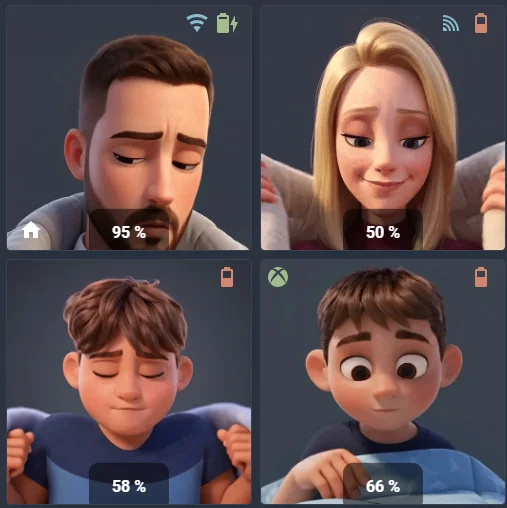
4. Rendu Final
Et voilà ! Une fois tes images et tes entités configurées, ton dashboard devrait ressembler à ceci :
Pourquoi ce script ?
Ce script permet d'avoir un magnifique bouton sur ton dashboard. Quand tu cliques dessus, un Pop-up s'ouvre pour te proposer différents messages ("À table", "École", etc.) qui seront diffusés sur tes enceintes Alexa.
1. Installer les modules via HACS
- Browser Mod (Indispensable pour faire apparaître la fenêtre Pop-up).
- Card Mod (Pour le design futuriste du bouton).
2. Les Automatisations (Scripts)
Va dans Paramètres > Automatisations > Scripts. Crée un nouveau script, passe en mode YAML et colle ceci pour chaque message souhaité.
alias: Annonce Descendre
mode: single
icon: mdi:amazon-alexa
description: ""
sequence:
  - action: notify.alexa_media_everywhere
    data:
      message: Les enfants, descendez rapidement !
      data:
        type: announce
        method: speak
* N'oublie pas de créer les autres scripts (`script.annonce_repas`, `script.annonce_on_y_vas`...)
3. Le Dashboard (Le Pop-up)
Ajoute une carte Grille (Grid) ou Manuel sur ton interface, et colle ce beau monstre :
type: grid
columns: 1
square: false
cards:
  - type: button
    name: Alexa Annonce
    show_name: true
    show_state: false
    show_icon: false
    entity: script.annonce_repas
    tap_action:
      action: fire-dom-event
      browser_mod:
        service: browser_mod.popup
        data:
          title: Choisir une annonce
          content:
            type: grid
            columns: 2
            square: false
            cards:
              - type: button
                name: À TABLE !
                icon: mdi:silverware-fork-knife
                tap_action:
                  action: call-service
                  service: script.annonce_repas
                card_mod:
                  style: |
                    ha-card {
                      background: linear-gradient(135deg, #1f2937, #4b5563);
                      border-radius: 12px;
                      border: 1px solid #00d1ff;
                      height: 80px !important;
                      box-shadow: 0 4px 8px rgba(0,0,0,0.3);
                    }
                    :host {
                      --mdc-icon-size: 28px;
                      color: #00d1ff;
                    }
              - type: button
                name: ON Y VA !
                icon: mdi:run-fast
                tap_action:
                  action: call-service
                  service: script.annonce_on_y_vas
                card_mod:
                  style: |
                    ha-card {
                      background: linear-gradient(135deg, #1f2937, #4b5563);
                      border-radius: 12px;
                      border: 1px solid #00d1ff;
                      height: 80px !important;
                    }
                    :host { color: #00d1ff; }
              - type: button
                name: ÉCOLE
                icon: mdi:school
                tap_action:
                  action: call-service
                  service: script.annonce_ecole
                card_mod:
                  style: |
                    ha-card {
                      background: linear-gradient(135deg, #1f2937, #4b5563);
                      border-radius: 12px;
                      border: 1px solid #00d1ff;
                      height: 80px !important;
                    }
                    :host { color: #00d1ff; }
              - type: button
                name: DESCENDRE
                icon: mdi:stairs-down
                tap_action:
                  action: call-service
                  service: script.annonce_descendre
                card_mod:
                  style: |
                    ha-card {
                      background: linear-gradient(135deg, #1f2937, #4b5563);
                      border-radius: 12px;
                      border: 1px solid #00d1ff;
                      height: 80px !important;
                    }
                    :host { color: #00d1ff; }
    card_mod:
      style: |
        ha-card {
          width: 100%;
          height: 70px !important;
          display: flex !important;
          flex-direction: row !important;
          align-items: center !important;
          justify-content: center !important;
          padding-left: 0px !important;
          gap: 15px;
          border-radius: 15px;
          background: linear-gradient(135deg, #1f2937, #4b5563);
          color: #f9fafb;
          font-weight: 700;
          font-size: 16px;
          box-shadow: 0 4px 12px rgba(0,0,0,0.3);
          transition: all 0.3s ease-in-out;
          overflow: hidden;
          position: relative;
        }
        ha-card::before {
          content: "\F0048";
          font-family: "Material Design Icons";
          display: flex;
          align-items: center;
          justify-content: center;
          width: 45px;
          height: 45px;
          background-color: #1f2937;
          color: #00d1ff;
          font-size: 28px;
          border-radius: 50%;
          border: 2px solid #00d1ff;
          flex-shrink: 0;
          z-index: 1;
          box-shadow: 0 0 10px rgba(0, 209, 255, 0.4);
        }
        ha-card::after {
          content: "📢";
          position: absolute;
          right: -5px;
          bottom: -15px;
          font-size: 5rem;
          opacity: 0.15;
          filter: grayscale(1) brightness(1.5);
          transform: rotate(-10deg);
          pointer-events: none;
        }
        .name { z-index: 1; }
        ha-card:hover { transform: scale(1.01); background: linear-gradient(135deg, #283046, #667085); cursor: pointer; }
4. Aperçu du Rendu
Et voici le résultat final incroyable que tu auras sur ton interface avant même d'ouvrir le pop-up :
Pourquoi ce script ?
Ce script permet d'afficher en géant le temps restant d'un minuteur lancé sur une enceinte Alexa. La carte n'apparaît que lorsqu'un minuteur est en cours, gardant ton dashboard propre le reste du temps.
1. Les Pré-requis
- Avoir intégré Alexa Media Player dans Home Assistant (via HACS).
- Installer Custom Button Card via HACS pour la mise en page avancée.
- Installer Card Mod via HACS.
2. Le Code Dashboard (YAML)
Ajoute une carte Manuel sur ton dashboard et colle ce prompt. Pense à remplacer `sensor.salon_la_prochaine_fois` par le capteur de ton enceinte Alexa (le sensor qui gère le minuteur "la_prochaine_fois" / "next_timer").
type: conditional
conditions:
  - entity: sensor.salon_la_prochaine_fois
    state_not: Inconnu
  - entity: sensor.salon_la_prochaine_fois
    state_not: unavailable
  - entity: sensor.salon_la_prochaine_fois
    state_not: idle
  - entity: sensor.salon_la_prochaine_fois
    state_not: unknown
card:
  type: custom:button-card
  entity: sensor.salon_la_prochaine_fois
  show_name: false
  show_state: false
  styles:
    card:
      - background: "linear-gradient(135deg, #1f2937 0%, #4b5563 100%)"
      - border-radius: 20px
      - height: 140px
      - border: none
      - position: relative
      - overflow: hidden
      - display: flex
      - flex-direction: column
      - padding: 0px
    grid:
      - grid-template-areas: "\"footer\" \"chrono\""
      - grid-template-rows: 45px 1fr
    custom_fields:
      footer:
        - color: "#FFD700"
        - font-size: 1.6rem
        - font-weight: 900
        - text-transform: uppercase
        - align-self: center
        - margin-top: 15px
        - z-index: 2
      chrono:
        - width: 100%
        - height: 100%
        - display: flex
        - align-items: center
        - justify-content: center
  custom_fields:
    footer: |
      [[[ return `⏳ ALEXA MINUTEUR`; ]]]
    chrono:
      card:
        type: tile
        entity: sensor.salon_la_prochaine_fois
        card_mod:
          style: |
            ha-card {
              background: none !important;
              border: none !important;
              box-shadow: none !important;
              padding: 0 !important;
              margin: 0 !important;
              width: 100% !important;
            }
            .icon-container, .info, .display {
              display: none !important;
            }
            .state {
              font-size: 6.5rem !important;
              font-weight: 900 !important;
              color: white !important;
              line-height: 1 !important;
              text-align: center !important;
              width: 100% !important;
              margin: 0 !important;
              position: absolute !important;
              left: 50% !important;
              top: 55% !important;
              transform: translate(-50%, -50%) !important;
            }
  extra_styles: |
    ha-card::after {
      content: "";
      position: absolute;
      right: -10px;
      bottom: -15px;
      width: 120px;
      height: 120px;
      background-color: white;
      -webkit-mask-image: url("https://api.iconify.design/mdi/timer-sand.svg");
      -webkit-mask-repeat: no-repeat;
      -webkit-mask-size: contain;
      opacity: 0.08;
      pointer-events: none;
    }
3. Explication Complète
Besoin de plus d'astuces sur ce script ? Va voir l'explication Tiktok complète :
 Voir la vidéo TikTok @techenclair
4. Aperçu du Rendu
Et voici la carte qui fera son apparition sur ton dashboard dès que tu demanderas à Alexa de lancer un minuteur :
🎭 Avatars Animés & Météo
Transforme ton dashboard en interface vivante avec des avatars qui parlent et qui réagissent à la météo en temps réel.
1. Création de l'Avatar IA
On va utiliser l'intelligence artificielle pour donner vie à tes personnages.
Rends-toi sur Hedra.com pour générer ton avatar.
- Crée ton avatar ou importe une photo
- Génère la vidéo avec un prompt vocal ou texte
- Télécharge le fichier .mp4
2. Conversion Technique (FFMPEG)
Pour que Home Assistant affiche l'animation de manière fluide et légère, on convertit le MP4 en WebP.
Script Terminal (FFMPEG)
.\ffmpeg.exe -i TonFichier.mp4 -vcodec libwebp -vf "fps=17,scale=512:-2" -lossless 0 -compression_level 6 -q:v 50 -loop 0 -preset picture -an avatar_anime_q50.webp
* Place ffmpeg.exe dans le dossier de ta vidéo, fais un clic droit > Ouvrir dans le terminal.
3. Optimisation Finale (GIF)
Si tu préfères utiliser un format GIF classique pour plus de compatibilité :
4. Le Code Dashboard (YAML)
Voici les deux méthodes : une pour l'animation simple et une autre combinée avec la météo et vos capteurs.
type: grid
columns: 2
square: false
cards:
  - type: picture-elements
    aspect_ratio: 1/1.2
    image: >-
      /api/image/serve/0688441747d58fb132b54c3f300ceed3/original?authSig=eyJhbGciOiJIUzI1NiIsInR5cCI6IkpXVCJ9.eyJpc3MiOiI2Y2U4ZTdhMDRmOWE0NDRkODYxNjNlZmZmODI4YzhkOSIsInBhdGgiOiIvYXBpL2ltYWdlL3NlcnZlLzA2ODg0NDE3NDdkNThmYjEzMmI1NGMzZjMwMGNlZWQzL29yaWdpbmFsIiwicGFyYW1zIjpbXSwiaWF0IjoxNzcyNjUwNTI3LCJleHAiOjE3NzI3MzY5Mjd9.9mKp0m5RWzRaIKRUfz5zb1zOktZiT60EeSyBOD8JWv8
    elements:
      - type: conditional
        conditions:
          - entity: weather.forecast_amilly
            state: sunny
        elements:
          - type: image
            image: >-
              /api/image/serve/645c55dbaa7abe1a2f4bba1b0c6398b9/original?authSig=eyJhbGciOiJIUzI1NiIsInR5cCI6IkpXVCJ9.eyJpc3MiOiI2Y2U4ZTdhMDRmOWE0NDRkODYxNjNlZmZmODI4YzhkOSIsInBhdGgiOiIvYXBpL2ltYWdlL3NlcnZlLzY0NWM1NWRiYWE3YWJlMWEyZjRiYmExYjBjNjM5OGI5L29yaWdpbmFsIiwicGFyYW1zIjpbXSwiaWF0IjoxNzcyNjUwNTY3LCJleHAiOjE3NzI3MzY5Njd9.Yi8CEiWkP1Bd7LPrw0lkztt6o8arBiEObLuX_FRxpZs
            style:
              top: 50%
              left: 50%
              width: 100%
              height: 100%
      - type: conditional
        conditions:
          - entity: weather.forecast_amilly
            state: rainy
        elements:
          - type: image
            image: >-
              /api/image/serve/44708cbf74c28ef680d6f5661468c54d/original?authSig=eyJhbGciOiJIUzI1NiIsInR5cCI6IkpXVCJ9.eyJpc3MiOiI2Y2U4ZTdhMDRmOWE0NDRkODYxNjNlZmZmODI4YzhkOSIsInBhdGgiOiIvYXBpL2ltYWdlL3NlcnZlLzQ0NzA4Y2JmNzRjMjhlZjY4MGQ2ZjU2NjE0NjhjNTRkL29yaWdpbmFsIiwicGFyYW1zIjpbXSwiaWF0IjoxNzcyNjUwMzU4LCJleHAiOjE3NzI3MzY3NTh9.kFrNL7UGCmAeTpe4dDQjfPVGUrrvhkQT3E0U9IKj80s
            style:
              top: 50%
              left: 50%
              width: 100%
              height: 100%
      - type: conditional
        conditions:
          - entity: schedule.mode_nuit_personnages
            state: "on"
        elements:
          - type: image
            image: >-
              /api/image/serve/ce669bc96e1faefbd2953c1abd575dda/original?authSig=eyJhbGciOiJIUzI1NiIsInR5cCI6IkpXVCJ9.eyJpc3MiOiI2Y2U4ZTdhMDRmOWE0NDRkODYxNjNlZmZmODI4YzhkOSIsInBhdGgiOiIvYXBpL2ltYWdlL3NlcnZlL2NlNjY5YmM5NmUxZmFlZmJkMjk1M2MxYWJkNTc1ZGRhL29yaWdpbmFsIiwicGFyYW1zIjpbXSwiaWF0IjoxNzcyNjUwMjYwLCJleHAiOjE3NzI3MzY2NjB9.989aVC-iZtbfODTYijaeAgn8uItcCqjrNvgoClErZ1s
            style:
              top: 50%
              left: 50%
              width: 100%
              height: 100%
      - type: image
        image: >-
          data:image/gif;base64,R0lGODlhAQABAIAAAAAAAP///yH5BAEAAAAALAAAAAABAAEAAAIBRAA7
        style:
          top: 50%
          left: 50%
          width: 100%
          height: 100%
        tap_action:
          action: fire-dom-event
          browser_mod:
            service: browser_mod.popup
            data:
              size: fullscreen
              content:
                type: iframe
                url: /local/miras.html
      - type: conditional
        conditions:
          - entity: sensor.mirasandalucia45_online_status
            state_not: offline
        elements:
          - type: icon
            icon: mdi:sony-playstation
            style:
              top: 7%
              left: 7%
            card_mod:
              style: "ha-icon { color: #88C0D0 !important; }"
      - type: conditional
        conditions:
          - entity: binary_sensor.s24_ping
            state: "on"
        elements:
          - type: icon
            icon: mdi:wifi
            style:
              top: 7%
              left: 78%
            card_mod:
              style: "ha-icon { color: #88C0D0 !important; }"
      - type: conditional
        conditions:
          - entity: binary_sensor.s24_ping
            state: "off"
        elements:
          - type: icon
            icon: mdi:signal-variant
            style:
              top: 7%
              left: 78%
            card_mod:
              style: "ha-icon { color: #88C0D0 !important; }"
      - type: conditional
        conditions:
          - entity: person.miras
            state: home
        elements:
          - type: icon
            icon: mdi:home
            style:
              top: 92%
              left: 10%
              color: white
      - type: state-icon
        entity: sensor.sm_s921b_battery_level
        style:
          top: 7%
          left: 90%
        card_mod:
          style: >-
            :host { --paper-item-icon-color: white !important; transform:
            scale(1.3); }
      - type: state-label
        entity: sensor.sm_s921b_battery_level
        style:
          top: 93%
          left: 50%
          font-size: 16px
          font-weight: bold
          color: white
          background-color: rgba(0,0,0,0.5)
          padding: 5px 15px
          border-radius: 10px
  - type: picture-elements
    aspect_ratio: 1/1.2
    image: >-
      /api/image/serve/85e566bc84d8ec6543bca57277036ad7/original?authSig=eyJhbGciOiJIUzI1NiIsInR5cCI6IkpXVCJ9.eyJpc3MiOiI2Y2U4ZTdhMDRmOWE0NDRkODYxNjNlZmZmODI4YzhkOSIsInBhdGgiOiIvYXBpL2ltYWdlL3NlcnZlLzg1ZTU2NmJjODRkOGVjNjU0M2JjYTU3Mjc3MDM2YWQ3L29yaWdpbmFsIiwicGFyYW1zIjpbXSwiaWF0IjoxNzcyNjUwNjUzLCJleHAiOjE3NzI3MzcwNTN9.Z14r8Ne4PPRRNw3mHdj6sn8xAc7ToqV9C128a-KgSTc
    elements:
      - type: conditional
        conditions:
          - entity: weather.forecast_amilly
            state: sunny
        elements:
          - type: image
            image: >-
              /api/image/serve/c2a57946d687fb58f71f5d078419a951/original?authSig=eyJhbGciOiJIUzI1NiIsInR5cCI6IkpXVCJ9.eyJpc3MiOiI2Y2U4ZTdhMDRmOWE0NDRkODYxNjNlZmZmODI4YzhkOSIsInBhdGgiOiIvYXBpL2ltYWdlL3NlcnZlL2MyYTU3OTQ2ZDY4N2ZiNThmNzFmNWQwNzg0MTlhOTUxL29yaWdpbmFsIiwicGFyYW1zIjpbXSwiaWF0IjoxNzcyNjUwNzcwLCJleHAiOjE3NzI3MzcxNzB9.BVGZyU-i5PggtPVY-y_BDfpJD4JMUclpay9vbwLqA28
            style:
              top: 50%
              left: 50%
              width: 100%
              height: 100%
      - type: conditional
        conditions:
          - entity: weather.forecast_amilly
            state: rainy
        elements:
          - type: image
            image: >-
              /api/image/serve/218c6f07a62d8fdb067527ecb4ab5079/original?authSig=eyJhbGciOiJIUzI1NiIsInR5cCI6IkpXVCJ9.eyJpc3MiOiI2Y2U4ZTdhMDRmOWE0NDRkODYxNjNlZmZmODI4YzhkOSIsInBhdGgiOiIvYXBpL2ltYWdlL3NlcnZlLzIxOGM2ZjA3YTYyZDhmZGIwNjc1MjdlY2I0YWI1MDc5L29yaWdpbmFsIiwicGFyYW1zIjpbXSwiaWF0IjoxNzcyNjUwNzA4LCJleHAiOjE3NzI3MzcxMDh9.X_7WYqxXgtycRM9R707HbWrLLHYyHL3H6BawOlmzpRY
            style:
              top: 50%
              left: 50%
              width: 100%
              height: 100%
      - type: conditional
        conditions:
          - entity: schedule.mode_nuit_personnages
            state: "on"
        elements:
          - type: image
            image: >-
              /api/image/serve/a660909436be369b05354407ae6d6391/original?authSig=eyJhbGciOiJIUzI1NiIsInR5cCI6IkpXVCJ9.eyJpc3MiOiI2Y2U4ZTdhMDRmOWE0NDRkODYxNjNlZmZmODI4YzhkOSIsInBhdGgiOiIvYXBpL2ltYWdlL3NlcnZlL2E2NjA5MDk0MzZiZTM2OWIwNTM1NDQwN2FlNmQ2MzkxL29yaWdpbmFsIiwicGFyYW1zIjpbXSwiaWF0IjoxNzcyNjUwNzQ5LCJleHAiOjE3NzI3MzcxNDl9.-_CT8x2tsPjRcaYdEUUaHF9_yYYVe5lS2cXQTdHNHCI
            style:
              top: 50%
              left: 50%
              width: 100%
              height: 100%
      - type: image
        image: >-
          data:image/gif;base64,R0lGODlhAQABAIAAAAAAAP///yH5BAEAAAAALAAAAAABAAEAAAIBRAA7
        style:
          top: 50%
          left: 50%
          width: 100%
          height: 100%
        tap_action:
          action: fire-dom-event
          browser_mod:
            service: browser_mod.popup
            data:
              size: fullscreen
              content:
                type: iframe
                url: /local/juju.html
      - type: conditional
        conditions:
          - entity: person.julie
            state: home
        elements:
          - type: icon
            icon: mdi:home
            style:
              top: 92%
              left: 10%
              color: white
      - type: conditional
        conditions:
          - entity: binary_sensor.s25_ping
            state: "on"
        elements:
          - type: icon
            icon: mdi:wifi
            style:
              top: 7%
              left: 78%
            card_mod:
              style: "ha-icon { color: #88C0D0 !important; }"
      - type: conditional
        conditions:
          - entity: binary_sensor.s25_ping
            state: "off"
        elements:
          - type: icon
            icon: mdi:signal-variant
            style:
              top: 7%
              left: 78%
            card_mod:
              style: "ha-icon { color: #88C0D0 !important; }"
      - type: state-icon
        entity: sensor.sm_julie_battery_level
        style:
          top: 7%
          left: 90%
        card_mod:
          style: >-
            :host { --paper-item-icon-color: white !important; transform:
            scale(1.3); }
      - type: state-label
        entity: sensor.sm_julie_battery_level
        style:
          top: 93%
          left: 50%
          font-size: 16px
          font-weight: bold
          color: white
          background-color: rgba(0,0,0,0.5)
          padding: 5px 15px
          border-radius: 10px
  - type: picture-elements
    aspect_ratio: 1/1.2
    image: >-
      /api/image/serve/bea94710957fe21a3762b742d68a4a6b/original?authSig=eyJhbGciOiJIUzI1NiIsInR5cCI6IkpXVCJ9.eyJpc3MiOiI2Y2U4ZTdhMDRmOWE0NDRkODYxNjNlZmZmODI4YzhkOSIsInBhdGgiOiIvYXBpL2ltYWdlL3NlcnZlL2JlYTk0NzEwOTU3ZmUyMWEzNzYyYjc0MmQ2OGE0YTZiL29yaWdpbmFsIiwicGFyYW1zIjpbXSwiaWF0IjoxNzcyNjUwODk3LCJleHAiOjE3NzI3MzczOTd9.1otC0FtOFvTvdYYbHeWyT1wmp5x4Nu7jXLhSju7sP2w
    elements:
      - type: conditional
        conditions:
          - entity: weather.forecast_amilly
            state: sunny
        elements:
          - type: image
            image: >-
              /api/image/serve/89fc76b3019e9dea5bd0d1694cfbb858/original?authSig=eyJhbGciOiJIUzI1NiIsInR5cCI6IkpXVCJ9.eyJpc3MiOiI2Y2U4ZTdhMDRmOWE0NDRkODYxNjNlZmZmODI4YzhkOSIsInBhdGgiOiIvYXBpL2ltYWdlL3NlcnZlLzg5ZmM3NmIzMDE5ZTlkZWE1YmQwZDE2OTRjZmJiODU4L29yaWdpbmFsIiwicGFyYW1zIjpbXSwiaWF0IjoxNzcyNjUwOTYyLCJleHAiOjE3NzI3MzczNjJ9.Co7tgXHpmrrp0tKYedASvvORlHaXYNB6faDtkjQYYLc
            style:
              top: 50%
              left: 50%
              width: 100%
              height: 100%
      - type: conditional
        conditions:
          - entity: weather.forecast_amilly
            state: rainy
        elements:
          - type: image
            image: >-
              /api/image/serve/32c4a9ba67b81d803a9a9b26f9bdd4e3/original?authSig=eyJhbGciOiJIUzI1NiIsInR5cCI6IkpXVCJ9.eyJpc3MiOiI2Y2U4ZTdhMDRmOWE0NDRkODYxNjNlZmZmODI4YzhkOSIsInBhdGgiOiIvYXBpL2ltYWdlL3NlcnZlLzMyYzRhOWJhNjdiODFkODAzYTlhOWIyNmY5YmRkNGUzL29yaWdpbmFsIiwicGFyYW1zIjpbXSwiaWF0IjoxNzcyNjUwOTM2LCJleHAiOjE3NzI3MzczMzZ9.PHgG9zYM6bsLssSpMzIBb-f85ka-TrBvXJNU8FAblgI
            style:
              top: 50%
              left: 50%
              width: 100%
              height: 100%
      - type: conditional
        conditions:
          - entity: schedule.mode_nuit_personnages
            state: "on"
        elements:
          - type: image
            image: >-
              /api/image/serve/3e921d36bab278e66e90580df616913c/original?authSig=eyJhbGciOiJIUzI1NiIsInR5cCI6IkpXVCJ9.eyJpc3MiOiI2Y2U4ZTdhMDRmOWE0NDRkODYxNjNlZmZmODI4YzhkOSIsInBhdGgiOiIvYXBpL2ltYWdlLzNlOTIxZDM2YmFiMjc4ZTY2ZTkwNTgwZGY2MTY5MTNjL29yaWdpbmFsIiwicGFyYW1zIjpbXSwiaWF0IjoxNzcyNjUwOTg1LCJleHAiOjE3NzI3MzczODV9.2FMC2NSOpPGsryZVIabk6AUxJs1G6Yy7y_CxHRxqmgQ
            style:
              top: 50%
              left: 50%
              width: 100%
              height: 100%
      - type: image
        image: >-
          data:image/gif;base64,R0lGODlhAQABAIAAAAAAAP///yH5BAEAAAAALAAAAAABAAEAAAIBRAA7
        style:
          top: 50%
          left: 50%
          width: 100%
          height: 100%
        tap_action:
          action: navigate
          navigation_path: /dashboard-home/esteban
      - type: icon
        icon: mdi:desktop-tower
        entity: sensor.prise_3_puissance
        style:
          top: 7%
          left: 7%
        card_mod:
          style: >
            :host { display: {{ 'block' if states('sensor.prise_3_puissance') |
            float(0) > 100 else 'none' }}; }

            ha-icon { color: #A3BE8C !important; }
      - type: conditional
        conditions:
          - entity: person.esteban
            state: home
        elements:
          - type: icon
            icon: mdi:home
            style:
              top: 92%
              left: 10%
              color: white
      - type: state-icon
        entity: sensor.esteban_battery_level
        style:
          top: 7%
          left: 90%
        card_mod:
          style: >-
            :host { --paper-item-icon-color: white !important; transform:
            scale(1.3); }
      - type: state-label
        entity: sensor.esteban_battery_level
        style:
          top: 93%
          left: 50%
          font-size: 16px
          font-weight: bold
          color: white
          background-color: rgba(0,0,0,0.5)
          padding: 5px 15px
          border-radius: 10px
  - type: picture-elements
    aspect_ratio: 1/1.2
    image: >-
      /api/image/serve/18856cd961f2ea46898e44c1c1939e5a/original?authSig=eyJhbGciOiJIUzI1NiIsInR5cCI6IkpXVCJ9.eyJpc3MiOiI2Y2U4ZTdhMDRmOWE0NDRkODYxNjNlZmZmODI4YzhkOSIsInBhdGgiOiIvYXBpL2ltYWdlL3NlcnZlLzE4ODU2Y2Q5NjFmMmVhNDY4OThlNDRjMWMxOTM5ZTVhL29yaWdpbmFsIiwicGFyYW1zIjpbXSwiaWF0IjoxNzcyNjUxMDgzLCJleHAiOjE3NzI3Mzc0ODN9.B1sjUqQ348FBJFfUkIiLwAxfzAWM5CiifzZPPxup_nk
    elements:
      - type: conditional
        conditions:
          - entity: weather.forecast_amilly
            state: sunny
        elements:
          - type: image
            image: >-
              /api/image/serve/540f27c98755316ecd1f42708d3b96d1/original?authSig=eyJhbGciOiJIUzI1NiIsInR5cCI6IkpXVCJ9.eyJpc3MiOiI2Y2U4ZTdhMDRmOWE0NDRkODYxNjNlZmZmODI4YzhkOSIsInBhdGgiOiIvYXBpL2ltYWdlL3NlcnZlLzU0MGYyN2M5ODc1NTMxNmVjZDFmNDI3MDhkM2I5NmQxL29yaWdpbmFsIiwicGFyYW1zIjpbXSwiaWF0IjoxNzcyNjUxMTM5LCJleHAiOjE3NzI3Mzc1Mzl9.nzcKi-EL39LNmvx2Y3ovLPdgq6o8ZtyU3RS1LaFDONA
            style:
              top: 50%
              left: 50%
              width: 100%
              height: 100%
      - type: conditional
        conditions:
          - entity: weather.forecast_amilly
            state: rainy
        elements:
          - type: image
            image: >-
              /api/image/serve/a6295db81033bc068860e3ec1140f739/original?authSig=eyJhbGciOiJIUzI1NiIsInR5cCI6IkpXVCJ9.eyJpc3MiOiI2Y2U4ZTdhMDRmOWE0NDRkODYxNjNlZmZmODI4YzhkOSIsInBhdGgiOiIvYXBpL2ltYWdlL3NlcnZlL2E2Mjk1ZGI4MTAzM2JjMDY4ODYwZTNlYzExNDBmNzM5L29yaWdpbmFsIiwicGFyYW1zIjpbXSwiaWF0IjoxNzcyNjUxMTE2LCJleHAiOjE3NzI3Mzc1MTZ9.tZlzJI1CoMs1bgafwNeTt3LXej7SLJWSnOvyh1_KfKo
            style:
              top: 50%
              left: 50%
              width: 100%
              height: 100%
      - type: conditional
        conditions:
          - entity: schedule.mode_nuit_personnages
            state: "on"
        elements:
          - type: image
            image: >-
              /api/image/serve/0cde417c03e1878be6e0353f2a23fa77/original?authSig=eyJhbGciOiJIUzI1NiIsInR5cCI6IkpXVCJ9.eyJpc3MiOiI2Y2U4ZTdhMDRmOWE0NDRkODYxNjNlZmZmODI4YzhkOSIsInBhdGgiOiIvYXBpL2ltYWdlLzBjZGU0MTdjMDNlMTg3OGJlNmUwMzUzZjJhMjNmYTc3L29yaWdpbmFsIiwicGFyYW1zIjpbXSwiaWF0IjoxNzcyNzc5MjE4LCJleHAiOjE3NzI4NjU2MTh9.5B00fkwor0pnWQ9xTVZ-5p1R2nEORvZUq6PCOjlfxoA
            style:
              top: 50%
              left: 50%
              width: 100%
              height: 100%
      - type: conditional
        conditions:
          - entity: binary_sensor.xbox_nathan_status
            state: "on"
        elements:
          - type: icon
            icon: mdi:microsoft-xbox
            style:
              top: 7%
              left: 7%
            card_mod:
              style: >-
                ha-icon { color: #A3BE8C !important; animation: pulse 2s
                infinite; }
      - type: state-icon
        entity: sensor.nathan_battery_level
        style:
          top: 7%
          left: 90%
        card_mod:
          style: >-
            :host { --paper-item-icon-color: white !important; transform:
            scale(1.3); }
      - type: state-label
        entity: sensor.nathan_battery_level
        style:
          top: 93%
          left: 50%
          font-size: 16px
          font-weight: bold
          color: white
          background-color: rgba(0,0,0,0.5)
          padding: 5px 15px
          border-radius: 10px
type: grid
columns: 2
square: false
cards:
  - type: picture-elements
    aspect_ratio: 1/1.2
    image: >-
      /api/image/serve/0688441747d58fb132b54c3f300ceed3/original?authSig=eyJhbGciOiJIUzI1NiIsInR5cCI6IkpXVCJ9.eyJpc3MiOiI2Y2U4ZTdhMDRmOWE0NDRkODYxNjNlZmZmODI4YzhkOSIsInBhdGgiOiIvYXBpL2ltYWdlL3NlcnZlLzA2ODg0NDE3NDdkNThmYjEzMmI1NGMzZjMwMGNlZWQzL29yaWdpbmFsIiwicGFyYW1zIjpbXSwiaWF0IjoxNzcyNjUwNTI3LCJleHAiOjE3NzI3MzY5Mjd9.9mKp0m5RWzRaIKRUfz5zb1zOktZiT60EeSyBOD8JWv8
    elements:
      - type: conditional
        conditions:
          - entity: weather.forecast_amilly
            state: sunny
        elements:
          - type: image
            image: >-
              /api/image/serve/645c55dbaa7abe1a2f4bba1b0c6398b9/original?authSig=eyJhbGciOiJIUzI1NiIsInR5cCI6IkpXVCJ9.eyJpc3MiOiI2Y2U4ZTdhMDRmOWE0NDRkODYxNjNlZmZmODI4YzhkOSIsInBhdGgiOiIvYXBpL2ltYWdlL3NlcnZlLzY0NWM1NWRiYWE3YWJlMWEyZjRiYmExYjBjNjM5OGI5L29yaWdpbmFsIiwicGFyYW1zIjpbXSwiaWF0IjoxNzcyNjUwNTY3LCJleHAiOjE3NzI3MzY5Njd9.Yi8CEiWkP1Bd7LPrw0lkztt6o8arBiEObLuX_FRxpZs
            style:
              top: 50%
              left: 50%
              width: 100%
              height: 100%
      - type: conditional
        conditions:
          - entity: weather.forecast_amilly
            state: rainy
        elements:
          - type: image
            image: >-
              /api/image/serve/44708cbf74c28ef680d6f5661468c54d/original?authSig=eyJhbGciOiJIUzI1NiIsInR5cCI6IkpXVCJ9.eyJpc3MiOiI2Y2U4ZTdhMDRmOWE0NDRkODYxNjNlZmZmODI4YzhkOSIsInBhdGgiOiIvYXBpL2ltYWdlL3NlcnZlLzQ0NzA4Y2JmNzRjMjhlZjY4MGQ2ZjU2NjE0NjhjNTRkL29yaWdpbmFsIiwicGFyYW1zIjpbXSwiaWF0IjoxNzcyNjUwMzU4LCJleHAiOjE3NzI3MzY3NTh9.kFrNL7UGCmAeTpe4dDQjfPVGUrrvhkQT3E0U9IKj80s
            style:
              top: 50%
              left: 50%
              width: 100%
              height: 100%
      - type: conditional
        conditions:
          - entity: schedule.mode_nuit_personnages
            state: "on"
        elements:
          - type: image
            image: >-
              /api/image/serve/ce669bc96e1faefbd2953c1abd575dda/original?authSig=eyJhbGciOiJIUzI1NiIsInR5cCI6IkpXVCJ9.eyJpc3MiOiI2Y2U4ZTdhMDRmOWE0NDRkODYxNjNlZmZmODI4YzhkOSIsInBhdGgiOiIvYXBpL2ltYWdlL3NlcnZlL2NlNjY5YmM5NmUxZmFlZmJkMjk1M2MxYWJkNTc1ZGRhL29yaWdpbmFsIiwicGFyYW1zIjpbXSwiaWF0IjoxNzcyNjUwMjYwLCJleHAiOjE3NzI3MzY2NjB9.989aVC-iZtbfODTYijaeAgn8uItcCqjrNvgoClErZ1s
            style:
              top: 50%
              left: 50%
              width: 100%
              height: 100%
      - type: image
        image: >-
          data:image/gif;base64,R0lGODlhAQABAIAAAAAAAP///yH5BAEAAAAALAAAAAABAAEAAAIBRAA7
        style:
          top: 50%
          left: 50%
          width: 100%
          height: 100%
        tap_action:
          action: fire-dom-event
          browser_mod:
            service: browser_mod.popup
            data:
              size: fullscreen
              content:
                type: iframe
                url: /local/miras.html
      - type: conditional
        conditions:
          - entity: person.miras
            state: home
        elements:
          - type: icon
            icon: mdi:home
            style:
              top: 92%
              left: 10%
              color: white
      - type: conditional
        conditions:
          - entity: sensor.mirasandalucia45_online_status
            state_not: offline
        elements:
          - type: icon
            icon: mdi:sony-playstation
            style:
              top: 7%
              left: 7%
            card_mod:
              style: "ha-icon { color: #88C0D0 !important; }"
          - type: state-label
            entity: sensor.mirasandalucia45_online_status
            style:
              top: 7%
              left: 28%
              font-weight: bold
            card_mod:
              style: >-
                div { font-size: 0px; } div::before { content: 'En ligne';
                font-size: 14px; color: #88C0D0; }
      - type: conditional
        conditions:
          - entity: binary_sensor.s24_ping
            state: "on"
        elements:
          - type: icon
            icon: mdi:wifi
            style:
              top: 7%
              left: 78%
            card_mod:
              style: "ha-icon { color: #88C0D0 !important; }"
      - type: conditional
        conditions:
          - entity: binary_sensor.s24_ping
            state: "off"
        elements:
          - type: icon
            icon: mdi:signal-variant
            style:
              top: 7%
              left: 78%
            card_mod:
              style: "ha-icon { color: #88C0D0 !important; }"
      - type: state-icon
        entity: sensor.sm_s921b_battery_level
        style:
          top: 7%
          left: 90%
        card_mod:
          style: >-
            :host { --paper-item-icon-color: white !important; transform:
            scale(1.3); }
      - type: state-label
        entity: sensor.sm_s921b_battery_level
        style:
          top: 93%
          left: 50%
          font-size: 16px
          font-weight: bold
          color: white
          background-color: rgba(0,0,0,0.5)
          padding: 5px 15px
          border-radius: 10px
  - type: picture-elements
    aspect_ratio: 1/1.2
    image: >-
      /api/image/serve/85e566bc84d8ec6543bca57277036ad7/original?authSig=eyJhbGciOiJIUzI1NiIsInR5cCI6IkpXVCJ9.eyJpc3MiOiI2Y2U4ZTdhMDRmOWE0NDRkODYxNjNlZmZmODI4YzhkOSIsInBhdGgiOiIvYXBpL2ltYWdlL3NlcnZlLzg1ZTU2NmJjODRkOGVjNjU0M2JjYTU3Mjc3MDM2YWQ3L29yaWdpbmFsIiwicGFyYW1zIjpbXSwiaWF0IjoxNzcyNjUwNjUzLCJleHAiOjE3NzI3MzcwNTN9.Z14r8Ne4PPRRNw3mHdj6sn8xAc7ToqV9C128a-KgSTc
    elements:
      - type: conditional
        conditions:
          - entity: weather.forecast_amilly
            state: sunny
        elements:
          - type: image
            image: >-
              /api/image/serve/c2a57946d687fb58f71f5d078419a951/original?authSig=eyJhbGciOiJIUzI1NiIsInR5cCI6IkpXVCJ9.eyJpc3MiOiI2Y2U4ZTdhMDRmOWE0NDRkODYxNjNlZmZmODI4YzhkOSIsInBhdGgiOiIvYXBpL2ltYWdlL3NlcnZlL2MyYTU3OTQ2ZDY4N2ZiNThmNzFmNWQwNzg0MTlhOTUxL29yaWdpbmFsIiwicGFyYW1zIjpbXSwiaWF0IjoxNzcyNjUwNzcwLCJleHAiOjE3NzI3MzcxNzB9.BVGZyU-i5PggtPVY-y_BDfpJD4JMUclpay9vbwLqA28
            style:
              top: 50%
              left: 50%
              width: 100%
              height: 100%
      - type: conditional
        conditions:
          - entity: weather.forecast_amilly
            state: rainy
        elements:
          - type: image
            image: >-
              /api/image/serve/218c6f07a62d8fdb067527ecb4ab5079/original?authSig=eyJhbGciOiJIUzI1NiIsInR5cCI6IkpXVCJ9.eyJpc3MiOiI2Y2U4ZTdhMDRmOWE0NDRkODYxNjNlZmZmODI4YzhkOSIsInBhdGgiOiIvYXBpL2ltYWdlL3NlcnZlLzIxOGM2ZjA3YTYyZDhmZGIwNjc1MjdlY2I0YWI1MDc5L29yaWdpbmFsIiwicGFyYW1zIjpbXSwiaWF0IjoxNzcyNjUwNzA4LCJleHAiOjE3NzI3MzcxMDh9.X_7WYqxXgtycRM9R707HbWrLLHYyHL3H6BawOlmzpRY
            style:
              top: 50%
              left: 50%
              width: 100%
              height: 100%
      - type: conditional
        conditions:
          - entity: schedule.mode_nuit_personnages
            state: "on"
        elements:
          - type: image
            image: >-
              /api/image/serve/a660909436be369b05354407ae6d6391/original?authSig=eyJhbGciOiJIUzI1NiIsInR5cCI6IkpXVCJ9.eyJpc3MiOiI2Y2U4ZTdhMDRmOWE0NDRkODYxNjNlZmZmODI4YzhkOSIsInBhdGgiOiIvYXBpL2ltYWdlL3NlcnZlL2E2NjA5MDk0MzZiZTM2OWIwNTM1NDQwN2FlNmQ2MzkxL29yaWdpbmFsIiwicGFyYW1zIjpbXSwiaWF0IjoxNzcyNjUwNzQ5LCJleHAiOjE3NzI3MzcxNDl9.-_CT8x2tsPjRcaYdEUUaHF9_yYYVe5lS2cXQTdHNHCI
            style:
              top: 50%
              left: 50%
              width: 100%
              height: 100%
      - type: image
        image: >-
          data:image/gif;base64,R0lGODlhAQABAIAAAAAAAP///yH5BAEAAAAALAAAAAABAAEAAAIBRAA7
        style:
          top: 50%
          left: 50%
          width: 100%
          height: 100%
        tap_action:
          action: fire-dom-event
          browser_mod:
            service: browser_mod.popup
            data:
              size: fullscreen
              content:
                type: iframe
                url: /local/juju.html
      - type: conditional
        conditions:
          - entity: person.julie
            state: home
        elements:
          - type: icon
            icon: mdi:home
            style:
              top: 92%
              left: 10%
              color: white
      - type: conditional
        conditions:
          - entity: binary_sensor.s25_ping
            state: "on"
        elements:
          - type: icon
            icon: mdi:wifi
            style:
              top: 7%
              left: 78%
            card_mod:
              style: "ha-icon { color: #88C0D0 !important; }"
      - type: conditional
        conditions:
          - entity: binary_sensor.s25_ping
            state: "off"
        elements:
          - type: icon
            icon: mdi:signal-variant
            style:
              top: 7%
              left: 78%
            card_mod:
              style: "ha-icon { color: #88C0D0 !important; }"
      - type: state-icon
        entity: sensor.sm_julie_battery_level
        style:
          top: 7%
          left: 90%
        card_mod:
          style: >-
            :host { --paper-item-icon-color: white !important; transform:
            scale(1.3); }
      - type: state-label
        entity: sensor.sm_julie_battery_level
        style:
          top: 93%
          left: 50%
          font-size: 16px
          font-weight: bold
          color: white
          background-color: rgba(0,0,0,0.5)
          padding: 5px 15px
          border-radius: 10px
  - type: picture-elements
    aspect_ratio: 1/1.2
    image: >-
      /api/image/serve/bea94710957fe21a3762b742d68a4a6b/original?authSig=eyJhbGciOiJIUzI1NiIsInR5cCI6IkpXVCJ9.eyJpc3MiOiI2Y2U4ZTdhMDRmOWE0NDRkODYxNjNlZmZmODI4YzhkOSIsInBhdGgiOiIvYXBpL2ltYWdlL3NlcnZlL2JlYTk0NzEwOTU3ZmUyMWEzNzYyYjc0MmQ2OGE0YTZiL29yaWdpbmFsIiwicGFyYW1zIjpbXSwiaWF0IjoxNzcyNjUwODk3LCJleHAiOjE3NzI3MzczOTd9.1otC0FtOFvTvdYYbHeWyT1wmp5x4Nu7jXLhSju7sP2w
    elements:
      - type: conditional
        conditions:
          - entity: weather.forecast_amilly
            state: sunny
        elements:
          - type: image
            image: >-
              /api/image/serve/89fc76b3019e9dea5bd0d1694cfbb858/original?authSig=eyJhbGciOiJIUzI1NiIsInR5cCI6IkpXVCJ9.eyJpc3MiOiI2Y2U4ZTdhMDRmOWE0NDRkODYxNjNlZmZmODI4YzhkOSIsInBhdGgiOiIvYXBpL2ltYWdlL3NlcnZlLzg5ZmM3NmIzMDE5ZTlkZWE1YmQwZDE2OTRjZmJiODU4L29yaWdpbmFsIiwicGFyYW1zIjpbXSwiaWF0IjoxNzcyNjUwOTYyLCJleHAiOjE3NzI3MzczNjJ9.Co7tgXHpmrrp0tKYedASvvORlHaXYNB6faDtkjQYYLc
            style:
              top: 50%
              left: 50%
              width: 100%
              height: 100%
      - type: conditional
        conditions:
          - entity: weather.forecast_amilly
            state: rainy
        elements:
          - type: image
            image: >-
              /api/image/serve/32c4a9ba67b81d803a9a9b26f9bdd4e3/original?authSig=eyJhbGciOiJIUzI1NiIsInR5cCI6IkpXVCJ9.eyJpc3MiOiI2Y2U4ZTdhMDRmOWE0NDRkODYxNjNlZmZmODI4YzhkOSIsInBhdGgiOiIvYXBpL2ltYWdlL3NlcnZlLzMyYzRhOWJhNjdiODFkODAzYTlhOWIyNmY5YmRkNGUzL29yaWdpbmFsIiwicGFyYW1zIjpbXSwiaWF0IjoxNzcyNjUwOTM2LCJleHAiOjE3NzI3MzczMzZ9.PHgG9zYM6bsLssSpMzIBb-f85ka-TrBvXJNU8FAblgI
            style:
              top: 50%
              left: 50%
              width: 100%
              height: 100%
      - type: conditional
        conditions:
          - entity: schedule.mode_nuit_personnages
            state: "on"
        elements:
          - type: image
            image: >-
              /api/image/serve/3e921d36bab278e66e90580df616913c/original?authSig=eyJhbGciOiJIUzI1NiIsInR5cCI6IkpXVCJ9.eyJpc3MiOiI2Y2U4ZTdhMDRmOWE0NDRkODYxNjNlZmZmODI4YzhkOSIsInBhdGgiOiIvYXBpL2ltYWdlLzNlOTIxZDM2YmFiMjc4ZTY2ZTkwNTgwZGY2MTY5MTNjL29yaWdpbmFsIiwicGFyYW1zIjpbXSwiaWF0IjoxNzcyNjUwOTg1LCJleHAiOjE3NzI3MzczODV9.2FMC2NSOpPGsryZVIabk6AUxJs1G6Yy7y_CxHRxqmgQ
            style:
              top: 50%
              left: 50%
              width: 100%
              height: 100%
      - type: image
        image: >-
          data:image/gif;base64,R0lGODlhAQABAIAAAAAAAP///yH5BAEAAAAALAAAAAABAAEAAAIBRAA7
        style:
          top: 50%
          left: 50%
          width: 100%
          height: 100%
        tap_action:
          action: navigate
          navigation_path: /dashboard-home/esteban
      - type: icon
        icon: mdi:desktop-tower
        entity: sensor.prise_3_puissance
        style:
          top: 7%
          left: 7%
        card_mod:
          style: >
            :host { display: {{ 'block' if states('sensor.prise_3_puissance') |
            float(0) > 100 else 'none' }}; }

            ha-icon { color: #A3BE8C !important; }
      - type: conditional
        conditions:
          - entity: person.esteban
            state: home
        elements:
          - type: icon
            icon: mdi:home
            style:
              top: 92%
              left: 10%
              color: white
      - type: state-icon
        entity: sensor.esteban_battery_level
        style:
          top: 7%
          left: 90%
        card_mod:
          style: >-
            :host { --paper-item-icon-color: white !important; transform:
            scale(1.3); }
      - type: state-label
        entity: sensor.esteban_battery_level
        style:
          top: 93%
          left: 50%
          font-size: 16px
          font-weight: bold
          color: white
          background-color: rgba(0,0,0,0.5)
          padding: 5px 15px
          border-radius: 10px
  - type: picture-elements
    aspect_ratio: 1/1.2
    image: >-
      /api/image/serve/18856cd961f2ea46898e44c1c1939e5a/original?authSig=eyJhbGciOiJIUzI1NiIsInR5cCI6IkpXVCJ9.eyJpc3MiOiI2Y2U4ZTdhMDRmOWE0NDRkODYxNjNlZmZmODI4YzhkOSIsInBhdGgiOiIvYXBpL2ltYWdlL3NlcnZlLzE4ODU2Y2Q5NjFmMmVhNDY4OThlNDRjMWMxOTM5ZTVhL29yaWdpbmFsIiwicGFyYW1zIjpbXSwiaWF0IjoxNzcyNjUxMDgzLCJleHAiOjE3NzI3Mzc0ODN9.B1sjUqQ348FBJFfUkIiLwAxfzAWM5CiifzZPPxup_nk
    elements:
      - type: conditional
        conditions:
          - entity: weather.forecast_amilly
            state: sunny
        elements:
          - type: image
            image: >-
              /api/image/serve/540f27c98755316ecd1f42708d3b96d1/original?authSig=eyJhbGciOiJIUzI1NiIsInR5cCI6IkpXVCJ9.eyJpc3MiOiI2Y2U4ZTdhMDRmOWE0NDRkODYxNjNlZmZmODI4YzhkOSIsInBhdGgiOiIvYXBpL2ltYWdlL3NlcnZlLzU0MGYyN2M5ODc1NTMxNmVjZDFmNDI3MDhkM2I5NmQxL29yaWdpbmFsIiwicGFyYW1zIjpbXSwiaWF0IjoxNzcyNjUxMTM5LCJleHAiOjE3NzI3Mzc1Mzl9.nzcKi-EL39LNmvx2Y3ovLPdgq6o8ZtyU3RS1LaFDONA
            style:
              top: 50%
              left: 50%
              width: 100%
              height: 100%
      - type: conditional
        conditions:
          - entity: weather.forecast_amilly
            state: rainy
        elements:
          - type: image
            image: >-
              /api/image/serve/a6295db81033bc068860e3ec1140f739/original?authSig=eyJhbGciOiJIUzI1NiIsInR5cCI6IkpXVCJ9.eyJpc3MiOiI2Y2U4ZTdhMDRmOWE0NDRkODYxNjNlZmZmODI4YzhkOTIsInBhdGgiOiIvYXBpL2ltYWdlL3NlcnZlL2E2Mjk1ZGI4MTAzM2JjMDY4ODYwZTNlYzExNDBmNzM5L29yaWdpbmFsIiwicGFyYW1zIjpbXSwiaWF0IjoxNzcyNjUxMTE2LCJleHAiOjE3NzI3Mzc1MTZ9.tZlzJI1CoMs1bgafwNeTt3LXej7SLJWSnOvyh1_KfKo
            style:
              top: 50%
              left: 50%
              width: 100%
              height: 100%
      - type: conditional
        conditions:
          - entity: schedule.mode_nuit_personnages
            state: "on"
        elements:
          - type: image
            image: >-
              /api/image/serve/0cde417c03e1878be6e0353f2a23fa77/original?authSig=eyJhbGciOiJIUzI1NiIsInR5cCI6IkpXVCJ9.eyJpc3MiOiI2Y2U4ZTdhMDRmOWE0NDRkODYxNjNlZmZmODI4YzhkOSIsInBhdGgiOiIvYXBpL2ltYWdlLzBjZGU0MTdjMDNlMTg3OGJlNmUwMzUzZjJhMjNmYTc3L29yaWdpbmFsIiwicGFyYW1zIjpbXSwiaWF0IjoxNzcyNzc5MjE4LCJleHAiOjE3NzI4NjU2MTh9.5B00fkwor0pnWQ9xTVZ-5p1R2nEORvZUq6PCOjlfxoA
            style:
              top: 50%
              left: 50%
              width: 100%
              height: 100%
      - type: conditional
        conditions:
          - entity: binary_sensor.xbox_nathan_status
            state: "on"
        elements:
          - type: icon
            icon: mdi:microsoft-xbox
            style:
              top: 7%
              left: 7%
            card_mod:
              style: >-
                ha-icon { color: #A3BE8C !important; animation: pulse 2s
                infinite; }
      - type: state-icon
        entity: sensor.nathan_battery_level
        style:
          top: 7%
          left: 90%
        card_mod:
          style: >-
            :host { --paper-item-icon-color: white !important; transform:
            scale(1.3); }
      - type: state-label
        entity: sensor.nathan_battery_level
        style:
          top: 100%
          left: 50%
          font-size: 16px
          font-weight: bold
          color: white
          background-color: rgba(0,0,0,0.5)
          padding: 5px 15px
          border-radius: 10px
* N'oublie pas d'adapter les noms de tes entités météo et batterie !
5. Aperçu du Rendu
Tes personnages prendront vie et changeront d'aspect selon les conditions météo et l'heure de la journée.
Voir la vidéo Tiktok pour le rendu animé complet
1. L'Automatisation YAML
Ce script allume ton écran (Switch Screen), envoie des notifications, et lance une vidéo géante en Pop-up (via Browser Mod).
alias: Système Boîte aux Lettres FINAL
description: Vidéo GÉANTE + Réveil par Switch Screen + Extinction Auto (10h-20h)
triggers:
  - trigger: state
    entity_id: binary_sensor.detecterur
    to: "on"
conditions:
  - condition: time
    after: "10:00:00"
    before: "20:00:00"
actions:
  - action: switch.turn_on
    target:
      entity_id:
        - switch.honor_pad_x8a_11_screen
  - action: notify.mobile_app_sm_s921b
    data:
      title: 📦 Boîte aux lettres
      message: Le facteur est passé !
  - action: notify.mobile_app_sm_julie
    data:
      title: 📦 Boîte aux lettres
      message: Le facteur est passé !
  - action: browser_mod.popup
    data:
      browser_id:
        - browser_mod_be82a6a3_ad1aefdf
      title: " "
      size: fullscreen
      timeout: 10000
      content:
        type: iframe
        url: /local/boite.html?v=1000
      card_mod:
        style:
          .: |
            :host {
              --header-height: 0px !important;
              --mdc-dialog-min-width: 100vw !important;
              --mdc-dialog-max-width: 100vw !important;
              --padding-x: 0px !important;
              --padding-y: 0px !important;
            }
            .header {
              display: none !important;
            }
          ha-dialog$: |
            .mdc-dialog__surface {
              background: black !important;
              width: 100vw !important;
              height: 100vh !important;
              max-width: none !important;
              max-height: none !important;
            }
            .mdc-dialog__content {
              padding: 0px !important;
              margin: 0px !important;
              width: 100vw !important;
              height: 100vh !important;
              transform: scale(1.05) !important;
            }
  - delay:
      hours: 0
      minutes: 0
      seconds: 15
      milliseconds: 0
  - action: switch.turn_off
    target:
      entity_id:
        - switch.honor_pad_x8a_11_screen
mode: single
2. Le Fichier HTML (boite.html)
Crée un fichier boite.html dans
ton
dossier /config/www/ (aussi appelé /local/). Ce fichier fait tourner
automatiquement ta vidéo (boite.mp4).
<!DOCTYPE html>
<html>
<body style="margin:0; background:black; overflow:hidden; width:100vw; height:100vh; display:flex; align-items:center; justify-content:center;">

  <div style="width:100%; height:100%; display:flex; align-items:center; justify-content:center; padding-top: 40px; box-sizing: border-box;">
    <video id="vid" playsinline style="max-width: 90%; max-height: 85%; width: auto; height: auto; object-fit: contain;">
      <source src="/local/boite.mp4?v=5" type="video/mp4">
    </video>
  </div>

  <script>
    const v = document.getElementById('vid');
    let hasPlayed = false;

    function startVideo() {
      if (hasPlayed) return;
      v.muted = false;
      v.volume = 1.0;
      v.play().then(() => {
        hasPlayed = true;
      }).catch(e => console.log("Clic requis"));
    }

    setTimeout(startVideo, 600);

    v.onended = function() {
      if (window.history.length > 1) {
        window.history.back();
      } else {
        window.location.href = '/dashboard-home/0';
      }
    };

    window.addEventListener('click', startVideo);
    window.addEventListener('touchstart', startVideo);
  </script>
</body>
</html>
3. Aperçu du Rendu
Ton écran sortira de veille automatiquement et affichera ceci en plein écran. S'il n'arrive pas à lancer la vidéo seul (sécurité des navigateurs), un seul "tap" suffira !
1. La Carte Dashboard (YAML)
Ajoute ce bouton unique sur ton Dashboard pour contrôler et visualiser ta
simulation de présence (basé sur custom:button-card).
type: custom:button-card
entity: switch.simulation
name: Simulation présence
label: Simulation de présence
show_label: true
show_state: true
styles:
  card:
    - background: "linear-gradient(135deg, #1f2937, #4b5563)"
    - border-radius: 15px
    - border: 1px solid rgba(255, 255, 255, 0.1)
    - box-shadow: 0 4px 12px rgba(0,0,0,0.3)
    - position: relative
    - overflow: hidden
    - height: 120px
    - transition: all 0.3s ease-in-out
  grid:
    - grid-template-areas: "\"i n\" \"i l\" \"i s\""
    - grid-template-columns: 1fr 2fr
  icon:
    - width: 45px
    - color: "#e5a00d"
    - filter: |
        [[[
          return entity.state === 'on'
          ? 'drop-shadow(0 0 10px #e5a00d)'
          : 'grayscale(0.8) opacity(0.4)'
        ]]]
  name:
    - justify-self: start
    - font-weight: 700
    - font-size: 14px
    - color: "#f9fafb"
    - text-transform: uppercase
    - margin-bottom: 2px
  label:
    - justify-self: start
    - font-size: 11px
    - color: "#9ca3af"
  state:
    - justify-self: start
    - font-size: 12px
    - font-weight: bold
    - color: |
        [[[ return entity.state === 'on' ? '#e5a00d' : '#4b5563' ]]]
custom_fields:
  bg_logo: |
    [[[
      return `<img src="https://api.iconify.design/mdi:shield-home.svg?color=%23ffffff"
      style="position: absolute; top: 10%; right: -10%; width: 100px; opacity: 0.05; pointer-events: none;">`;
    ]]]
state:
  - value: "on"
    styles:
      card:
        - filter: brightness(1.1)
        - border: 1px solid rgba(229, 160, 13, 0.4)
  - value: "off"
    styles:
      card:
        - filter: brightness(0.8)
        - background: "linear-gradient(135deg, #111827, #1f2937)"
extra_styles: |
  ha-card:hover {
    transform: scale(1.02);
    filter: brightness(1.2);
  }
2. Aperçu du Rendu
Un design premium avec un fond dégradé, un bouclier en filigrane discret en arrière-plan, et une icône orange néon qui s'illumine quand activée.
1. Prérequis HACS
Assure-toi d'avoir installé la carte Battery State Card depuis HACS.
2. La Carte Dashboard (YAML)
Ce code gère le tri par niveau de batterie, les couleurs dynamiques par seuil, et des animations Card Mod pour les survol et le rechargement.
type: custom:battery-state-card
title: 🔋 État des Équipements
sort_by_level: asc
layout: grid
collapse: 3
filter:
  include: []
  exclude:
    - entity_id: "*"
bulk_update:
  include: []
color_thresholds:
  - value: 20
    color: "#e74c3c"
  - value: 50
    color: "#f39c12"
  - value: 100
    color: "#2ecc71"
entities:
  - entity: sensor.sm_s921b_battery_level
    name: Samsung S24
    icon: mdi:cellphone
    charging_state:
      attribute:
        name: battery_status
        value: charging
  - entity: sensor.sm_julie_battery_level
    name: SM-Julie
    icon: mdi:cellphone
    charging_state:
      attribute:
        name: battery_status
        value: charging
  - entity: sensor.bob_batterie
    name: Aspirateur BOB
    icon: mdi:robot-vacuum
  - entity: sensor.honor_battery_level
    name: Tablette Honor
    icon: mdi:cellphone
    charging_state:
      attribute:
        name: battery_status
        value: charging
  - entity: sensor.dyad_air_2024_batterie
    name: Aspirateur DYAD AIR
    icon: mdi:vacuum
  - entity: sensor.maison_interrupteur_batterie
    name: Télécommande HUE
    icon: mdi:remote
  - entity: sensor.samsung_m2020_series_black_toner_s_n_crum_17091625519
    name: Toner Imprimante
    icon: mdi:printer-3d-nozzle
  - entity: sensor.galaxy_watch6_classic_d4he_battery_level
    name: Montre Papa
    icon: mdi:watch-variant
    charging_state:
      attribute:
        name: battery_status
        value: charging
  - entity: sensor.galaxy_watch8_fbxh_battery_level
    name: Montre Maman
    icon: mdi:watch-variant
    charging_state:
      attribute:
        name: battery_status
        value: charging
  - entity: sensor.detecterur_batterie
    name: Boîte aux lettres
    icon: mdi:mailbox
  - entity: sensor.detecteur_1_batterie
    name: Détecteur Cuisine
    icon: mdi:motion-sensor
  - entity: sensor.detecteur_2_batterie
    name: Détecteur Escalier
    icon: mdi:motion-sensor
  - entity: sensor.arriere_cour_battery_percentage
    name: Arrière Cour
    icon: mdi:shield-check
  - entity: sensor.temp_batterie
    name: Batterie Capteur Bureau
    icon: mdi:battery-bluetooth
card_mod:
  style: |
    ha-card {
      background: linear-gradient(135deg, #1f2937, #4b5563) !important;
      color: #f9fafb !important;
      border-radius: 15px !important;
      font-weight: 600;
      box-shadow: 0 4px 12px rgba(0,0,0,0.3);
      transition: all 0.3s ease-in-out;
      padding: 8px !important;
      overflow: hidden;
      position: relative;
    }

    ha-card::after {
      content: "🔋";
      position: absolute;
      right: 10px;
      bottom: -15px;
      font-size: 8rem;
      opacity: 0.1;
      pointer-events: none;
      transform: rotate(-10deg);
      filter: grayscale(1) brightness(1.5);
      animation: batteryCharging 6s linear infinite;
    }

    @keyframes batteryCharging {
      0% { clip-path: inset(100% 0 0 0); }
      80% { clip-path: inset(0% 0 0 0); }
      100% { clip-path: inset(0% 0 0 0); opacity: 0.15; }
    }

    ha-card:hover {
      transform: scale(1.005);
      background: linear-gradient(135deg, #283046, #667085) !important;
    }

    .card-header {
      color: #f9fafb !important;
      font-size: 18px !important;
      font-weight: 700 !important;
      text-transform: uppercase;
      letter-spacing: 1px;
      position: relative;
      z-index: 1;
    }

    .entity-row.charging battery-state-icon {
      animation: pulse 2s infinite;
    }

    @keyframes pulse {
      0% { opacity: 1; }
      50% { opacity: 0.5; }
      100% { opacity: 1; }
    }

    :host {
      --paper-item-icon-color: #f9fafb;
      --secondary-text-color: #9ca3af;
    }
3. Aperçu du Rendu
Un dashboard de batteries complet, clair, avec des icônes colorées par seuil, et une grosse icône de batterie en filigrane dynamique en arrière-plan !
🔋 État des Équipements
1. Prérequis HACS
Installe Swipe Card et Mushroom Cards via HACS pour gérer ce carrousel.
2. La Carte Dashboard (YAML)
Glisse latéralement pour changer de pièce. Inclus le code de la "Prise TV" qui palpite quand la puissance est haute !
type: custom:swipe-card
parameters:
  spacing: 8
  scrollbar:
    hide: false
    draggable: true
    snapOnRelease: true
cards:
  - type: vertical-stack
    cards:
      - type: custom:mushroom-entity-card
        entity: sensor.salon_temperature_2
        name: Salon
        icon: mdi:thermometer
        icon_color: orange
        layout: horizontal
      - type: grid
        title: Salon et Cuisine ↔️
        columns: 2
        square: true
        cards:
          - type: button
            entity: light.salon
            name: Tout le Salon
            icon: mdi:lightbulb-group
            show_state: true
          - type: button
            entity: light.plafond
            name: Plafond
            icon: mdi:ceiling-light
          - type: button
            entity: light.canapes
            name: Canapés
            icon: mdi:sofa
          - type: button
            entity: light.lampadaire
            name: Lampadaire
            icon: mdi:floor-lamp
          - type: button
            entity: light.lampe_de_chevet_2
            name: Lampe de chevet
            icon: mdi:floor-lamp-outline
          - type: button
            entity: light.grosse_boule
            name: Grosse Boule
            icon: mdi:circle-double
          - type: button
            entity: light.petite_boule
            name: Petite Boule
            icon: mdi:circle-outline
          - type: button
            entity: light.lsc_smart_led_strip_rgbic_cctic_5m
            name: LED Cuisine
            icon: mdi:led-strip-variant
          - type: button
            entity: light.cuisine_2
            name: Plafond Cuisine
            icon: mdi:lightbulb-outline
          - type: custom:mushroom-template-card
            primary: TV Salon
            entity: switch.prise_1
            layout: vertical
            icon: mdi:television-ambient-light
            secondary: |
              {% if is_state('switch.prise_1', 'on') %}
                {{ states('sensor.prise_1_puissance') | float(0) | round(1) }}W | {{ states('sensor.prise_1_courant') | float(0) | round(2) }}A | {{ states('sensor.prise_1_tension') | float(0) | round(1) }}V
              {% else %}

              {% endif %}
            icon_color: "{{ 'info' if is_state('switch.prise_1', 'on') else 'disabled' }}"
            card_mod:
              style:
                mushroom-shape-icon$: |
                  .shape {
                    background: none !important;
                    --icon-symbol-size: 55px;
                    opacity: {{ '1' if is_state('switch.prise_1', 'on') else '0.3' }};
                  }
                .: |
                  ha-card {
                    height: 100% !important;
                    display: flex;
                    flex-direction: column;
                    justify-content: center;
                    align-items: center;
                  }
                  .secondary {
                    color: {{ 'var(--info-color)' if is_state('switch.prise_1', 'on') else 'white' }} !important;
                    font-size: 10px !important;
                    white-space: nowrap;
                  }
  - type: vertical-stack
    cards:
      - type: custom:mushroom-entity-card
        entity: sensor.miaomiaoc_de_blt_4_14kc52pmcgk00_t2_temperature_p_2_1
        name: Chambre Enfants
        icon: mdi:baby-face-outline
        icon_color: green
        layout: horizontal
      - type: grid
        title: ↔️ Chambre des enfants ↔️
        columns: 2
        square: true
        cards:
          - type: custom:mushroom-template-card
            primary: PC Esteban
            entity: switch.prise_3
            layout: vertical
            icon: mdi:power-plug
            secondary: |
              {% if is_state('switch.prise_3', 'on') %}
                {{ states('sensor.prise_3_puissance') | float(0) | round(1) }}W | {{ states('sensor.prise_3_courant') | float(0) | round(2) }}A | {{ states('sensor.prise_3_tension') | float(0) | round(1) }}V
              {% else %}

              {% endif %}
            icon_color: "{{ 'info' if is_state('switch.prise_3', 'on') else 'disabled' }}"
            card_mod:
              style:
                mushroom-shape-icon$: |
                  .shape {
                    background: none !important;
                    --icon-symbol-size: 55px;
                    {% set pwr_val = states('sensor.prise_3_puissance') | float(0) %}
                    {% if pwr_val > 30.0 %}
                        opacity: 1;
                        animation: ultra-tv-thump 1.8s ease-in-out infinite;
                        --tv-glow: tv-glow-vibration 1.4s ease-in-out infinite;
                    {% elif is_state('switch.prise_3', 'on') %}
                        opacity: 1;
                    {% else %}
                        opacity: 0.3;
                    {% endif %}
                    isolation: isolate;
                    position: relative;
                  }
                  .shape::before {
                    content: '';
                    position: absolute; inset: -4px; border-radius: 50%;
                    z-index: 1; animation: var(--tv-glow);
                  }
                  @keyframes ultra-tv-thump {
                    0%, 100% { transform: scale(1); }
                    50%  { transform: scale(1.1); }
                  }
                  @keyframes tv-glow-vibration {
                    0%, 100% { box-shadow: 0 0 10px 2px rgba(255, 0, 0, 0.4); }
                    50% { box-shadow: 0 0 20px 6px rgba(255, 0, 0, 0.6); }
                  }
                .: |
                  ha-card {
                    height: 100% !important;
                    display: flex;
                    flex-direction: column;
                    justify-content: center;
                    align-items: center;
                  }
                  .secondary {
                    color: {{ 'var(--info-color)' if is_state('switch.prise_3', 'on') else 'white' }} !important;
                    font-size: 10px !important;
                    white-space: nowrap;
                  }
          - type: button
            entity: switch.esteban_switch_1
            name: TV Esteban
            icon: mdi:power-plug
            show_state: true
          - type: button
            entity: switch.nathan_prise
            name: TV Nathan
            icon: mdi:power-plug
            show_state: true
          - type: button
            entity: light.pc_3
            name: Bureau Esteban
            icon: mdi:led-strip-variant
            show_state: true
  - type: vertical-stack
    cards:
      - type: custom:mushroom-entity-card
        entity: sensor.miaomiaoc_de_blt_4_14kc2ef10gc00_t2_temperature_p_2_1
        name: Bureau
        icon: mdi:thermometer-water
        icon_color: blue
        layout: horizontal
      - type: grid
        title: ↔️ Bureau Gaming de papa ↔️
        columns: 2
        square: true
        cards:
          - type: button
            entity: light.bureau
            name: Bureau
            icon: mdi:desk-lamp
            show_state: true
          - type: button
            entity: light.pc
            name: PC Gauche
            icon: mdi:monitor
            show_state: true
          - type: button
            entity: light.pc_2
            name: PC Droite
            icon: mdi:monitor-shimmer
            show_state: true
  - type: grid
    title: ↔️ Chambre parentale
    columns: 2
    square: true
    cards:
      - type: button
        entity: light.chambre_parentale
        name: Tout Allumer
        icon: mdi:lightbulb-group
        show_state: true
      - type: button
        entity: light.plafond_2
        name: Plafond
        icon: mdi:ceiling-light
        show_state: true
3. Aperçu du Rendu
Un carrousel magique pour ta maison : glisse à gauche ou à droite pour voguer entre ton Salon, le Bureau ou les Chambres.
Salon et Cuisine ↔️
1. Prérequis HACS
Assure-toi d'avoir installé Mushroom Cards et Card Mod via HACS.
2. Le Code Dashboard (En Cours)
Cette carte apparaît uniquement quand ton Lave-vaisselle consomme plus de 10W, avec une animation bleue rotative.
type: conditional
conditions:
  - condition: numeric_state
    entity: sensor.prise_2_puissance
    above: 10
card:
  type: custom:mushroom-template-card
  primary: Lave-vaisselle
  secondary: CYCLE EN COURS...
  icon: mdi:dishwasher
  icon_color: blue
  card_mod:
    style: |
      ha-card {
        background: rgba(0, 122, 255, 0.05) !important;
        border-radius: 20px !important;
        animation: border-pulse-blue 2s infinite;
      }
      @keyframes border-pulse-blue {
        0% { border: 2px solid rgba(0, 122, 255, 0.4); box-shadow: 0 0 0px rgba(0, 122, 255, 0); }
        50% { border: 2px solid rgba(0, 122, 255, 1); box-shadow: 0 0 15px rgba(0, 122, 255, 0.4); }
        100% { border: 2px solid rgba(0, 122, 255, 0.4); box-shadow: 0 0 0px rgba(0, 122, 255, 0); }
      }
      .mushroom-shape-icon {
        animation: spin 3s linear infinite;
      }
      @keyframes spin {
        100% { transform: rotate(360deg); }
      }
      .secondary {
        color: #007aff !important;
        font-weight: 900;
        animation: blink 2s linear infinite;
      }
      @keyframes blink {
        50% { opacity: 0.3; }
      }
3. Automatisation : Notification de Départ
T'avertit quand le cycle a réellement commencé, et empêche les fausses
notifications successives grâce au template > 10800 (3 heures).
alias: "Lave-vaisselle : Notification de départ"
description: Alerte quand le cycle de lavage commence réellement
triggers:
  - trigger: numeric_state
    entity_id: sensor.prise_2_puissance
    above: 10
    for:
      hours: 0
      minutes: 1
      seconds: 0
conditions:
  - condition: state
    entity_id: switch.prise_2
    state: "on"
  - condition: template
    value_template: >-
      {{ (as_timestamp(now()) -
      as_timestamp(state_attr('automation.lave_vaisselle_notification_de_depart',
      'last_triggered') | default(0))) > 10800 }}
actions:
  - action: notify.mobile_app_sm_s921b
    data:
      title: Lave-vaisselle
      message: Le cycle a commencé. Fin prévue dans environ 1h30.
  - action: notify.mobile_app_sm_julie
    data:
      title: Lave-vaisselle
      message: Le cycle a commencé.
mode: single
4. Automatisation : Cycle Terminé + Extinction
Coupe la prise quand la consommation retombe sous 2W, active l'Input Boolean pour afficher la carte "Terminé", et te notifie.
alias: "Lave-vaisselle : Extinction automatique"
description: Coupe la prise après 10 minutes de consommation basse et affiche l'alerte
triggers:
  - trigger: numeric_state
    entity_id:
      - sensor.prise_2_puissance
    below: 2
    for:
      hours: 0
      minutes: 10
      seconds: 0
conditions:
  - condition: state
    entity_id: switch.prise_2
    state: "on"
actions:
  - action: input_boolean.turn_on
    target:
      entity_id: input_boolean.alerte_lave_vaisselle_termine
  - action: switch.turn_off
    target:
      entity_id: switch.prise_2
  - action: notify.mobile_app_sm_s921b
    data:
      title: 🧼 Lave-vaisselle
      message: Cycle terminé ! La prise a été coupée pour économiser l'énergie.
  - action: notify.mobile_app_sm_julie
    data:
      message: Cycle terminé ! La prise a été coupée pour économiser l'énergie.
mode: single
5. L'Alerte Dashboard "Terminé"
⚠️ IMPORTANT :
Créer l'entrée > Paramètres > Appareils et services > Entrées > Interrupteur >
Alerte Lave-vaisselle Terminé
type: conditional
conditions:
  - condition: state
    entity: input_boolean.alerte_lave_vaisselle_termine
    state: "on"
card:
  type: custom:mushroom-template-card
  primary: Lave-vaisselle
  secondary: "TERMINÉ : Cliquer pour éteindre"
  icon: mdi:check-circle-outline
  icon_color: green
  tap_action:
    action: perform-action
    perform_action: input_boolean.turn_off
    target:
      entity_id: input_boolean.alerte_lave_vaisselle_termine
  card_mod:
    style: |
      ha-card {
        background: rgba(0, 255, 0, 0.1) !important;
        border-radius: 20px !important;
        border: 2px solid green !important;
        animation: finish-alert 1.5s infinite;
      }
      @keyframes finish-alert {
        0% { box-shadow: 0 0 0px 0px rgba(0, 255, 0, 0.5); }
        50% { box-shadow: 0 0 15px 5px rgba(0, 255, 0, 0.3); }
        100% { box-shadow: 0 0 0px 0px rgba(0, 255, 0, 0.5); }
      }
6. Aperçu du Rendu
La carte apparaîtra en bleu scintillant pendant le cycle avec l'icône de Lave-vaisselle qui tourne, puis passera en clignotant vert fluo une fois l'appareil vidé et détecté comme inactif !
Lave-vaisselle
Cycle en cours...
Lave-vaisselle
TERMINÉ : Cliquer pour éteindre
1. Carte Dashboard : Apple TV 4K
Cette carte affiche la jaquette du film en fond, le statut de lecture et les
contrôles tactiles intégrés au code custom:button-card. Elle n'apparaît pas si l'appareil est
éteint.
type: conditional
conditions:
  - entity: media_player.sejour
    state_not: "off"
  - entity: media_player.sejour
    state_not: unavailable
  - entity: media_player.sejour
    state_not: standby
card:
  type: custom:button-card
  entity: media_player.sejour
  triggers_update:
    - media_player.sejour
  name: Apple TV 4K
  show_name: false
  show_state: false
  show_icon: false
  styles:
    card:
      - height: 160px
      - border-radius: 24px
      - border: none
      - background-size: cover
      - background-position: center
      - background-repeat: no-repeat
      - background-image: |
          [[[
            const img = entity.attributes.entity_picture;
            if (img) {
              return `linear-gradient(rgba(0,0,0,0.6), rgba(0,0,0,0.6)), url("${img}")`;
            }
            return 'linear-gradient(145deg, #1c1f21, #101213)';
          ]]]
      - transition: all 0.4s ease
    grid:
      - grid-template-areas: "\"pwr\" \"info\" \"controles\""
      - grid-template-columns: 1fr
      - grid-template-rows: 1fr 1fr 1fr
      - padding: 10px
    custom_fields:
      pwr:
        - justify-self: end
        - align-self: start
      info:
        - justify-self: center
        - align-self: center
      controles:
        - justify-self: center
        - align-self: end
        - width: 100%
  extra_styles: >
    .status-text { color: white; font-size: 14px; font-weight: bold;
    text-shadow: 1px 1px 3px black; }

    .ctrl-icon { width: 26px !important; height: 26px !important; color: white;
    }

    .pwr-icon { width: 22px !important; height: 22px !important; color: red;
    cursor: pointer; }

    .scrolling-container {
      overflow: hidden; white-space: nowrap; background: rgba(0, 0, 0, 0.5);
      border: 1px solid rgba(255, 255, 255, 0.1); border-radius: 10px;
      padding: 2px 10px; backdrop-filter: blur(5px); width: 85%; margin-top: 5px;
    }
  custom_fields:
    pwr: |
      [[[
        return `<ha-icon icon="mdi:power" class="pwr-icon" onclick="setTimeout(() => {
          const event = new Event('hass-action', { bubbles: true, composed: true });
          event.detail = { config: { tap_action: { action: 'call-service', service: 'media_player.toggle', target: { entity_id: 'media_player.sejour' } } }, action: 'tap' };
          document.querySelector('home-assistant').dispatchEvent(event);
        }, 100)"></ha-icon>`;
      ]]]
    info: |
      [[[
        const app = entity.attributes.app_name || 'Apple TV';
        return `
          <div style="text-align: center;">
            <div style="display: flex; align-items: center; justify-content: center; gap: 5px; opacity: 0.7;">
               <ha-icon icon="mdi:apple" style="width: 14px; color: white;"></ha-icon>
               <span style="color: white; font-size: 10px; font-weight: 900; letter-spacing: 1px;">TV 4K</span>
            </div>
            <div class="status-text">${app}</div>
          </div>`;
      ]]]
    controles: |
      [[[
        const play_icon = entity.state === 'playing' ? 'mdi:pause' : 'mdi:play';
        const media_title = entity.attributes.media_title || 'En attente...';
        return `
          <div style="display: flex; flex-direction: column; align-items: center;">
            <div style="display: flex; justify-content: space-evenly; width: 100%; align-items: center;">
              <ha-icon icon="mdi:skip-previous" class="ctrl-icon"></ha-icon>
              <ha-icon icon="${play_icon}" class="ctrl-icon" style="color: red; --mdc-icon-size: 32px;"></ha-icon>
              <ha-icon icon="mdi:skip-next" class="ctrl-icon"></ha-icon>
            </div>
            <div class="scrolling-container">
              <div style="color: white; font-size: 11px; text-align: center; text-overflow: ellipsis; overflow: hidden; white-space: nowrap;">${media_title}</div>
            </div>
          </div>`;
      ]]]
  tap_action:
    action: call-service
    service: media_player.media_play_pause
    target:
      entity_id: media_player.sejour
2. Carte Dashboard : Freebox Player POP
Même principe mais optimisé pour ton Player Freebox POP. Texte défilant animé et récupération automatique du logo FreeTV.
type: custom:button-card
entity: media_player.freebox_player_pop
show_name: false
show_state: false
show_icon: false
styles:
  card:
    - height: 160px
    - border-radius: 24px
    - background-size: cover
    - background-position: center
    - background-repeat: no-repeat
    - background-image: |
        [[[
          const img = entity.attributes.entity_picture;
          if (img) {
            // Si l'image existe, on l'affiche avec un voile sombre pour que le texte reste lisible
            const url = img.startsWith('http') ? img : window.location.origin + img;
            return `linear-gradient(rgba(0,0,0,0.7), rgba(0,0,0,0.7)), url("${url}")`;
          }
          // Sinon, on garde ton dégradé par défaut
          return 'linear-gradient(145deg, #2c3e50, #000000)';
        ]]]
    - display: |
        [[[
          return (entity.state === 'off' || entity.state === 'unavailable') ? 'none' : 'block';
        ]]]
    - transition: all 0.5s ease-in-out
  grid:
    - grid-template-areas: "\"imag nom pwr\" \"veil veil veil\""
    - grid-template-columns: 1fr 2fr 1fr
    - grid-template-rows: 1fr min-content
    - padding: 15px
  custom_fields:
    pwr:
      - justify-self: center
      - align-self: center
      - margin-right: 10px
    nom:
      - justify-self: center
      - align-self: center
    imag:
      - justify-self: center
      - align-self: center
    veil:
      - padding-top: 10px
      - width: 100%
extra_styles: |
  @keyframes scrolling {
    0% { transform: translateX(100%); }
    100% { transform: translateX(-100%); }
  }
  .scrolling-container {
    overflow: hidden;
    white-space: nowrap;
    background: rgba(0,0,0,0.6);
    border-radius: 8px;
    padding: 5px;
    border: 1px solid rgba(255,255,255,0.1);
  }
  .scrolling-text {
    display: inline-block;
    animation: scrolling 15s linear infinite;
    color: white;
    font-weight: bold;
  }
custom_fields:
  pwr: |
    [[[
      return `<ha-icon icon="mdi:power" style="color: red; cursor: pointer; --mdc-icon-size: 30px;"></ha-icon>`;
    ]]]
  nom: |
    [[[
      return `<img src="https://tv.free.fr/landing/images/Logo-FreeTV.svg" style="width:70px;">`;
    ]]]
  imag: |
    [[[
      const anim = entity.state === 'playing' ? 'pulse 1.5s infinite' : 'none';
      return `<ha-icon icon="mdi:television-play" style="--mdc-icon-size: 40px; color: red; animation: ${anim};"></ha-icon>`;
    ]]]
  veil: |
    [[[
      const title = entity.attributes.media_title;
      const app = entity.attributes.app_name;
      const display = title || app || 'Flux TV';
      return `<div class="scrolling-container"><span class="scrolling-text">${display}</span></div>`;
    ]]]
3. Aperçu du Rendu
Des cartes compactes, élégantes, aux arrières-plans qui s'ajustent pour matcher ce qu'il se passe sur la TV. Et ça ne pollue pas ton Dashboard quand c'est éteint !
1. Prérequis HACS
Assure-toi d'avoir installé Clock Weather Card et Card Mod via HACS.
2. Le Code Dashboard
Une horloge moderne avec la météo sur 5 jours incrustée. Grâce au
card_mod, la carte a le bas plat (margin-bottom: -1px) pour se coller
parfaitement
au-dessus de tes boutons.
type: custom:clock-weather-card
entity: weather.forecast_amilly
title: Amilly
hide_today_section: false
hide_forecast_section: false
animated_icon: true
forecast_days: 5
locale: fr
time_format: 24
card_mod:
  style: |
    ha-card {
      background-color: var(--ha-card-background, #1c1c1e) !important;
      border-radius: 20px 20px 0px 0px !important;
      border: none !important;
      margin-bottom: -1px !important; /* Pour coller les boutons à la météo */
    }
3. Aperçu du Rendu
Un en-tête de tableau de bord hyper propre avec l'heure bien visible et la météo qui s'intègre naturellement à ton interface !
Amilly
1. L'Entrée : Créer l'Interrupteur
⚠️ IMPORTANT :
Créer l'entrée > Paramètres > Appareils et services > Entrées > Interrupteur >
Mode Invité
2. L'Automatisation Cinéma
Gère la lumière selon si Plex/Netflix est en lecture ou en pause, sauf si le mode invité est activé, auquel cas l'automatisation est bypassée.
alias: Mode Cinéma Séjour
description: Gère les lumières selon Plex, sauf si le mode invité est activé
triggers:
  - entity_id: media_player.sejour
    to: playing
    id: film_lance
    trigger: state
  - entity_id: media_player.sejour
    to: paused
    id: film_pause
    trigger: state
  - entity_id: media_player.sejour
    to:
      - idle
      - "off"
    id: film_stop
    trigger: state
conditions:
  - condition: state
    entity_id: input_boolean.mode_invite
    state: "off"
  - condition: sun
    after: sunset
actions:
  - choose:
      - conditions:
          - condition: trigger
            id: film_lance
        sequence:
          - target:
              entity_id: light.salon
            data:
              transition: 4
            action: light.turn_off
      - conditions:
          - condition: trigger
            id: film_pause
        sequence:
          - target:
              entity_id: light.salon
            data:
              brightness_pct: 25
              transition: 2
            action: light.turn_on
      - conditions:
          - condition: trigger
            id: film_stop
          # --- AJOUT ICI ---
          - condition: state
            entity_id: light.salon
            state: "off" # On ne rallume que si c'était éteint !
        sequence:
          - target:
              entity_id: light.salon
            data:
              brightness_pct: 100
              transition: 3
            action: light.turn_on
3. Le Code Dashboard (Bouton Animé)
Une carte visuellement folle avec un effet violet pulsant et des verres qui
trinquent en filigrane (ha-card::after) !
type: conditional
conditions:
  - condition: state
    entity: sun.sun
    state: below_horizon
card:
  type: custom:mushroom-template-card
  primary: Mode Cinéma
  secondary: |
    {% if is_state('input_boolean.mode_invite', 'on') %}
      ACTIVÉ (Automatisations en pause)
    {% else %}
      Cliquer ici pour le désactiver
    {% endif %}
  icon: mdi:account-group
  entity: input_boolean.mode_invite
  icon_color: >-
    {% if is_state('input_boolean.mode_invite', 'on') %}purple{% else
    %}disabled{% endif %}
  card_mod:
    style: |
      ha-card {
        background: rgba(128, 0, 128, 0.1) !important;
        border-radius: 25px !important;
        backdrop-filter: blur(10px);
        overflow: hidden;
        position: relative;
        /* Animation de bordure pulsante violette */
        animation: border-pulse-purple 2s infinite;
      }

      /* Icône fantôme en fond avec animation */
      ha-card::after {
        content: "🥂";
        position: absolute;
        right: 10px;
        bottom: -5px;
        font-size: 3.2rem;
        opacity: 0.1;
        pointer-events: none;
        /* Ajout de l'animation de tintement */
        animation: clink-glasses 2s infinite;
        transform-origin: bottom center; /* Point de pivot en bas */
      }

      /* Définition de l'animation de bordure pulsante violette */
      @keyframes border-pulse-purple {
        0% {
          border: 2px solid rgba(155, 89, 182, 0.4);
          box-shadow: 0 0 0px rgba(155, 89, 182, 0);
        }
        50% {
          border: 2px solid rgba(155, 89, 182, 1);
          box-shadow: 0 0 15px rgba(155, 89, 182, 0.4);
        }
        100% {
          border: 2px solid rgba(155, 89, 182, 0.4);
          box-shadow: 0 0 0px rgba(155, 89, 182, 0);
        }
      }

      /* Définition de l'animation de tintement des verres */
      @keyframes clink-glasses {
        0%, 100% {
          transform: rotate(0deg);
        }
        40% {
          transform: rotate(-15deg); /* Incline vers la gauche pour "prendre de l'élan" */
        }
        50% {
          transform: rotate(10deg);  /* Le choc du tintement */
        }
        60% {
          transform: rotate(-5deg);  /* Stabilisation */
        }
      }

      .secondary {
        {% if is_state('input_boolean.mode_invite', 'on') %}
          color: #9b59b6 !important;
          font-weight: 700;
        {% endif %}
      }
4. Aperçu du Rendu
Un contrôle magnifique pour éviter que la maison s'éteigne ou bouge brusquement alors que des amis sont invités à la soirée.
1. L'Automatisation d'Alerte
Cette automatisation surveille l'entité météo de la ville d'Amilly et envoie immédiatement une notification Push "Haute Priorité" (réveillant le téléphone) lorsque l'état devient orageux.
alias: "Alerte ORAGE Amilly (Direct)"
description: "Notification immédiate orage pour Monsieur et Madame"
mode: single

trigger:
  - platform: state
    entity_id: weather.forecast_amilly
    # On déclenche uniquement si l'état devient orageux
    to:
      - "lightning"
      - "lightning-rainy"

action:
  # 1. Notification pour votre Samsung S24 (S921B)
  - action: notify.mobile_app_sm_s921b
    data:
      title: "⚡ ALERTE MÉTÉO"
      message: "Home Assistant a détecté de l'orage à Amilly. Pensez à débrancher les appareils sensibles."
      data:
        ttl: 0
        priority: high
        importance: high

  # 2. Notification pour le téléphone de Julie
  - action: notify.mobile_app_sm_julie
    data:
      title: "⚡ ALERTE MÉTÉO"
      message: "Home Assistant a détecté de l'orage à Amilly. Pensez à débrancher les appareils sensibles."
      data:
        ttl: 0
        priority: high
        importance: high
2. Aperçu de la Notification
Les paramètres priority: high forcent l'affichage immédiat sur
vos
téléphones Android/iOS.
Home Assistant a détecté de l'orage à Amilly. Pensez à débrancher les appareils sensibles.
1. Prérequis HACS
Assure-toi d'avoir installé Mushroom Cards et Card Mod via HACS.
2. La Carte Dashboard (YAML)
Cette carte s'affiche automatiquement le Mercredi soir des semaines impaires. Elle utilise un calcul Jinja2 complexe pour gérer le calendrier de ramassage.
type: custom:mushroom-template-card
entity: sensor.poubelle_jaune
primary: Poubelle Jaune
secondary: SORTIR CE SOIR
picture: /api/image/serve/44eb98bd5dedf45d1787d568ec4fa3d8/256x256
tap_action:
  action: none
hold_action:
  action: none
double_tap_action:
  action: none
card_mod:
  style: |
    {# Configuration des dates #}
    {% set jour_veille = 2 %} {# 2 = Mercredi #}
    {% set est_semaine_impaire = (now().isocalendar()[1] % 2 != 0) %}
    {% set est_mercredi = (now().weekday() == jour_veille) %}

    {# Condition d'affichage : Mercredi + Semaine Impaire #}
    {% set afficher = est_mercredi and est_semaine_impaire %}

    :host {
      display: {{ 'block' if afficher else 'none' }} !important;
    }

    ha-card {
      border-radius: 16px;
      background-color: rgba(0,0,0,0.4) !important;
      animation: alert-jaune 2s infinite ease-in-out;
      border: 2px solid yellow !important;
    }

    @keyframes alert-jaune {
      0% { border-color: rgba(255, 255, 0, 0.5); transform: scale(1); }
      50% { border-color: rgba(255, 255, 0, 1); box-shadow: 0 0 20px 5px rgba(255, 255, 0, 0.4); transform: scale(1.02); }
      100% { border-color: rgba(255, 255, 0, 0.5); transform: scale(1); }
    }

    .mushroom-shape-avatar {
      border-radius: 0px !important;
      background: none !important;
    }

    .primary {
      color: yellow !important;
      font-weight: bold;
    }

    .secondary {
      color: yellow !important;
      font-weight: 900;
      animation: blink 1s infinite;
    }

    @keyframes blink {
      50% { opacity: 0; }
    }
3. Aperçu du Rendu
La carte apparaît avec une bordure jaune fluo pulsante et le texte "SORTIR CE SOIR" qui clignote pour attirer ton attention.

1. Création de l'Entrée
Pour suivre le ramassage, tu dois créer une Liste déroulante (Input Select) dans Home Assistant.
Chemin : Paramètres > Appareils et services > Entrées > Créer une entrée > Liste déroulante
- Nom : Ramassage des œufs
- ID : input_select.ramassage_des_oeufs
- Options : Lundi, Mardi, Mercredi, Jeudi, Vendredi, Samedi, Dimanche
Si tu préfères passer par le mode YAML (Trois petits points > Détails > Mode YAML), voici le bloc à coller :
state:
  translated: Mercredi
  raw: Mercredi
attributes:
  options:
    - Lundi
    - Mardi
    - Mercredi
    - Jeudi
    - Vendredi
    - Samedi
    - Dimanche
  editable: true
  icon: mdi:calendar
  friendly_name: Ramassage des œufs
2. Le Code Dashboard (YAML)
Ce bouton affiche le dernier jour de ramassage avec une animation de poule qui picote et un œuf géant en arrière-plan.
type: grid
columns: 1
square: false
cards:
  - type: button
    name: "Dernier ramassage des œufs :"
    show_name: true
    show_state: true
    show_icon: false
    entity: input_select.ramassage_des_oeufs
    tap_action:
      action: more-info
    card_mod:
      style: |
        ha-card {
          width: 100%;
          height: 70px !important;
          display: flex !important;
          flex-direction: row !important;
          align-items: center !important;
          justify-content: flex-start !important;
          padding-left: 15px !important;
          gap: 15px;
          border-radius: 15px;
          background: linear-gradient(135deg, #1f2937, #4b5563);
          color: #f9fafb;
          font-weight: 700;
          font-size: 16px;
          box-shadow: 0 4px 12px rgba(0,0,0,0.3);
          transition: all 0.3s ease-in-out;
          overflow: hidden;
          position: relative;
        }

        /* Ta poule avec animation de picotage */
        ha-card::before {
          content: "";
          display: block;
          width: 45px;
          height: 45px;
          background-image: url("/api/image/serve/4f63c2c82a78394d7c07bb7907194f08/original?authSig=eyJhbGciOiJIUzI1NiIsInR5cCI6IkpXVCJ9.eyJpc3MiOiI2Y2U4ZTdhMDRmOWE0NDRkODYxNjNlZmZmODI4YzhkOSIsInBhdGgiOiIvYXBpL2ltYWdlL3NlcnZlLzRmNjNjMmM4MmE3ODM5NGQ3YzA3YmI3OTA3MTk0ZjA4L29yaWdpbmFsIiwicGFyYW1zIjpbXSwiaWF0IjoxNzcyNjUxNTcxLCJleHAiOjE3NzI3Mzc5NzF9.byVidY0j5B7vOlveOgktek_CexiL6zQkfwV-vbjEI0A");
          background-size: cover;
          background-position: center;
          border-radius: 50%;
          border: 2px solid #FF9800;
          flex-shrink: 0;
          z-index: 2;
          animation: henBob 3s ease-in-out infinite;
        }

        @keyframes henBob {
          0%, 100% { transform: scale(1) translateY(0); }
          50% { transform: scale(1.05) translateY(-2px); }
        }

        /* L'œuf en fond avec animation d'oscillation */
        ha-card::after {
          content: "🥚";
          position: absolute;
          right: -5px;
          bottom: -15px;
          font-size: 5rem;
          opacity: 0.12;
          filter: grayscale(1) brightness(1.5);
          transform: rotate(-10deg);
          pointer-events: none;
          animation: eggWobble 4s ease-in-out infinite;
          transform-origin: center bottom;
        }

        @keyframes eggWobble {
          0%, 100% { transform: rotate(-10deg); }
          50% { transform: rotate(5deg); }
        }

        /* Style du texte */
        .name, .state {
          z-index: 1;
        }

        .state {
          color: #FF9800 !important;
          margin-left: -5px !important;
          /* Petite lueur sur l'état pour rappeler l'oeuf frais */
          text-shadow: 0 0 5px rgba(255, 152, 0, 0.3);
        }

        ha-card:hover {
          transform: scale(1.01);
          background: linear-gradient(135deg, #283046, #667085);
          cursor: pointer;
        }
3. Aperçu du Rendu
Un bouton interactif qui donne une touche de vie à ton Dashboard de ferme connectée !
1. Prérequis HACS
Assure-toi d'avoir installé Mushroom Cards et Card Mod via HACS.
2. La Carte Dashboard (YAML)
Un bouton TV qui vibre et s'illumine dès que la consommation dépasse 20W (pour différencier la veille de l'utilisation réelle).
type: custom:mushroom-template-card
primary: Salon TV / Apple TV / Home cinéma
secondary: |
  {% set pwr = states('sensor.prise_1_puissance') | float(0) | round(1) %}
  {% set amp = states('sensor.prise_1_courant') | float(0) | round(2) %}
  {% set volt = states('sensor.prise_1_tension') | float(0) | round(1) %}
  {{ pwr }} W | {{ amp }} A | {{ volt }} V
entity: switch.prise_1
icon: mdi:television-play
icon_color: red
tap_action:
  action: toggle
card_mod:
  style:
    mushroom-shape-icon$: |
      .shape {
        {# ========== CONFIGURATION DU SEUIL ========== #}
        {% set pwr_val = states('sensor.prise_1_puissance') | float(0) %}
        {# On monte le seuil à 20W car la veille consomme 12W #}
        {% set threshold = 20.0 %}
        {% set trigger_active = (pwr_val > threshold) %}
        {# ============================================ #}

        {% if trigger_active %}
           opacity: 1;
           animation: ultra-tv-thump 1.8s ease-in-out infinite;
           --tv-glow: tv-glow-vibration 1.4s ease-in-out infinite;
        {% else %}
           opacity: 0.8;
           animation: none;
           --tv-glow: none;
        {% endif %}

        isolation: isolate;
        position: relative;
      }

      .shape::before {
        content: '';
        position: absolute;
        inset: -4px;
        border-radius: 50%;
        z-index: 1;
        animation: var(--tv-glow);
      }

      @keyframes ultra-tv-thump {
        0%, 100% { transform: scale(1); }
        50%  { transform: scale(1.08); }
      }

      @keyframes tv-glow-vibration {
        0%, 100% {
          box-shadow:
            0 0 8px 2px rgba(255, 0, 0, 0.4),
            -4px 0 10px -4px rgba(255, 0, 0, 0.5),
             4px 0 10px -4px rgba(0, 128, 255, 0.5);
        }
        50% {
          box-shadow:
            0 0 18px 6px rgba(255, 0, 0, 0.7),
            -8px 0 14px -4px rgba(255, 0, 0, 0.7),
             8px 0 14px -4px rgba(0, 128, 255, 0.7);
        }
      }
    .: |
      mushroom-shape-icon {
        --icon-size: 65px;
        display: flex;
        margin: -16px 0px 10px -15px !important;
        padding-right: 10px;
      }
      ha-card {
        clip-path: inset(0 0 0 0 round var(--ha-card-border-radius,12px));
      }
3. Aperçu du Rendu
Dès que tu allumes la TV, l'icône bat et rayonne d'un éclat rouge/bleu dynamique.
1. Le Code Dashboard (V2 Animée)
⚠️ Nouveau : Animation de tambour tournant via Card Mod !
type: custom:mushroom-template-card
primary: Lave vaisselle
secondary: |
  {% set pwr = states('sensor.prise_2_puissance') | float(0) | round(1) %}
  {% set amp = states('sensor.prise_2_courant') | float(0) | round(2) %}
  {% set volt = states('sensor.prise_2_tension') | float(0) | round(1) %}
  {{ pwr }} W | {{ amp }} A | {{ volt }} V
entity: switch.prise_2
icon: mdi:washing-machine
icon_color: blue
tap_action:
  action: toggle
card_mod:
  style:
    mushroom-shape-icon$: >
      .shape {
        {# ========== CONFIGURATION ANIMATION ========== #}
        {% set pwr_val = states('sensor.prise_2_puissance') | float(0) %}
        {% set threshold = 2.0 %}
        {% set is_running = (pwr_val > threshold) %}
        {# ============================================= #}

        {% if is_running %}
           opacity: 1;
           --wash-glow: ultra-wash-glow 1.8s ease-in-out infinite;
           --wash-drum: spin-laundry 0.6s cubic-bezier(0.4, 0.0, 0.2, 1) infinite;
           animation: ultra-wash-thump 1.8s ease-in-out infinite;
        {% else %}
           opacity: 0.8;
           --wash-glow: none;
           --wash-drum: none;
           animation: none;
        {% endif %}
        isolation: isolate;
        position: relative;
      }


      .shape::after {
        content: "";
        position: absolute;
        top: 58%; left: 50%; width: 24px; height: 24px;
        border-radius: 50%; z-index: 2;
        background: conic-gradient(from 0deg, transparent 0deg, var(--icon-color) 40deg, transparent 100deg, var(--icon-color) 160deg, var(--icon-color) 200deg, transparent 280deg, var(--icon-color) 320deg);
        filter: blur(0.8px); opacity: 0.7;
        animation: var(--wash-drum);
        display: {% if states('sensor.prise_2_puissance') | float(0) > 2.0 %} block {% else %} none {% endif %};
      }


      .shape::before {
        content: ''; position: absolute; inset: -4px; border-radius: 50%; z-index: 1; animation: var(--wash-glow);
      }


      @keyframes spin-laundry { 0% { transform: translate(-50%, -50%)
      rotate(0deg); } 100% { transform: translate(-50%, -50%) rotate(360deg); }
      }

      @keyframes ultra-wash-glow { 0%, 100% { box-shadow: 0 0 10px 3px
      rgba(var(--rgb-blue), 0.6), 0 0 20px 8px rgba(var(--rgb-blue), 0.3); } 50%
      { box-shadow: 0 0 18px 6px rgba(var(--rgb-blue), 0.9), 0 0 32px 12px
      rgba(var(--rgb-blue), 0.4); } }

      @keyframes ultra-wash-thump { 0%, 100% { transform: scale(1); } 50% {
      transform: scale(1.05); } }
    .: |
      mushroom-shape-icon {
        --icon-size: 65px;
        display: flex;
        margin: -16px 0 10px -16px !important;
        padding-right: 10px;
      }
      ha-card {
        clip-path: inset(0 0 0 0 round var(--ha-card-border-radius, 12px));
      }
2. Aperçu du Rendu
Un tambour virtuel tourne au centre de l'icône pendant que la machine est en marche. Effet garanti !
1. Prérequis HACS & Thème
Pour un rendu optimal, installe les éléments suivants via HACS :
La carte de base pour la télécommande tactile.
Optionnel, pour les couleurs sombres et élégantes.
2. Création de la Vue (YAML)
Crée une nouvelle page (Vue) dans ton dashboard, sélectionne le type
Sections, puis clique sur les trois petits points > Modifier en YAML et colle ceci :
type: sections
max_columns: 1
title: Apple TV 4K
path: apple-tv-4k
theme: Nordic Blue Dark
sections:
  - type: grid
    cards:
      - type: media-control
        entity: media_player.sejour
      - type: custom:universal-remote-card
        remote_id: remote.sejour
        media_player_id: media_player.sejour
        platform: Apple TV
        grid_options:
          columns: full
        card_mod:
          style: |
            ha-card {
              background: linear-gradient(135deg, #1f2937, #4b5563) !important;
              border-radius: 20px !important;
              border: 1px solid rgba(0, 212, 255, 0.2) !important;
              padding: 4px !important;
            }
            .touchpad {
              height: 100px !important;
              min-height: 100px !important;
              margin: 2px 0 !important;
            }
            .remote-row {
              justify-content: center !important;
              margin-bottom: -2px !important;
            }
            .remote-button {
              --remote-button-background: rgba(255, 255, 255, 0.05) !important;
              --remote-button-color: #f9fafb !important;
              height: 48px !important;
            }
            .remote-row-container {
              gap: 2px !important;
            }
            [data-id="power"] { --remote-button-color: #ff5252 !important; }
            [data-id="play_pause"] { --remote-button-color: #00d4ff !important; }
        rows:
          - - back
            - power
            - home
            - menu
          - - touchpad
          - - volume_buttons
          - - rewind
            - previous
            - play_pause
            - next
            - fast_forward
          - - netflix
            - plex
            - primevideo
            - twitch
            - disney
            - youtube
icon: mdi:apple
N'oublie
pas de changer media_player.sejour par ton entité réelle !
3. Aperçu du Rendu
Une télécommande tactile ultra-réactive avec touchpad et accès direct à tes apps préférées.



Pourquoi ce script ?
Ce script permet d'intégrer une station météo ultra-complète incluant les prévisions, la qualité de l'air (Atmo France) et les niveaux de pollens, le tout avec un design premium et des icônes fantômes pour un dashboard pro.
1. Inscription & Intégration
- S'inscrire sur Atmo France : atmo-france.org. Attention, il faut souvent attendre 2 jours après l'inscription pour pouvoir créer son mot de passe.
- Installer Atmo France dans HACS : Ajoute le dépôt personnalisé si nécessaire : GitHub Sebcaps.
- Installer Clock Weather Card et Mushroom Cards via HACS pour le rendu visuel.
2. Le Code Dashboard Complet (YAML)
Copie ce code en entier dans une carte **Pile Verticale** (Vertical Stack).
N'oublie pas de remplacer amilly par ton entité de ville.
type: vertical-stack
cards:
  - type: vertical-stack
    cards:
      - type: custom:clock-weather-card
        entity: weather.forecast_amilly
        title: Amilly
        hide_today_section: false
        hide_forecast_section: false
        animated_icon: true
        forecast_days: 5
        locale: fr
        card_mod:
          style: |
            ha-card {
              background: linear-gradient(135deg, #1f2937, #4b5563) !important;
              border-radius: 15px 15px 0px 0px !important;
              border: 1px solid rgba(255, 255, 255, 0.1) !important;
              border-bottom: none !important;
              margin-bottom: 0px !important;
              position: relative;
              overflow: hidden;
            }
            /* Icône fantôme Nuage */
            ha-card::after {
              content: "☁️";
              position: absolute;
              right: 10px;
              top: 10px;
              font-size: 7rem;
              opacity: 0.08;
              pointer-events: none;
              transform: rotate(-10deg);
              filter: grayscale(1) brightness(1.5);
            }
      - type: custom:mod-card
        card_mod:
          style: |
            ha-card {
              /* Remise du dégradé au lieu du noir */
              background: linear-gradient(135deg, #1f2937, #4b5563) !important;
              border-radius: 0px 0px 15px 15px !important;
              border: 1px solid rgba(255, 255, 255, 0.1) !important;
              border-top: 1px solid rgba(255, 255, 255, 0.05) !important;
              margin-top: -1px !important;
              padding: 8px !important;
              position: relative;
              overflow: hidden;
            }
            /* Icône fantôme Vent */
            ha-card::after {
              content: "🌬️";
              position: absolute;
              right: 5px;
              bottom: -15px;
              font-size: 8rem;
              opacity: 0.1;
              pointer-events: none;
              transform: rotate(-10deg);
              filter: grayscale(1) brightness(1.5);
            }
            :host {
              --mush-icon-size: 36px;
            }
        card:
          type: grid
          columns: 2
          square: false
          cards:
            - type: custom:mushroom-entity-card
              entity: sensor.qualite_globale_amilly
              name: Air
              icon: mdi:weather-dust
              icon_color: green
              layout: horizontal
            - type: custom:mushroom-entity-card
              entity: sensor.qualite_globale_amilly_j_1
              name: Air J+1
              icon: mdi:weather-dust
              icon_color: blue-grey
              layout: horizontal
            - type: custom:mushroom-entity-card
              entity: sensor.qualite_globale_pollen_amilly
              name: Pollen
              icon: mdi:flower-pollen
              icon_color: amber
              layout: horizontal
            - type: custom:mushroom-entity-card
              entity: sensor.qualite_globale_pollen_amilly_j_1
              name: Pollen J+1
              icon: mdi:flower-pollen-outline
              icon_color: orange
              layout: horizontal
  - type: grid
    columns: 4
    square: false
    cards:
      - show_name: false
        show_icon: true
        type: button
        entity: alarm_control_panel.home_base_2
        icon: mdi:shield-lock
        card_mod:
          style: |
            ha-card {
              background: #374151 !important;
              border-radius: 4px !important;
              border: none !important;
              color: {% if is_state('alarm_control_panel.home_base_2', 'disarmed') %} #98ae85 {% else %} #f44336 {% endif %} !important;
            }
      - type: button
        icon: mdi:map-marker-radius
        show_name: false
        tap_action:
          action: fire-dom-event
          browser_mod:
            service: browser_mod.popup
            data:
              title: Positions Famille
              card_mod:
                style:
                  ha-dialog$: |
                    div.mdc-dialog__surface {
                      min-width: 550px !important;
                    }
              content:
                type: map
                entities:
                  - person.julie
                  - person.miras
                  - person.esteban
                  - person.nathan
        card_mod:
          style: |
            ha-card {
              background: #374151 !important;
              border-radius: 4px !important;
              border: none !important;
              color: #f9fafb !important;
            }
      - type: button
        icon: mdi:cctv
        show_name: false
        tap_action:
          action: call-service
          service: script.regarder_camera_arriere_cour
        double_tap_action:
          action: more-info
          entity: camera.192_168_1_160_3
        hold_action:
          action: more-info
          entity: camera.192_168_1_160_3
        card_mod:
          style: |
            ha-card {
              background: #374151 !important;
              border-radius: 4px !important;
              border: none !important;
              color: #f9fafb !important;
            }
      - type: button
        entity: switch.arriere_cour_rtsp_stream
        icon: mdi:video-input-antenna
        show_name: false
        card_mod:
          style: |
            ha-card {
              background: #374151 !important;
              border-radius: 4px !important;
              border: none !important;
              color: {% if is_state('switch.arriere_cour_rtsp_stream', 'on') %} #fdd835 {% else %} #f9fafb {% endif %} !important;
            }
  - type: button
    entity: switch.simulation
    name: Simulation présence
    show_state: true
    icon: mdi:home-lightning-bolt
    card_mod:
      style: |
        ha-card {
          background: #374151 !important;
          border-radius: 0px 0px 15px 15px !important;
          border: none !important;
          margin-top: -2px !important;
          height: 60px !important;
          display: flex !important;
          align-items: center !important;
          justify-content: center !important;
          position: relative !important;
          overflow: hidden !important;
          transition: all 0.3s ease-in-out !important;
          {% if is_state('switch.simulation', 'on') %}
          box-shadow: inset 0 0 10px #fdd835, 0 0 15px rgba(253, 216, 53, 0.4) !important;
          border: 1px solid rgba(253, 216, 53, 0.5) !important;
          {% endif %}
        }
        ha-card > :first-child {
          flex-direction: row !important;
          display: flex !important;
          align-items: center !important;
          justify-content: center !important;
          width: 100% !important;
          z-index: 2 !important;
        }
        ha-state-icon {
          margin: 0 10px 0 0 !important;
          --mdc-icon-size: 24px;
          color: {% if is_state('switch.simulation', 'on') %} #fdd835 {% else %} #f9fafb {% endif %} !important;
        }
        .name {
          font-size: 14px !important;
          color: #f9fafb !important;
          margin-right: 5px !important;
        }
        .state {
          font-size: 14px !important;
          color: #94a3b8 !important;
        }
        /* Image fantôme ALARME (Gauche) */
        ha-card::before {
          content: "🛡️";
          position: absolute;
          left: 10px;
          bottom: -15px;
          font-size: 4.5rem;
          opacity: 0.04;
          pointer-events: none;
          transform: rotate(-15deg);
          z-index: 1;
        }
        /* Image fantôme MAISON (Droite) */
        ha-card::after {
          content: "🏠";
          position: absolute;
          right: 15px;
          bottom: -15px;
          font-size: 5rem;
          opacity: 0.05;
          pointer-events: none;
          transform: rotate(10deg);
          z-index: 1;
        }
3. Aperçu du Rendu
Un dashboard météo d'exception avec un dégradé élégant et des informations cruciales sur l'air et le pollen.
Amilly
En direct
Qualité Air
Très Bon
Pollens
Nul
Pourquoi ce script ?
Ne plus jamais oublier le lait ! Ce système intelligent vous envoie votre liste de courses directement sur votre téléphone avec des boutons d'actions rapides ("Copier", "Ouvrir"), et vous rappelle même de faire les courses dès que vous arrivez au magasin (Géo-fencing).
1. Installer les modules Home Assistant
- Installe l'intégration officielle
Liste d'achats (nom :
todo.liste_dachats). - Installe l'intégration Liste de tâches Local (nom : Ma Liste de Course).
2. Le Script d'Envoi (Notifications)
Crée un nouveau script et colle ce code en remplaçant les entités de vos téléphones et les URLs de votre serveur.
alias: Envoi Liste de Courses
sequence:
  - action: todo.get_items
    target:
      entity_id: todo.liste_dachats
    response_variable: ma_liste
  - action: notify.mobile_app_sm_s921b
    data:
      title: 🤖 Liste de Courses
      message: >
        {% set articles = ma_liste['todo.liste_dachats']['items'] %} {% if
        articles %}
          Mickael, voici les articles : {{ articles | map(attribute='summary') | join(', ') }}
        {% else %}
          La liste de courses est vide.
        {% endif %}
      data:
        tag: liste_courses_active
        sticky: true
        clickAction: https://votre-url-serveur.fr:8123/dashboard-home/course
        actions:
          - action: URI
            title: 🛒 OUVRIR LA LISTE
            uri: https://votre-url-serveur.fr:8123/dashboard-home/course
          - action: copy_to_clipboard
            title: 📋 Garder en mémoire
  - action: notify.mobile_app_sm_julie
    data:
      title: 🤖 Liste de Courses
      message: >
        {% set articles = ma_liste['todo.liste_dachats']['items'] %} {% if
        articles %}
          Julie, voici les articles : {{ articles | map(attribute='summary') | join(', ') }}
        {% else %}
          La liste est vide, Julie.
        {% endif %}
      data:
        tag: liste_courses_active
        actions:
          - action: URI
            title: 🛒 OUVRIR LA LISTE
            uri: https://votre-url-serveur.fr:8123/dashboard-home/course
          - action: copy_to_clipboard
            title: 📋 Garder en mémoire
mode: single
3. Automatisations (Clic & Géo)
Gère le clic sur "Copier en mémoire" et le rappel automatique à l'arrivée au magasin.
alias: Système - Action Clic Copier Liste
triggers:
  - event_type: mobile_app_notification_action
    event_data:
      action: copy_to_clipboard
    trigger: event
actions:
  - action: todo.get_items
    target:
      entity_id: todo.liste_dachats
    response_variable: liste_actuelle
  - action: notify.mobile_app_sm_s921b
    data:
      title: 🛒 TA LISTE DE COURSES
      message: >
        {% set articles = liste_actuelle['todo.liste_dachats']['items'] %} {% if
        articles %}
          {{ articles | map(attribute='summary') | join('\n') }}
        {% else %}
          Zut, la liste est vraiment vide !
        {% endif %}
      data:
        tag: liste_courses_active
        persistent: true
        sticky: true
        color: "#2196F3"
        actions:
          - action: finish_shopping
            title: ✅ J'AI FINI (EFFACER)
  - action: notify.mobile_app_sm_julie
    data:
      title: 🛒 TA LISTE DE COURSES
      message: >
        {% set articles = liste_actuelle['todo.liste_dachats']['items'] %} {% if
        articles %}
          {{ articles | map(attribute='summary') | join('\n') }}
        {% else %}
          Zut, la liste est vraiment vide !
        {% endif %}
      data:
        tag: liste_courses_active
        persistent: true
        sticky: true
        color: "#2196F3"
        actions:
          - action: finish_shopping
            title: ✅ J'AI FINI (EFFACER)
alias: Courses - Rappel à l'arrivée au magasin
description: >-
  Envoie la liste de courses dès que Mickael ou Julie arrive chez Carrefour ou Leclerc
triggers:
  - entity_id: device_tracker.sm_s921b
    zone: zone.carrefour
    event: enter
    trigger: zone
  - entity_id: device_tracker.sm_s921b
    zone: zone.leclerc
    event: enter
    trigger: zone
  - entity_id: device_tracker.sm_julie
    zone: zone.carrefour
    event: enter
    trigger: zone
  - entity_id: device_tracker.sm_julie
    zone: zone.leclerc
    event: enter
    trigger: zone
conditions:
  - condition: template
    value_template: "{{ state_attr('todo.liste_dachats', 'items') | count > 0 }}"
actions:
  - action: script.envoi_liste_de_courses_aux_telephones
mode: parallel
max: 10
4. Carte Dashboard (ToDo + Bouton)
type: vertical-stack
cards:
  - type: todo-list
    entity: todo.liste_dachats
    title: 📋 Liste de Courses
    card_mod:
      style: |
        ha-card {
          background: linear-gradient(135deg, #1f2937, #4b5563) !important;
          color: #f9fafb !important;
          border-radius: 15px 15px 0px 0px !important;
          font-weight: 600;
          box-shadow: 0 4px 12px rgba(0,0,0,0.3);
          padding: 8px !important;
          border: none !important;
        }
  - type: button
    name: Envoyer à l'équipage
    icon: mdi:cellphone-arrow-down
    tap_action:
      action: call-service
      service: script.envoi_liste_de_courses_aux_telephones
    card_mod:
      style: |
        ha-card {
          background: linear-gradient(135deg, #1f2937, #4b5563) !important;
          color: #f9fafb !important;
          border-radius: 0px 0px 15px 15px !important;
          height: 60px !important;
          border-top: 1px solid rgba(255,255,255,0.1) !important;
        }
5. Aperçu du Rendu
Un dashboard de courses pro avec synchronisation automatique vers vos smartphones.
Pourquoi ce script ?
Marre de chercher les sorties ciné ? Ce script **Multiscrape** va scanner automatiquement la page Allociné pour toi toutes les 6h et afficher les 10 meilleurs films directement sur ton dashboard.
1. Prérequis HACS
- Multiscrape : Indispensable pour récupérer les noms des films sur Allociné.
- Browser Mod : Nécessaire si tu souhaites utiliser la version avec Pop-up.
- Card Mod & Custom Button Card : Pour le design premium.
2. Configuration YAML (Scraping)
Ajoute ce bloc dans ton fichier configuration.yaml. Ce code va
créer 10 capteurs (sensor.film_1 à sensor.film_10).
multiscrape:
  - name: Sorties Cinema
    resource: https://www.allocine.fr/film/sorties-semaine/
    scan_interval: 21600 # Vérification toutes les 6h
    sensor:
      - unique_id: film_1
        name: "Film 1"
        select: "li.mdl:nth-child(1) h2 a"
      - unique_id: film_2
        name: "Film 2"
        select: "li.mdl:nth-child(2) h2 a"
      - unique_id: film_3
        name: "Film 3"
        select: "li.mdl:nth-child(3) h2 a"
      - unique_id: film_4
        name: "Film 4"
        select: "li.mdl:nth-child(4) h2 a"
      - unique_id: film_5
        name: "Film 5"
        select: "li.mdl:nth-child(5) h2 a"
      - unique_id: film_6
        name: "Film 6"
        select: "li.mdl:nth-child(6) h2 a"
      - unique_id: film_7
        name: "Film 7"
        select: "li.mdl:nth-child(7) h2 a"
      - unique_id: film_8
        name: "Film 8"
        select: "li.mdl:nth-child(8) h2 a"
      - unique_id: film_9
        name: "Film 9"
        select: "li.mdl:nth-child(9) h2 a"
      - unique_id: film_10
        name: "Film 10"
        select: "li.mdl:nth-child(10) h2 a"
3. Dashboard Version 1 (Simple)
Une carte simple qui affiche directement la liste des films sur ton interface.
type: markdown
content: >
  **🍿 Sorties de la semaine :**

  {% for i in range(1, 11) -%}
    {% set f = states('sensor.film_' ~ i) -%}
    {% if f not in ['unknown', 'unavailable', 'none', 'Indisponible'] -%}
      - {{ f }}

    {%- endif %}
  {%- endfor %}
card_mod:
  style: |
    ha-card {
      width: 100%;
      border-radius: 15px;
      background: linear-gradient(135deg, #1f2937, #4b5563);
      color: #f9fafb !important;
      font-weight: 700;
      font-size: 16px;
      box-shadow: 0 4px 12px rgba(0,0,0,0.3);
      padding: 15px !important;
    }
    .card-content {
      color: #f9fafb !important;
      line-height: 1.3 !important;
    }
4. Dashboard Version 2 (Pop-up)
Un bouton élégant qui ouvre une fenêtre Pop-up quand tu cliques dessus. Plus discret pour un dashboard épuré.
type: custom:button-card
name: 🍿 Sorties Cinéma
aspect_ratio: 3/1
styles:
  card:
    - border-radius: 12px
    - background: "linear-gradient(135deg, #1f2937, #4b5563)"
    - color: "#f9fafb"
    - padding: 2px
  grid:
    - grid-template-areas: "\"left_hand n right_hand\""
    - grid-template-columns: 1fr auto 1fr
  name:
    - font-size: 14px
    - font-weight: bold
  custom_fields:
    left_hand:
      - justify-self: end
      - font-size: 16px
      - position: relative
    right_hand:
      - justify-self: start
      - font-size: 16px
      - position: relative
custom_fields:
  left_hand: >
    👆


  right_hand: >
    👆


extra_styles: >
  @keyframes click-me { 0%, 100% { transform: translateY(0); } 50% {
  transform: translateY(2px); } }

  @keyframes ripple { 0% { transform: scale(0.5); opacity: 1; } 100% {
  transform: scale(2); opacity: 0; } }
tap_action:
  action: fire-dom-event
  browser_mod:
    service: browser_mod.popup
    data:
      title: 🍿 Films au Cinéma
      content:
        type: markdown
        content: |

          {% for i in range(1, 11) -%}
            {% set f = states('sensor.film_' ~ i) -%}
            {% if f not in ['unknown', 'unavailable', 'none', 'Indisponible'] -%}

                - {{ f }}

            {%- endif %}
          {%- endfor %}
5. Aperçu du Rendu V2
Un magnifique bouton animé avec des indicateurs de clic "Ripple" qui attirent l'œil.
Pourquoi ce script ?
Permettez à vos enfants d'envoyer des messages rapides à maman ou papa directement depuis une tablette murale. Le système efface automatiquement le texte après l'envoi.
1. Création de l'Entrée (Input Text)
- Va dans Paramètres > Appareils et services > Entrées
- Crée une entrée de type Texte
- Nomme l'entrée :
Message Enfant
2. Le Script d'Envoi (YAML)
Crée un script > 3 petits points > Modifier en YAML. Remplace
notify.mobile_app_sm_julie par ton propre service de notification.
alias: Envoi Message Enfant vers Maman
sequence:
  - data:
      title: Message de la maison 🏠
      message: "{{ states('input_text.message_enfant') }}"
      data:
        priority: high
        ttl: 0
    action: notify.mobile_app_sm_julie
  - target:
      entity_id: input_text.message_enfant
    data:
      value: ""
    action: input_text.set_value
mode: single
description: ""
3. Dashboard (3 Variantes)
Variante A : Standard
type: vertical-stack
cards:
  - type: entities
    entities:
      - entity: input_text.message_enfant
        name: "Tape ton message :"
        icon: mdi:comment-edit
  - type: grid
    columns: 2
    square: false
    cards:
      - type: button
        name: Maman
        image: /api/image/serve/0f04e76551b997d983421d0a3d46f53e/512x512
        tap_action:
          action: call-service
          service: script.envoi_message_enfant_vers_maman
      - type: button
        name: Papa
        image: /api/image/serve/3690d56c9a3028f80455a2a22026131c/512x512
        tap_action:
          action: call-service
          service: script.envoi_message_enfant_vers_papa
Variante B : Premium (Hover + 4 Membres)
type: vertical-stack
cards:
  - type: entities
    entities:
      - entity: input_text.message_enfant
        name: Écrit ici
        icon: mdi:message-text
    card_mod:
      style: |
        ha-card {
          border-radius: 20px;
          padding: 10px;
          background: linear-gradient(145deg, #1e1f25, #2a2c34);
          box-shadow: 0 8px 20px rgba(0,0,0,0.4);
        }
  - type: grid
    columns: 2
    square: false
    cards:
      - type: button
        name: Maman
        image: /api/image/serve/0f04e76551b997d983421d0a3d46f53e/512x512
        tap_action:
          action: call-service
          service: script.envoi_message_enfant_vers_maman
        card_mod:
          style: |
            ha-card {
              border-radius: 20px;
              background: linear-gradient(145deg, #3a3d46, #2a2c34);
              color: white;
              font-weight: 600;
              overflow: hidden;
              box-shadow: 0 6px 15px rgba(0,0,0,0.4);
              transition: 0.3s;
            }
            ha-card:hover { transform: scale(1.05); }
      - type: button
        name: Papa
        image: /api/image/serve/3690d56c9a3028f80455a2a22026131c/512x512
        tap_action:
          action: call-service
          service: script.envoi_message_enfant_vers_papa
        card_mod:
          style: |
            ha-card {
              border-radius: 20px;
              background: linear-gradient(145deg, #3a3d46, #2a2c34);
              color: white;
              font-weight: 600;
              overflow: hidden;
              box-shadow: 0 6px 15px rgba(0,0,0,0.4);
              transition: 0.3s;
            }
            ha-card:hover { transform: scale(1.05); }
  - type: grid
    columns: 2
    square: false
    cards:
      - type: button
        name: Esteban
        tap_action:
          action: call-service
          service: script.envoi_message_enfant_vers_esteban
        card_mod:
          style: |
            ha-card {
              border-radius: 20px;
              background: linear-gradient(145deg, #3a3d46, #2a2c34);
              color: white;
              font-weight: 600;
              box-shadow: 0 6px 15px rgba(0,0,0,0.4);
              transition: 0.3s;
            }
            ha-card:hover { transform: scale(1.05); }
      - type: button
        name: Nathan
        tap_action:
          action: call-service
          service: script.envoi_message_enfant_vers_nathan
        card_mod:
          style: |
            ha-card {
              border-radius: 20px;
              background: linear-gradient(145deg, #3a3d46, #2a2c34);
              color: white;
              font-weight: 600;
              box-shadow: 0 6px 15px rgba(0,0,0,0.4);
              transition: 0.3s;
            }
            ha-card:hover { transform: scale(1.05); }
Variante C : Pop-up (Browser Mod + Mushroom)
type: custom:mushroom-template-card
primary: ENVOYER UN MESSAGE
secondary: ""
icon: mdi:send-variant
icon_color: "#88C0D0"
tap_action:
  action: fire-dom-event
  browser_mod:
    service: browser_mod.popup
    data:
      title: Nouveau Message
      content:
        type: vertical-stack
        cards:
          - type: entities
            entities:
              - entity: input_text.message_enfant
                name: Tape ton message ici
            card_mod:
              style: |
                ha-card {
                  background: #1c1e26;
                  border: 1px solid #444953;
                  border-radius: 20px;
                }
          - type: grid
            columns: 2
            square: false
            cards:
              - type: button
                name: Maman
                image: /api/image/serve/0f04e76551b997d983421d0a3d46f53e/512x512
                tap_action:
                  action: call-service
                  service: script.envoi_message_enfant_vers_maman
                card_mod:
                  style: |
                    ha-card {
                      border-radius: 20px;
                      background: #2a2c34;
                      border: 2px solid #88C0D0;
                    }
              - type: button
                name: Papa
                image: /api/image/serve/3690d56c9a3028f80455a2a22026131c/512x512
                tap_action:
                  action: call-service
                  service: script.envoi_message_enfant_vers_papa
                card_mod:
                  style: |
                    ha-card {
                      border-radius: 20px;
                      background: #2a2c34;
                      border: 2px solid #88C0D0;
                    }
          - type: grid
            columns: 2
            square: false
            cards:
              - type: button
                name: Esteban
                show_icon: false
                tap_action:
                  action: call-service
                  service: script.envoi_message_enfant_vers_esteban
                card_mod:
                  style: |
                    ha-card {
                      border-radius: 20px;
                      background: #2a2c34;
                      border: 2px solid #88C0D0;
                      height: 80px;
                      display: flex;
                      align-items: center;
                      justify-content: center;
                      color: white;
                    }
              - type: button
                name: Nathan
                show_icon: false
                tap_action:
                  action: call-service
                  service: script.envoi_message_enfant_vers_nathan
                card_mod:
                  style: |
                    ha-card {
                      border-radius: 20px;
                      background: #2a2c34;
                      border: 2px solid #88C0D0;
                      height: 80px;
                      display: flex;
                      align-items: center;
                      justify-content: center;
                      color: white;
                    }
card_mod:
  style: |
    ha-card {
      background: #2a2c34 !important;
      border-radius: 12px !important;
      border: 2px solid #88C0D0 !important;
      height: 55px !important;
      display: flex;
      align-items: center;
      justify-content: center;
    }
    .mushroom-state-item {
      flex-direction: row !important;
      margin-top: 0px !important;
      justify-content: center !important;
    }
    .mushroom-shape-icon {
      --icon-size: 35px;
      background: none !important;
    }
    .primary {
      font-weight: bold !important;
      color: #88C0D0 !important;
      font-size: 16px !important;
      margin-left: 10px !important;
    }
4. Aperçu du Rendu
Des cartes tactiles avec photo, parfaites pour une tablette murale. Un clic = un message envoyé.
Pourquoi ce script ?
Suivez les prix du carburant de vos stations préférées (TotalEnergies, Géant Casino, Leclerc...) directement dans Home Assistant. Fini de faire le tour des stations, le bon prix s'affiche sur votre dashboard !
1. Prérequis HACS
- Dans HACS, recherche et installe l'intégration Prix Carburants France (ou similaire).
- Après installation, configure l'intégration en cherchant tes stations par nom ou localisation.
- Des capteurs comme
sensor.station_xxxx_gazoleseront créés automatiquement.
2. Carte Dashboard (Style Jarvis)
Colle ce code dans une nouvelle carte de ton dashboard. Remplace les
entity par les identifiants de tes propres stations.
type: entities
title: ⛽ Carburants
show_header_toggle: false
state_color: true
entities:
  - type: section
    label: TotalEnergies
  - entity: sensor.station_relais_solterre_la_commodite_gazole
    name: Gazole
    secondary_info: last-updated
  - type: section
    label: Géant Casino
  - entity: sensor.station_geant_casino_gazole
    name: Gazole
    secondary_info: last-updated
  - type: section
    label: Leclerc Amilly
  - entity: sensor.station_adis_gazole
    name: Gazole
    image: >-
      https://cdn-1.webcatalog.io/catalog/mon-e-leclerc/mon-e-leclerc-icon-filled-256.webp?v=1768783498405
    secondary_info: last-updated
card_mod:
  style: |
    ha-card {
      background: linear-gradient(135deg, #1f2937, #4b5563) !important;
      color: #f9fafb !important;
      border-radius: 15px !important;
      font-weight: 600;
      box-shadow: 0 4px 12px rgba(0,0,0,0.3);
      transition: all 0.3s ease-in-out;
      overflow: hidden;
      position: relative;
    }
    ha-card::after {
      content: "⛽";
      position: absolute;
      right: 5px;
      bottom: -10px;
      font-size: 8rem;
      opacity: 0.08;
      pointer-events: none;
      transform: rotate(-10deg);
      filter: grayscale(1) brightness(1.5);
    }
    ha-card:hover {
      transform: scale(1.01);
      background: linear-gradient(135deg, #283046, #667085) !important;
    }
    .card-header {
      color: #f9fafb !important;
      font-weight: 700 !important;
      text-transform: uppercase;
      letter-spacing: 1px;
      position: relative;
      z-index: 1;
    }
    .section {
      color: #60a5fa !important;
      font-weight: bold !important;
      position: relative;
      z-index: 1;
    }
    :host {
      --paper-item-icon-color: #f9fafb;
      --secondary-text-color: #9ca3af;
      position: relative;
      z-index: 1;
    }
3. Aperçu du Rendu
Une carte élégante style Jarvis avec un fond dégradé, une icone pompe fantôme et un effet de survol subtil.
Pourquoi ce script ?
Dès que quelqu'un sonne à la porte, votre PC et votre tablette affichent automatiquement la caméra en plein écran avec un pop-up glassmorphism. Fini de rater le facteur !
1. Prérequis Browser Mod
- Installe Browser Mod via HACS.
- Ajoute-le dans Paramètres > Appareils et services.
- Ouvre la barre latérale gauche de Browser Mod sur chaque appareil (PC, tablette) et active REGISTER.
- Note les Browser ID de chaque appareil affichés dans l'interface Browser Mod et remplace-les dans l'automatisation.
2. L'Automatisation Complète (YAML)
Remplace les browser_id, le entity_id de ta
sonnette et l'image_entity (ou utilise un flux live si ta caméra le supporte).
alias: Affichage Caméra Sonnette - Plein Écran
description: Affiche la caméra sur PC et Tablette via Browser Mod
triggers:
  - entity_id: binary_sensor.sonnette_ringing
    to: "on"
    trigger: state
actions:
  - data:
      browser_id:
        - browser_mod_aefefc30_77e515eb
        - browser_mod_8cf8e514_485e2cfe
      title: Quelqu'un est à la porte
      size: fullscreen
      timeout: 30000
      content:
        type: picture-glance
        camera_view: auto
        fit_mode: cover
        image_entity: image.sonnette_event_image
        entities: []
        card_mod:
          style: |
            ha-card {
              background: rgba(255, 255, 255, 0.05) !important;
              backdrop-filter: blur(20px) !important;
              -webkit-backdrop-filter: blur(20px) !important;
              border-radius: 30px !important;
              border: 1px solid rgba(255, 255, 255, 0.1) !important;
              box-shadow: 0 15px 35px rgba(0,0,0,0.3) !important;
              overflow: hidden;
              height: 100vh;
            }
            .title {
              background: rgba(0, 0, 0, 0.3) !important;
              backdrop-filter: blur(10px) !important;
              font-weight: 300 !important;
              font-family: 'SF Pro Display', sans-serif !important;
              color: white !important;
            }
    action: browser_mod.popup
mode: single



Espace réservé aux membres
Vous devez être connecté pour voir les avis et participer aux discussions.
Se connecter ou s'inscrire